
Preview


Description
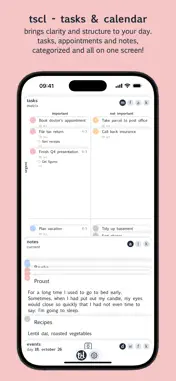
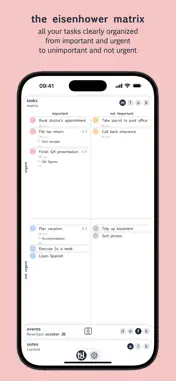
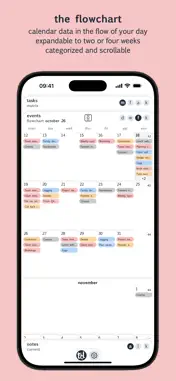
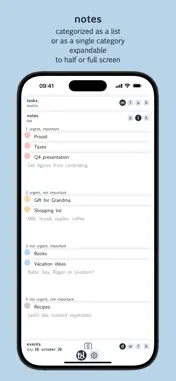
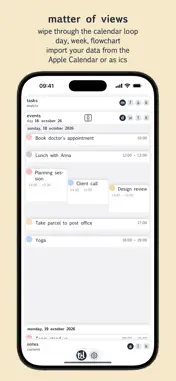
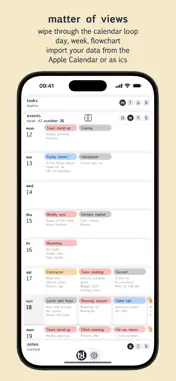
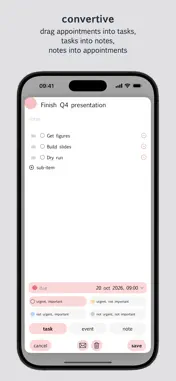
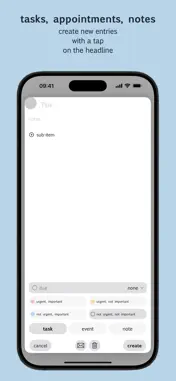
tscl brings overview and structure to your everyday life Tasks, events and notes, categorized and at a glance. Everything in one place. Everything on one screen. Tasks in the Eisenhower matrix A clearly structured overview of your tasks — from important and urgent to unimportant and not urgent. Events in the flowchart Calendar data in the flow of your day. All events and tasks with a date, each in the color of its category. Can be pulled out to two or four weeks. Lots of events on one day? Events are scrollable, and a counter shows when entries are hidden. A tap on it opens the day view. A stack full of cards Tasks, events and notes are all made of the same stuff — cards. Convertible, any card type into any other. Drag a task onto the event stack and tscl turns it into an event. A note dragged onto the task list becomes a task. The views tscl shows three stacks of tabs: the Eisenhower matrix with your tasks, the flowchart with your events and the notes pad. Swipe horizontally through the different view modes — day view, week view and flowchart. Slide the calendar and notes into view as far as you need them: half open, the flowchart shows two weeks, fully open four. Choose in the settings what you want to see on the start screen. Widget & Live Activities Your most important tasks and the next event — right on the home screen or in the Dynamic Island, always in view. Exchange Sync your Apple calendar and your reminders with tscl. Send tasks, events or notes by e-mail in ICS format. Your data, your device All data stays local on your iPhone. No cloud, no account, no sign-in. How it works Tap a card title to create new entries. Move tasks into other categories, events to another date. Drag items onto a card title and convert tasks into events or notes, notes into tasks or events, events into tasks or notes. Tap the center button to reset every view to the current time — the day view to today, the week view to this week, the flowchart to the next two or four weeks. One price, no subscription Try tscl free for one month. After that, a one-time purchase lets you keep using tscl as usual. If you download tscl before the end of the year, it is yours for free for good.
What's New
Version 1.10 2026-10-20
A new look, more clarity: • New appearance: categories as coloured dots, everything softer and calmer. Choose in Settings: colour or monochrome, dots or header...A new look, more clarity: • New appearance: categories as coloured dots, everything softer and calmer. Choose in Settings: colour or monochrome, dots or header bars, light or dark. • Flip through your notes like a stack of cards. Dragging the category dot moves the whole stack of that category. • Week view with calendar week. • The app starts in the flowchart view with the calendar half open. • Bug fix: in the form, days in the expanded calendar can be selected again (due date, start, end). • Smaller improvements and bug fixes. Technical Analysis
Package Overview Basic metadata
Bundle ID
com.eoo.tscl Current Version 1.10
Minimum iOS 16.0
Package Size App Store Size
Package Metadata 0 / 0 version records
Detailed binary, privacy manifest, framework, and Info.plist results have not been indexed for this package yet. The verified App Store and archive metadata above remains available.
Developer Information
Known Version Records
0 version records with stored package metadata
Stored metadata does not guarantee a package is currently available to download.
| Details | Version / IDs | Version date | Action |
|---|