
Preview





Description
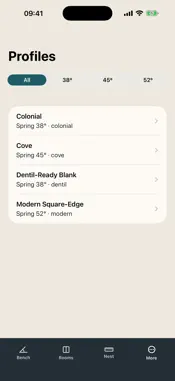
CrownSpring Miter Desk is an interactive compound-miter workbench for finish carpenters, trim crews, trade-school students, and serious DIYers hanging interior crown molding. Set each wall corner and molding spring angle, then read exact miter and blade bevel with clear left/right orientation. Walk to the saw with job-ready numbers, cope calls, and a stock-nested cut list—far beyond a static pocket chart or one-screen angle calculator. CORNER COMPOUND BENCH Enter inside or outside corner degrees (or 90°/45° presets), choose spring angle 38°, 45°, 52°, or custom, and get live miter plus saw bevel. A left/right blade orientation diagram shows which end of the stick hits the fence. SEEDED SCENARIOS ON FIRST LAUNCH Open a box four-wall room, L-kitchen bulkhead, bay-window angle set, or vaulted wall break—each pre-filled with corners and solved saw settings so every session starts with dense, solvable trim work. ROOM-RUN SEQUENCER Add walls in walk-around order, mark inside/outside, track cumulative lengths, and get scarf joint direction suggestions so paint and grain run consistently around the room before you cut. COPE-OR-MITER COACH For every inside corner, see when to cope the profile versus dual-miter. A molding silhouette highlights which piece receives the cope and which stays square-cut. STOCK NEST CUTTER Enter stick lengths on the truck (8, 12, 16 ft or custom), place each wall piece with kerf waste, minimize leftover, and flag runs that need a scarf on a single stick. PROFILE LIBRARY Colonial, cove, modern square-edge, and dentil-ready blanks—each with typical spring angle, fence-face tip, and paint-edge note used by the corner bench. SAW-SETUP CARD EXPORT One-tap share as PDF or image per corner or full room: labels, miter, bevel, cope note, piece length, and spring angle. Works fully offline with no placeholders. APPRENTICE ANGLE DRILLS Random corner challenges where you enter miter and bevel, get instant right/wrong feedback, and reveal the correct pair. Practice only—no saved history lists. HOME SCREEN WIDGET Glance the last corner’s miter, bevel, and spring values beside the chop saw. Offline-first on-device storage for rooms and nests. No account, no cloud archive, no materials store—just crown spring-angle setups built for the job site and the shop.
What's New
Version 1.0.1 2026-09-17
The application has been adjusted to perform more smoothly under load. Technical Analysis
Package Overview Basic metadata
Bundle ID
com.nizicegal77.crownspringmiterdesk Current Version 1.0.1
Minimum iOS 17.0
Package Size App Store Size
Package Metadata 0 / 0 version records
Detailed binary, privacy manifest, framework, and Info.plist results have not been indexed for this package yet. The verified App Store and archive metadata above remains available.
Developer Information
Known Version Records
0 version records with stored package metadata
Stored metadata does not guarantee a package is currently available to download.
| Details | Version / IDs | Version date | Action |
|---|