Preview






Description
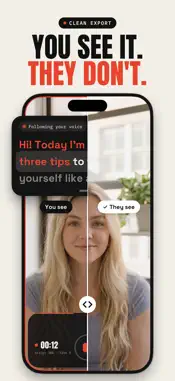
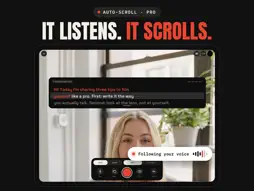
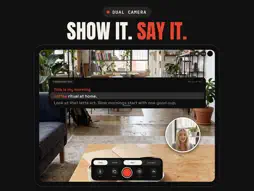
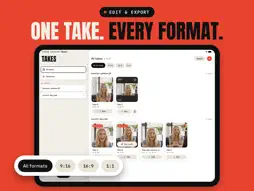
Stop memorizing every line. TakeKit is a teleprompter camera for creators, coaches, and founders. Write your script, hit record, and read from an on-screen guide that only you can see — your exported video is always clean. READ WHILE YOU RECORD • The guide scrolls automatically as you speak (speech recognition, fully on-device) • Or use fixed-speed scrolling with instant speed control • The current line stays highlighted mid-screen so you never get lost • Eye-contact mode docks the text next to the front lens — you appear to look straight at the camera BUILT FOR TAKES • Record as many takes as you need, grouped by script • Resume from where you stopped — no re-reading from the top • Mark your best take with a star, rename it, compare attempts • Live mic meter so you never discover bad audio too late • Dual camera: record front and back at the same time (supported devices) EXPORT CLEAN • Crop to 9:16, 16:9, 1:1, or 4:5 for Reels, TikTok, Shorts, YouTube • Trim, then export in up to 1080p — the guide text is never in the video • Pro: burn in auto-generated captions, timed word by word • Pro: auto-cut silences and dead air YOURS, PRIVATELY • No account, no login — your scripts and takes sync privately through your own iCloud • Speech recognition runs on your iPhone; nothing is sent anywhere • Share text from any app straight into TakeKit as a new script PAY ONCE, OWN IT TakeKit is free for up to 5 scripts and 5 recordings with a small watermark. TakeKit Pro is a single one-time purchase — no subscription, no renewal, ever. It unlocks unlimited scripts and takes, speech-paced auto-scroll, captions, silence cutting, and watermark-free export. Write it once. Say it like you mean it.
What's New
Version 1.5 2026-10-14
Unfold your phone, and your script unfolds with it. TakeKit now runs on iPhone Duo, closed and open: • Closed, it works like the iPhone you know, with its cont... Technical Analysis
Package Overview Basic metadata
Bundle ID
com.eduardopinillos.TakeKit Current Version 1.5
Minimum iOS 26.0
Package Size App Store Size
Package Metadata 0 / 0 version records
Detailed binary, privacy manifest, framework, and Info.plist results have not been indexed for this package yet. The verified App Store and archive metadata above remains available.
Developer Information
Known Version Records
0 version records with stored package metadata
Stored metadata does not guarantee a package is currently available to download.
| Details | Version / IDs | Version date | Action |
|---|