
Preview




Description
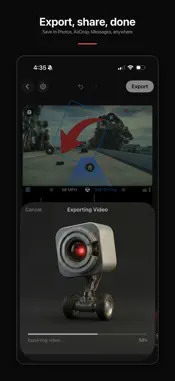
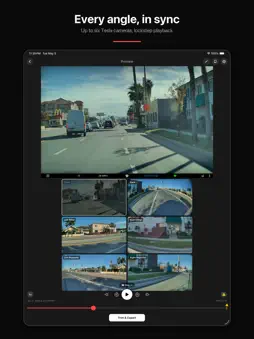
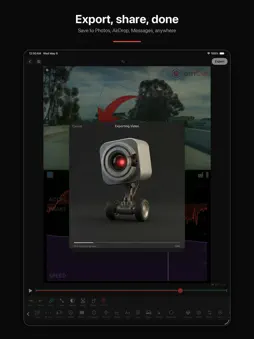
View, manage, edit, and share your Tesla dashcam footage, all from your iPhone. Watch every camera angle in sync, drop in the real telemetry your car actually recorded, trim, and export, all on-device. No laptop, no cloud, no subscription required. Plug a TeslaCam USB drive into your iPhone, pick an event, and CamCut composes the cut: speed, the real GPS route on a live map, the actual G-forces, the steering and pedal inputs. Every overlay is pulled straight from the data Tesla embedded in the clip. Trim it. Export it. Send it. CAMERAS THAT MOVE TOGETHER • Up to six Tesla camera angles in sync: front, back, both pillars, both repeaters • Layouts ranging from single-camera to side-by-side, grid, picture-in-picture, and a stitched 180° panorama • Tap to swap any camera into any slot • Scrub anywhere on the timeline; every angle stays aligned WHAT YOUR TESLA WAS ACTUALLY DOING CamCut reads the hidden telemetry stream Tesla writes into every dashcam clip. None of it is estimated. It's what the car actually saw and did: • Speed in mph or km/h • G-forces from the accelerometer (cornering and braking) • Gear (P / R / N / D) • Turn signals, brake input, accelerator input • Steering angle • GPS position and heading • Autopilot / FSD engagement state OVERLAYS THAT BELONG IN THE FRAME Place any overlay anywhere. Resize it, rotate it, fade it: • A clean telemetry bar with speed, signals, pedals, and Autopilot state • A live interactive map of the route you drove, with heading arrow and breadcrumb trail • A radial G-force plot: a dot that pushes around the screen as you brake, accelerate, and corner • A 3D path that combines steering, acceleration, and braking into a single shape that moves through 3D space as you watch • A time-series chart of speed or G-force across the whole clip • Free-form text and image overlays for captions, social handles, or your own logo CUT, RENDER, POST • Frame-accurate trim handles • Every overlay bakes into the final video. One render, ready to share. • Save to Photos, AirDrop it, message it, post it. Wherever your audience is. GETTING FOOTAGE IN CamCut imports directly from a TeslaCam USB drive plugged into your iPhone. Sentry events, saved clips, and recent recordings come into the app with the camera angles and telemetry your car wrote to the drive. Plug in, pick the TeslaCam folder, and go. HW3 and HW4 vehicles supported. FREE & PRO The free version is a real, usable viewer: browse and play every Sentry, Saved, and Recent event with all your camera angles in sync. Export 15-second clips using four starter layout templates and a starter overlay set, with a small CamCut watermark. Free users can also open the built-in demo project to explore Pro editing tools with bundled footage. CamCut Pro is a one-time $5.99 purchase. Buy once, yours to keep. It unlocks the full editor: every overlay with every adjustment, custom layouts, the premium template library, exports up to your full clip length, and removes the watermark. No subscription required.
What's New
Version 1.3 2026-09-24
CamCut 1.3 is a major update: • Explore a stitched 360° surround view in Preview, fullscreen, editor layouts, and exports. • Start browsing your newest clips wh...CamCut 1.3 is a major update: • Explore a stitched 360° surround view in Preview, fullscreen, editor layouts, and exports. • Start browsing your newest clips while CamCut continues scanning the drive. • Open Sentry events in the full editor with available telemetry. • Add the new Self-Driving status overlay and review footage at up to 10× speed. • Copy and paste overlays, with expanded alignment, fit, and mirroring controls for custom layouts. • Use CamCut throughout in Simplified Chinese. • Enjoy performance and reliability improvements across importing, playback, editing, and export. Technical Analysis
Package Overview Basic metadata
Bundle ID
stan.CamCut Current Version 1.3
Minimum iOS 26.0
Package Size App Store Size
Package Metadata 1 / 4 version records
Detailed binary, privacy manifest, framework, and Info.plist results have not been indexed for this package yet. The verified App Store and archive metadata above remains available.
Developer Information
Known Version Records
1 version record with stored package metadata • 4 known version records
Stored metadata does not guarantee a package is currently available to download.
| Details | Version / IDs | Version date | Action |
|---|---|---|---|
| 139.04 MB | v1.2 App Store ID: 887621839Build: 1.2 | 2026-06-30 23:53:20 | Get Version |
| Not archived | App Store ID: 886627393 | Unknown | Request Version |
| Not archived | App Store ID: 886184345 | Unknown | Request Version |
| Not archived | App Store ID: 884152115 | Unknown | Request Version |