
Preview




Description
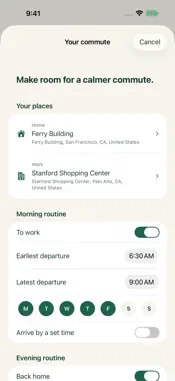
Lanelark helps you choose a better time for your daily drive. Save home and work, choose the times you can leave, and compare Apple Maps driving estimates across your window. A HEADS-UP BEFORE THE RUSH Get a notification before your recommended departure. Open Apple Maps from the alert or see other times when your plans change. YOUR ROUTINE, BOTH WAYS At work, see Back home. At home, see To work. Allow location access to switch automatically while Lanelark is open. Drive home shows the estimated driving time from your current location to your saved home, even when you are far from home and work, plus an arrival estimate and directions in Apple Maps. Your current coordinates go directly to Apple Maps and are never stored by Lanelark. You can also choose either direction yourself. Set separate days and departure windows for work and home. Add an arrival target and choose how much notice you need. RUNNING LATE? Your saved commute is shown by default. After your departure window ends, turn on Show times from now to compare later departures. Turn it off to return to your commute. The comparison covers the same amount of time as your saved window, and viewing it does not change your selected reminder or alarm. CAN'T LEAVE THEN? Compare departure times, expected driving minutes, traffic delay, and estimated arrival. Pick another departure for your reminder or skip the next commute alert. YOUR TIME, YOUR ALARM Choose an optional one-time departure alarm on iOS 26 or newer. Ring at departure or 5, 10, 15, 30, or 60 minutes before. Lanelark alarms sound through Silent mode and Focus after you allow alarm access. They stay at your chosen time as estimates refresh. Manage or cancel alarms in Settings. Earlier iOS versions use commute notifications. SIMPLE BY DESIGN No account signup. No background location tracking. No ads. Your saved places and schedule are encrypted on our service, and you can delete your data in the app. Driving estimates are provided by Apple Maps and can change. Lanelark compares several times within your chosen window; it does not guarantee a traffic-free trip or an exact arrival. Notifications require permission and internet access and may be delayed by iPhone Focus or notification settings. Open the app at least once every 90 days to keep alerts active. Departure windows span up to four hours within one calendar day.
What's New
Version 1.0.1 2026-09-29
New dark mode: follow your iPhone appearance, or choose System, Light, or Dark in Settings. Your choice is saved. Also includes Drive home estimates from your c... Technical Analysis
Package Overview Basic metadata
Bundle ID
com.edgecase.lanelark Current Version 1.0.1
Minimum iOS 17.0
Package Size App Store Size
Package Metadata 0 / 0 version records
Detailed binary, privacy manifest, framework, and Info.plist results have not been indexed for this package yet. The verified App Store and archive metadata above remains available.
Developer Information
Known Version Records
0 version records with stored package metadata
Stored metadata does not guarantee a package is currently available to download.
| Details | Version / IDs | Version date | Action |
|---|