Preview




Description
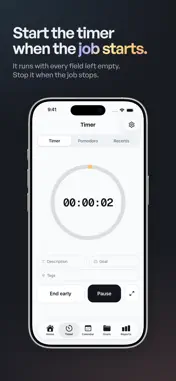
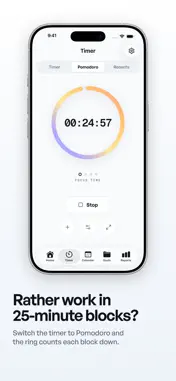
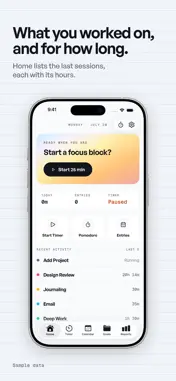
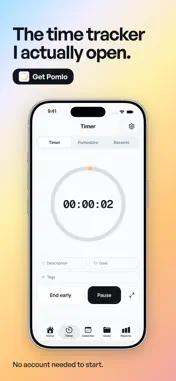
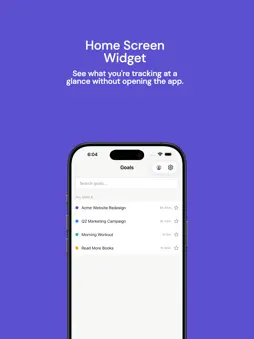
If you've ever wondered where your day went, Pomlo is for you. It's a simple time tracker that gets out of your way. Tap play, do your thing, and Pomlo keeps a clean record of how you spend your hours. No complicated setup, no account required — just open the app and go. WORKS THE WAY YOU DO Some people track billable hours for clients. Others want to build better habits or stay on top of personal goals. Pomlo handles both. Switch between a Personal workspace for things like exercise, reading, and side projects — and a Work workspace for clients, invoices, and billable tracking. Each workspace has its own settings, so you're never looking at stuff you don't need. TIMER THAT STAYS OUT OF YOUR WAY Tap once to start. Tap again to stop. That's it. You can also add time manually if you forgot to hit the button (we've all been there). Assign a project or goal, add a tag, and move on. Need more structure? The built-in Pomodoro timer runs 25-minute focus sessions followed by short breaks — and it automatically logs each completed session as a time entry. Customize the durations, auto-start the next phase, and link sessions to a project. HOME SCREEN WIDGET Start and control your timer without opening the app. The home screen widget shows your currently tracked project and elapsed time, with pause and stop buttons right there. Tap start to jump straight into focus. GOALS, PROJECTS & CLIENTS Call them goals or projects — Pomlo adapts the language based on your workspace type. Personal workspaces show "Goals" with templates like Exercise, Meditation, Reading, and Deep Work. Work workspaces show "Projects" with templates for Development, Design, Management, and more. Each project gets its own color, optional budget, and hourly rate. Link projects to clients to see exactly how much time and money you're putting into each relationship. When it's time to bill, everything's already organized. INVOICES IN MINUTES Turn tracked hours into clean, professional invoices. Add your company logo, set your tax rate and payment terms, drop in line items, and send. Track each invoice through draft, sent, and paid status. All invoices live under each client, so nothing slips through. REPORTS YOU'LL ACTUALLY READ The reports page shows your hours broken down by day, project, and client — with bar charts for daily trends and a donut chart for project distribution. Filter by date range, export to CSV, and see billable vs. non-billable at a glance. It takes about five seconds to understand where your week went. CALENDAR VIEW See your time entries and scheduled tasks on a clean month or week calendar. Each day shows colored dots for active projects and total tracked time. Tap any day to see the full list of entries underneath. You can schedule tasks ahead of time right from the calendar. PRIVATE BY DESIGN Your data stays on your device. No account required to start — just download and track. When you want cloud backup and multi-device sync, upgrade to a Pomlo account (coming soon). GET STARTED FREE The free plan gives you unlimited time tracking, up to 5 projects, and 7 days of history. That's enough to see if Pomlo fits your workflow. When you're ready for more, Pro unlocks unlimited projects, full history, advanced reports, calendar integrations, and everything else. No trials that expire. No credit card to start. Just download and track. Terms of Use (EULA): https://pomlo.app/terms Privacy Policy: https://pomlo.app/privacy
What's New
Version 1.3.0 2026-10-30
Pomlo 1.3 makes your tracked time more reliable: • Reports no longer freeze on timers that run past midnight • Paused and resumed timers keep their real start ... Technical Analysis
Package Overview Basic metadata
Bundle ID
com.echopersona.timetracker Current Version 1.3.0
Minimum iOS 15.1
Package Size App Store Size
Package Metadata 0 / 2 version records
Detailed binary, privacy manifest, framework, and Info.plist results have not been indexed for this package yet. The verified App Store and archive metadata above remains available.
Developer Information
Known Version Records
0 version records with stored package metadata • 2 known version records
Stored metadata does not guarantee a package is currently available to download.
| Details | Version / IDs | Version date | Action |
|---|---|---|---|
| Not archived | App Store ID: 886387631 | Unknown | Request Version |
| Not archived | App Store ID: 883902358 | Unknown | Request Version |