
Preview
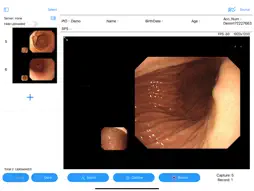

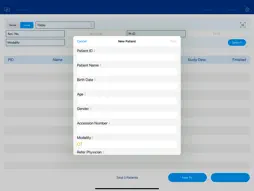

Description
The UniGate i Lite (UGi Lite) app is an advanced DICOM gateway that captures and converts non-DICOM images into the DICOM format. It connects non-DICOM compliant modalities to standard DICOM solutions and systems. UGi Lite is available as a mobile application specically designed for the iPad, leveraging its high-quality display and portability to enhance usability and mobility for medical professionals, in comparison to conventional network workstations. Features - Supports 2K/4K resolution video input - Supports UVC video capture devices (2K Maximum) - Supports integration with HIS/Worklist and automated patient ID assignment for rapid patient information setup - Supports image capture and dynamic video recording in formats such as Standard Multi-Frame, MP4 DICOM, JPEG Lossless, and JPEG Lossy Scenarios - Recording and teaching for endoscopic examinations and operating room procedures. Disclaimer: Always consult a qualified healthcare professional before making any medical decisions or relying on the information provided by this app.
What's New
Version 1.4 2026-11-05
Home and worklist • Tap a column title to sort; double-tap an exam row to start it • Multi-select files in Local mode and upload them to PACS as a batch; tap St...Home and worklist • Tap a column title to sort; double-tap an exam row to start it • Multi-select files in Local mode and upload them to PACS as a batch; tap Stop at any time • The Status column uses a single icon that distinguishes not uploaded / partially uploaded / all uploaded / upload failed • Upload failures are recorded; on the next launch the app asks whether to retry, or choose Don't Upload to stop being asked • Entering an exam that still has images to upload shows a reminder with an Upload now button Exam screen • Switching patient now only switches; images stay with the original patient. To move images, use Select in Preview and the transfer button • The thumbnail column can be resized by dragging and remembers its width (iOS 26); thumbnails fill the column • The upload status bar is colored by state (in progress / waiting / success / error); error messages stay until the next upload • The pedal low-battery warning is now a banner at the top and no longer interrupts capture • If an error occurs during recording, what was recorded so far is kept and a clear message is shown instead of losing the whole recording Pedals • Support for new encrypted (Secure) pedals • New Pedal Sleep power-saving setting; pedals with power saving sync automatically on connect • Pressing the pedal while the screen is asleep or locked no longer saves a stale frame; an error sound plays instead, and capture resumes once you return to the app Settings • New text size setting (Standard / Large / Extra Large) • New Scanner Camera setting so the barcode scanner can use the front camera • The PACS connection test shows the response latency • Alert sounds now use the media volume, so they play at normal volume on Bluetooth speakers and can be adjusted with the volume keys • New Manual Upload Sound per File option to play a sound for every file during manual upload • New Log Files tab: pick a date or a date range to share the logs as a zip (AirDrop / Mail / Save to Files) when reporting a problem • New app diagnostics log (launch, foreground / background, memory, battery, …), exported together with the other logs from Log Files Stability and reliability • Uploads that meet a PACS transfer in progress now wait in a queue instead of being blocked or dropped; a corrupt file no longer stalls the batch; leaving the screen no longer interrupts uploads • UniScope records are saved before sending, so nothing is lost when the network drops • Database load errors no longer crash the app; an error screen with Retry is shown instead • Fixed Bluetooth barcode scanners misreading digits when no field is selected • Fixed an occasional crash during Bluetooth initialization • When running on a Mac, a single click now selects an exam row • Fixes for crashes after capture / recording, overlapping worklist titles on iPad portrait, and more Technical Analysis
Package Overview Basic metadata
Bundle ID
com.ebmtech.UGiLite Current Version 1.4
Minimum iOS 17.6
Package Size App Store Size
Package Metadata 2 / 4 version records
Detailed binary, privacy manifest, framework, and Info.plist results have not been indexed for this package yet. The verified App Store and archive metadata above remains available.
Developer Information
Known Version Records
2 version records with stored package metadata • 4 known version records
Stored metadata does not guarantee a package is currently available to download.
| Details | Version / IDs | Version date | Action |
|---|---|---|---|
 Not archived | v1.3 App Store ID: 886453439Build: 1.3 | 2026-07-27 08:37:25 | Request Version |
| 10.51 MB | v1.3 App Store ID: 881441412Build: 1.3 | 2026-07-27 08:37:25 | Get Version |
| Not archived | v1.1 App Store ID: 875863697Build: 1.1 | 2026-01-08 02:40:17 | Request Version |
| 4.63 MB | v1.0 App Store ID: 871371926Build: 22 | 2025-06-04 02:19:28 | Get Version |