
Preview



Description
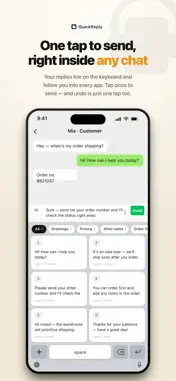
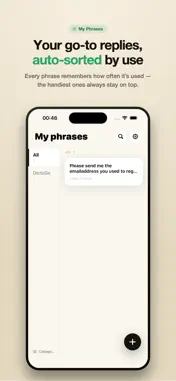
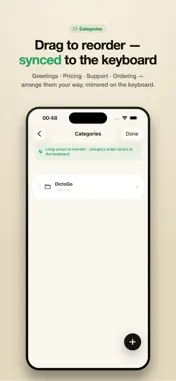
Customer Service Keyboard is a third-party iOS keyboard for support teams. Save your most-used replies once, then send them with a single tap inside any chat box. KEY FEATURES · Phrase library: create, categorize, and organize reply templates in the app · One-tap insert: bring up the keyboard in any text field and tap to send · Fast search: find the right phrase instantly by keyword · Backup: import/export everything as JSON to move phrases between devices PRIVACY: LOCAL ONLY · NO NETWORK · NO UPLOADS Your phrases live only on your device. The app and keyboard make no network calls, upload nothing, and collect no input. No analytics SDKs. Full Access is used solely to read the phrase library you created on this device — what you type in other apps is never sent anywhere. WHO IT'S FOR E-commerce support, community managers, and after-sales teams — anyone who sends the same replies again and again on mobile. GET STARTED 1. Enable "Customer Service Keyboard" in Settings → General → Keyboard 2. Long-press the globe key in any chat box to switch to it 3. Turn on "Allow Full Access" to read and send your phrases Requires iOS 16 or later.
What's New
Version 1.0.1 2026-06-17
1. Select the text->Share->Save to the vocabulary library 2. Added space key, enter key and plus sign key 3. New functions: save copied text, save selected text... Technical Analysis
Package Overview Basic metadata
Bundle ID
au.easymeta.cskeyboard Current Version 1.0.1
Minimum iOS 16.0
Package Size App Store Size
Package Metadata 0 / 2 version records
Detailed binary, privacy manifest, framework, and Info.plist results have not been indexed for this package yet. The verified App Store and archive metadata above remains available.
Developer Information
Known Version Records
0 version records with stored package metadata • 2 known version records
Stored metadata does not guarantee a package is currently available to download.
| Details | Version / IDs | Version date | Action |
|---|---|---|---|
| Not archived | App Store ID: 886920863 | Unknown | Request Version |
| Not archived | App Store ID: 886311158 | Unknown | Request Version |