
Preview





Description
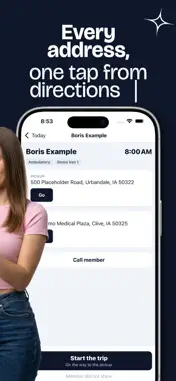
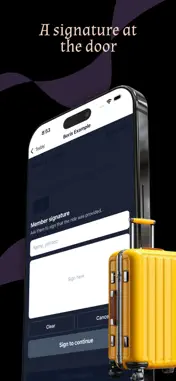
ProveTrip is used by non-emergency medical transport companies to record what happened on every trip. This app is the part the driver carries. The office works in the ProveTrip web application; the two are the same system. THE DAY Your runs appear in order with the member's name, the service level, both addresses and the expected time. Move between days with the arrows. Tap a trip to open it. A TRIP, FROM START TO FINISH Each trip moves through the states the work actually has, and one button offers the next one — never a form to fill in while you are holding the phone at a door. • On the way to the pickup • Arrived at the pickup • Member on board • Arrived at the drop-off • Trip complete Every one of those records the time it happened, and where you were if you have allowed location. Together they are the proof the trip took place as described. ADDRESSES AND DIRECTIONS Both addresses are shown in full, each with a Go button that hands off to your phone's maps app. The member's number, when the office has one on file, is a single tap to call — useful when nobody answers the door. SIGNATURES At the drop-off the app asks for a signature on the screen, with the signer's printed name. It is stored with the time and the location it was taken. NO-SHOWS AND INCIDENTS When a member is not there, record a no-show and photograph the address. Brokers ask for that evidence, and it is easier to produce at the curb than a week later. When something goes wrong on a run — a member unwell, a vehicle problem, a difficult situation at a door — file an incident report with a note and a photograph. It reaches the office immediately instead of waiting for the end of a shift. WORKING WITH NO SIGNAL Everything you record is held on the phone and sent when coverage returns. You never wait for bars before pressing a button, and nothing is lost when a van is out of range for an hour. Your schedule is cached on the device, so the app opens and works in a dead spot. A bar at the top shows anything still waiting to be sent. YOUR SCHEDULE Ask for time off for a day, three days or a week. See what the office has answered. When somebody else's trip appears as cover you can take it, without a phone call either way. NOTIFICATIONS If you allow them, the app tells you when a trip is assigned to you or your schedule changes. WHY IT ASKS FOR PERMISSIONS Location is recorded when you mark an arrival, collection, drop-off or no-show. If your office uses live tracking and you agree to it, your location is also shared while a trip is running, so a dispatcher can see where the van is and tell a member when their ride will arrive. It stops when the trip ends, and your iPhone shows a marker at the top of the screen the whole time it is on. You are asked before it ever starts, and nothing is recorded between trips, before your shift, or on a day off. Trails are kept for 90 days and then deleted. The record that a trip happened — the times and the signature — is kept for as long as the claim behind it requires. If you decline, you can still do your job. The trip records that the location was missing rather than pretending otherwise. Leave Precise Location on. Approximate is accurate to about a kilometre, which is not enough to show that you were at an address. The camera opens only when you tap to photograph a no-show or an incident. You can also attach a photograph you already have, which opens your photo library at that moment and at no other. Nothing is read from your contacts, your calendar or your microphone. YOU NEED AN ACCOUNT There is no sign-up here. Your employer creates your login and it works only if their company uses ProveTrip. If you have not been given one, ask your office. Privacy: https://provetrip.com/privacy
What's New
Version 1.3.3 2026-10-21
You are now asked before the app shares your location while you drive, and you can change your mind afterwards — there is a switch on the Schedule screen. If yo...You are now asked before the app shares your location while you drive, and you can change your mind afterwards — there is a switch on the Schedule screen. If you say no, nothing is reported, and it stays no. When your location is too vague to place you at an address, the trip screen says so and offers to fix it rather than leaving a trip that cannot be proved. Fixes are taken more accurately, within about ten metres instead of a hundred. The incident report button no longer sits underneath the home indicator on tall screens, where it could not be tapped. Technical Analysis
Package Overview Basic metadata
Bundle ID
com.provetrip.driver Current Version 1.3.3
Minimum iOS 15.1
Package Size App Store Size
Package Metadata 0 / 0 version records
Detailed binary, privacy manifest, framework, and Info.plist results have not been indexed for this package yet. The verified App Store and archive metadata above remains available.
Developer Information
Known Version Records
0 version records with stored package metadata
Stored metadata does not guarantee a package is currently available to download.
| Details | Version / IDs | Version date | Action |
|---|