
Preview







Description
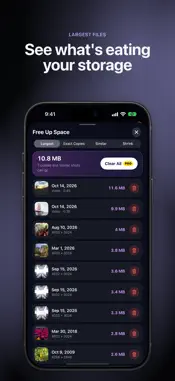
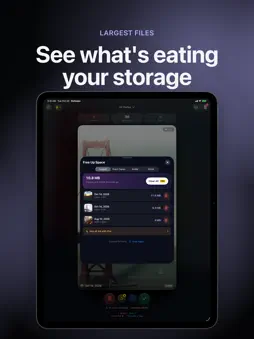
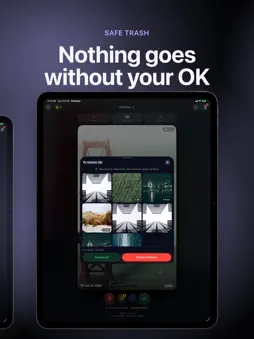
Your camera roll, one swipe at a time. Swipe left to trash a photo, right to keep it, and watch your storage come back. FREE UP SPACE (NEW) Pixpare scans your library on your device and shows you where the space went: - Largest: your biggest photos and videos, sorted by size - Exact copies: duplicate files saved more than once - Similar photos: bursts and near-repeat shots grouped together - Shrink: turn Live Photos into stills and compress big videos (Pro) In every group, Pixpare suggests the best copy to keep, so you only decide what goes. SWIPE TO CLEAN - Left to trash - Right to keep - Up to favorite - Down to skip for now - Double-tap to protect a photo so it can't be trashed by accident Tap any photo to see it fullscreen and keep swiping there. Sorting thousands of photos becomes a quick, satisfying game. TODAY & STREAKS Build a daily cleaning habit: your streak lives in the top bar, Today shows your progress and photos from this day in past years, and Home Screen widgets keep it all one glance away. A SAFE TRASH Nothing is deleted the moment you swipe. Everything you trash waits in Pixpare's Trash, where you can look it over, rescue anything you changed your mind about, and delete the rest together. iOS asks you to confirm, and deleted items stay in Recently Deleted for 30 days. ONE MONTH AT A TIME Filter by year and month to clean a trip, a holiday or that one chaotic summer, then move on to the next. PRIVATE BY DESIGN Your photos and their details stay on your device. Pixpare works offline, needs no account and has no ads. We never collect your photos or personal data; optional anonymous usage statistics can be turned off in Settings. FREE TO TRY Swipe through 50 photos a day for free, review your Trash, and see your top results in Free Up Space. ROLLWIPE PRO - Unlimited swiping, every day - Every result in Free Up Space, one-tap clearing and Shrink - Undo any swipe, and step back through your whole session in History - Albums while you swipe: drag a photo up to file it straight into an album - Private Vault: hide photos behind Face ID or Touch ID - Remove or edit location and metadata: save a privacy-clean copy, or fix a photo's date and place Works on iPhone and iPad, including iPhone Duo. SUBSCRIPTION DETAILS Pixpare is free to download and includes 50 swipes a day. Pixpare Pro is an optional auto-renewing subscription: Pixpare Pro Yearly, 1 year, $19.99 per year, or Pixpare Pro Monthly, 1 month, $3.99 per month (prices may vary by region). New Yearly subscribers may get a 3-day free trial where offered; unless cancelled at least 24 hours before the trial ends, the yearly price is charged. Payment is charged to your Apple ID account at confirmation of purchase. The subscription renews automatically unless it is cancelled at least 24 hours before the end of the current period, and your account is charged for renewal within 24 hours before the end of the current period. You can manage or cancel your subscription in your Apple ID account settings after purchase. Terms of Use (EULA): https://www.apple.com/legal/internet-services/itunes/dev/stdeula/ Privacy Policy: https://snrgwa-bot.github.io/CleanSwipe/privacy.html
What's New
Version 1.9.3 2026-10-30
Polish for Pixpare: - New Pixpare icon throughout the app - A more compact Pro screen with Yearly and Monthly plans - Shorter filter label in the top bar (just ... Technical Analysis
Package Overview Basic metadata
Bundle ID
Compass..Photo-Swipe-Remove-and-Actions Current Version 1.9.3
Minimum iOS 18.6
Package Size App Store Size
Package Metadata 0 / 4 version records
Detailed binary, privacy manifest, framework, and Info.plist results have not been indexed for this package yet. The verified App Store and archive metadata above remains available.
Developer Information
Known Version Records
0 version records with stored package metadata • 4 known version records
Stored metadata does not guarantee a package is currently available to download.
| Details | Version / IDs | Version date | Action |
|---|---|---|---|
| Not archived | App Store ID: 883485435 | Unknown | Request Version |
| Not archived | App Store ID: 882526223 | Unknown | Request Version |
| Not archived | App Store ID: 882167674 | Unknown | Request Version |
| Not archived | App Store ID: 881671150 | Unknown | Request Version |