Preview


Description
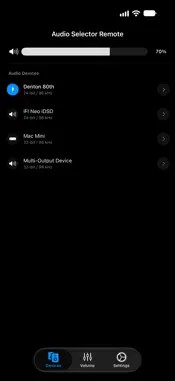
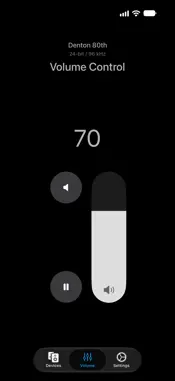
Audio Selector Remote is the official companion app for "Audio Selector" on macOS. Turn your iPhone or iPad into a powerful, wireless remote control for your Mac's audio environment. * Note: This app requires "Audio Selector" installed and running on your Mac to function. ◆ KEY FEATURES * Total Audio Control (Devices): Wirelessly switch between speakers, headphones, or DACs. You can change audio formats (e.g., 24-bit / 96kHz) and adjust individual device volumes directly from your iOS device. * Input Devices (Devices): Switch your Mac's microphone or line-in from the same list. Turn it on with 'Show input devices in menu' in the Settings tab. * Software Volume Control: When Audio Selector for Mac controls a DAC's volume in software (macOS 14.2 or later), you can adjust it from your iPhone or iPad like any other device. * Dedicated Volume Remote (Volume): Turn your device into a sleek, dedicated volume controller. You can even use your iPhone/iPad's physical volume buttons to adjust your Mac's audio level without looking at the screen! You can choose to show or hide the 'Mute' and 'Play/Pause' buttons in Settings → Volume Tab. * L/R Balance Control (Pro): Fine-tune your stereo sound remotely. Adjust the left and right audio balance for individual Mac output devices right from your screen. (Shown only for devices that support balance control). * Multichannel Output Pair (Pro): Choose which stereo pair - 1–2, 3–4, 5–6 and so on - a multichannel interface on your Mac uses for output. (Shown only for devices that expose multiple output pairs). * Seamless & Secure Connection (Settings): Connect instantly using Auto-Discovery on your local network, or use manual IP/Port configuration for advanced setups. Supports 'Require Pairing' for a secure connection. * Roon Zone Control (Devices): See your Mac's output devices that Roon is currently playing to - marked with a Roon badge - and adjust or mute Roon's zone volume in real time, even while Roon holds the device exclusively. Works with Roon's Device Volume and DSP Volume modes. (Requires Roon Volume Integration enabled in the Mac app.) * Pro Sync: If you are a Premium user of Audio Selector on your Mac, Audio Selector Remote will automatically detect it and provide an ad-free experience. ◆ REQUIREMENTS * Audio Selector Remote requires the 'Audio Selector' app on your Mac. * Your Mac and iOS device must be connected to the same local Wi-Fi network.
What's New
Version 2.8.0 2026-11-04
* Side by side on wide screens: on iPad or an unfolded iPhone, the device list and the volume control now share one tab. You can turn this off in Settings › Lay... Technical Analysis
Package Overview Basic metadata
Bundle ID
studio.timeblimp.AudioSelector-iOS Current Version 2.8.0
Minimum iOS 16.6
Package Size App Store Size
Package Metadata 0 / 4 version records
Detailed binary, privacy manifest, framework, and Info.plist results have not been indexed for this package yet. The verified App Store and archive metadata above remains available.
Developer Information
Known Version Records
0 version records with stored package metadata • 4 known version records
Stored metadata does not guarantee a package is currently available to download.
| Details | Version / IDs | Version date | Action |
|---|---|---|---|
| Not archived | App Store ID: 886338177 | Unknown | Request Version |
| Not archived | App Store ID: 885472498 | Unknown | Request Version |
| Not archived | App Store ID: 884938704 | Unknown | Request Version |
| Not archived | App Store ID: 883916684 | Unknown | Request Version |