
Preview






Description
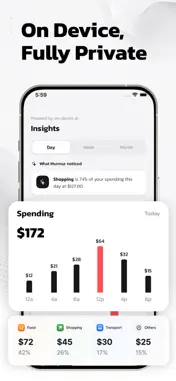
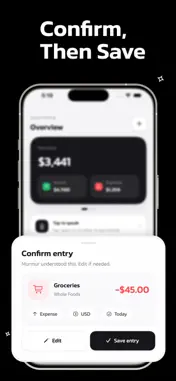
We start every month telling ourselves we'll finally track our spending. Then life happens. Receipts pile up, manual entry feels like a chore, and by week two the app is forgotten. Murmur is different. It listens. Just say what you spent. "Paid 18 for a taxi." "Got 2400 for a freelance gig." Hey Siri, log an expense. Murmur understands the amount, picks the right category, and saves it. No typing. No menus. No friction. That single change, hands-free two-second logging, is the difference between actually tracking your money and not. Speak it. Save it. Tap the mic on Home, or say "Hey Siri, log an expense in Murmur" from your lock screen, your AirPods, or your Apple Watch. Murmur listens, parses the amount, the currency and the category, then logs the entry. Locked phone, hands at the till, walking out of a cafe, it doesn't matter. The point of voice-first is that there's no point where it isn't an option. Record your own Siri phrase during onboarding and "Hey Siri, log expense" opens Murmur to the live mic. Use the longer form, "Hey Siri, log an expense in Murmur", from the lock screen and it saves without opening the app at all. Apple Intelligence, fully private. Every spoken phrase is processed on-device by Apple's on-device language model. Your transactions never leave your phone. No servers, no analytics, no leaks. The same Apple Intelligence engine that powers Writing Tools and Visual Intelligence is the one that understands your money. 32 currencies, understood naturally. Murmur knows the difference between US dollars and Australian dollars, Indian rupees and Pakistani rupees, Mexican pesos and Philippine pesos. It speaks euros, yen, pounds, kronor, francs, dirhams, rand, lira, baht and twenty more. Live thousands separators appear as you type, with locale-aware grouping for both Indian (1,00,000) and Western (1,000,000) numbering systems. Set caps that actually pace you. Pick a daily, weekly or monthly cap. A subtle chip on the Home card shows how much of it you've used at a glance, in real time. Swipe the card to switch periods. The Insights tab reads your budget too, so the AI summary talks about pacing, not just totals. Track every event. Wedding coming up. Trip to Goa. Side hustle. Friend's birthday weekend. Create an Event in the Plans tab, set a date range and an optional cap, and group every related expense under it. See exactly what each trip or function actually cost, separately from the rest of the month. Patterns you can act on. The Insights tab uses Apple Intelligence to surface what mattered this Day, Week or Month. Food is 38 percent of your spend. Wednesday was your highest day. 78 percent of your monthly cap used. Specific, honest, and zero graphs you have to interpret. History that earns its keep. Past months are saved as Reports. Open any month to see the total, the category breakdown, the top spend categories and a clean pass-or-fail badge against the budget you set at the time. Browse back as far as you want. Built for the way you live. A calm manual entry mode for the rare moment voice isn't an option, with the same locale-aware thousands separators and a one-thumb keypad. Confirm-before-saving toggle if you want a quick review. iCloud sync keeps your entries identical on every device. Swipe to delete on any row. Light, fast, deliberate. The honest truth about money trackers is that the best one is the one you'll actually use. Murmur removes the only thing standing between you and a real picture of where your money goes, the friction of logging it. Speak. Save. See. That's it. *About Premium* The free tier gives you a 1 voice & 3 manual entry per day. Premium unlocks unlimited entries across voice, Siri and manual, plus everything Murmur ships in the future. Weekly, yearly or one-time purchase, your choice. Privacy Policy: https://www.dropouts.in/privacypolicy/privacy-policy.html Terms of Use: https://www.dropouts.in/privacypolicy/terms-of-use.html
What's New
Version 1.0.3 2026-07-22
Added Edit Option for Recent Entries. Just Swipe from right to left on the entry to get to the edit option Technical Analysis
Package Overview Basic metadata
Bundle ID
com.dropouts.ExpenseManager Current Version 1.0.3
Minimum iOS 26.0
Package Size App Store Size
Package Metadata 0 / 0 version records
Detailed binary, privacy manifest, framework, and Info.plist results have not been indexed for this package yet. The verified App Store and archive metadata above remains available.
Developer Information
Known Version Records
0 version records with stored package metadata
Stored metadata does not guarantee a package is currently available to download.
| Details | Version / IDs | Version date | Action |
|---|