Preview


Description
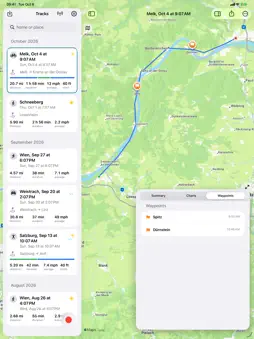
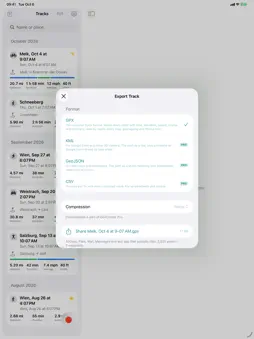
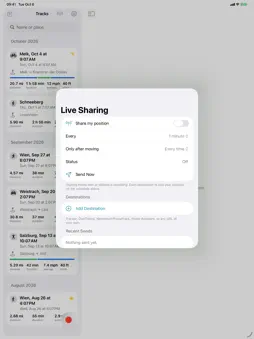
GeoCorder records where you went, keeps it as files you own, and can tell a server of your choosing where you are right now. No GeoCorder account. No ads. No analytics. Keep tracks locally or sync your library through your iCloud Drive. Export your tracks whenever you want — your tracks are your data. RECORD Press record. GeoCorder stores every position fix with its GPS altitude, barometric altitude, speed, course and accuracy, in the background, with a Live Activity on the Lock Screen. Pause and resume, mark spots with a name and a note, stop. Recording survives the app being killed. An accuracy graph shows the last minute of fixes, so you always know whether the receiver has a real GPS fix or is guessing from cell towers. Filters drop the jitter while you stand still and the jumps when GPS drops out, so the distance counts like an odometer. KEEP A library with a drawing of every path. Maps coloured by speed or elevation, statistics, elevation profile and speed chart with a scrubber, waypoints, notes, and the weather along the track hour by hour. Import GPX files recorded elsewhere. On iPad, the library sits beside the map. EXPORT GPX 1.1 with timestamps, elevation, speed, course and accuracy — everything else reads it. KML and KMZ with a Google Earth time slider. GeoJSON. CSV. Plain, gzip or zip. Through the share sheet to AirDrop, Files, Mail, Messages and any app that takes a file. FOR PHOTOGRAPHERS Took photos with a real camera? Every point carries a precise timestamp and its own accuracy, so the exported GPX geotags your RAW files in Lightroom, HoudahGeo or exiftool exactly as it always has. SHARE LIVE Send your position on a schedule to a URL you write yourself — GET or POST, JSON or form, with placeholders for every value and headers for API keys — or use the presets for Traccar, OwnTracks, Nextcloud PhoneTrack and Home Assistant. A send log shows exactly what happened. Sharing works with or without a recording. APPLE WATCH AND SIRI Leave the phone in your pocket or on the handlebar. The Apple Watch app starts, pauses and stops the recording on your iPhone, marks a waypoint where you stand, and shows time, distance and climb at a glance; a complication puts it on your watch face. Or ask Siri: "Start recording in GeoCorder", "Pause my GeoCorder track", "Save my GeoCorder track", "Send my location with GeoCorder". The same actions are in the Shortcuts app for automations of your own. ALSO Metric, imperial and nautical units. Coordinates as decimal degrees, degrees and minutes, or DMS. iPhone, iPad and Apple Watch. GEOCORDER PRO Recording, the library, the map, statistics and GPX export are free. One purchase adds KML, KMZ, GeoJSON and CSV export, compression, charts and unlimited live-sharing destinations. No subscription. GeoCorder first appeared on the App Store in 2009. Version 2 is a complete rewrite with the same idea at its heart: your tracks are your data.
What's New
Version 2.0 2026-10-12
Version 2.0 is a complete rewrite, seventeen years after 1.0. Everything you used GeoCorder for still works the way it did: press record, and get a GPX file wi... Technical Analysis
Package Overview Basic metadata
Bundle ID
com.drobnik.GeoCorder Current Version 2.0
Minimum iOS 18.0
Package Size App Store Size
Package Metadata 0 / 0 version records
Detailed binary, privacy manifest, framework, and Info.plist results have not been indexed for this package yet. The verified App Store and archive metadata above remains available.
Developer Information
Known Version Records
0 version records with stored package metadata
Stored metadata does not guarantee a package is currently available to download.
| Details | Version / IDs | Version date | Action |
|---|