Preview


Description
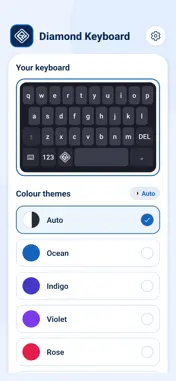
DRC Diamond Keyboard – Type in Style Make every message stand out with DRC Diamond Keyboard, a fast, clean and fully customizable keyboard for iPhone. Choose your own colors, pick a look you love and turn everyday typing into something special. FEATURES Diamond-inspired design A sleek, modern keyboard with a premium look. Custom colors Change your key colors to match your mood, your outfit or your wallpaper. Key shapes and themes Switch the style of your keys and choose from a range of themes. Smooth, responsive typing Keys respond fast, so typing feels natural and comfortable. Easy to use Set up in a few taps. No complicated settings. HOW TO GET STARTED 1. Install DRC Diamond Keyboard. 2. Open Settings → General → Keyboard → Keyboards → Add New Keyboard. 3. Select DRC Diamond Keyboard. 4. Open the app to pick your colors and style. 5. In any app, tap and hold the globe key to switch to your new keyboard. PRIVACY Your privacy matters. DRC Diamond Keyboard is built only to help you type. Please read our Privacy Policy for details on how data is handled. FEEDBACK We're always improving. If you have ideas or find a bug, please contact us. Your feedback helps us make the keyboard better. Download DRC Diamond Keyboard today and give your typing a new shine!
Technical Analysis
Package Overview Basic metadata
Bundle ID
com.diamondkeyboard Current Version 1.0
Minimum iOS 15.1
Package Size App Store Size
Package Metadata 0 / 0 version records
Detailed binary, privacy manifest, framework, and Info.plist results have not been indexed for this package yet. The verified App Store and archive metadata above remains available.
Known Version Records
0 version records with stored package metadata
Stored metadata does not guarantee a package is currently available to download.
| Details | Version / IDs | Version date | Action |
|---|