
Preview



Description
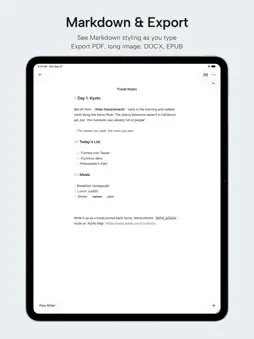
Writing connects us with the past and lets us imagine the future. Pure Writer is a very fast plain text editor, built so writing can go back to what it was meant to be: pure, safe, always ready, and never losing your words. Your words stay yours. Documents are stored on your device and can be backed up to your own iCloud or cloud drive. Pure Writer is simply a tool for writing and organizing your own text, and it never publishes what you write. PEACE OF MIND Even if you delete something by mistake, or your phone loses power without warning, your document is still saved in full, or waiting for you in History. SMOOTH AND FLUID Built on ten years of experience with editors and rebuilt from the ground up for iOS, with Liquid Glass throughout. Typewriter Mode keeps the paragraph you are writing in focus, and reopening a document brings you back to where you left off. 217 CRAFTED DETAILS, INCLUDING: Editing • Blue Fill Box: type inside paired symbols, press Return to jump past them • Paired symbols delete together; lists, numbering, and indents continue • One undo history for title and body, with three-finger gestures and shake to undo • Date completion • Move paragraphs up and down • Dual Editors, and no word limit Focus & Layout • Typewriter Mode, Immersive Mode, a top bar that hides as you scroll • Floating word count, selection count, and your choice of counting rules • Line spacing, margins, paragraph spacing, and font size, with a live preview • One-Tap Typesetting Look & Feel • Light and Dark appearance, custom accent color, your own fonts • Paper backgrounds from solid colors, built-in scenery, or your photos • Manuscript ruling lines and rounded, refined selection highlights Quick Input • A shortcut bar for phrases, names, symbols, dates, and actions • Set where the cursor lands after inserting Organize Your Writing • Organize your own writing in nested groups, from quick notes to long drafts • Tags, drag to reorder, collapsible groups, detailed lists Find & Replace • Search and replace across all your documents • Several conditions at once, match case, regular expressions Saving & Recovery • Autosave and History, with version comparison • Writing Cache and Trash • Automatic and manual local backups, saved to the Files app if you like • A safety backup before every restore, and a clear backup protection status Cloud • Extra iCloud backups • Automatic backups to Dropbox or OneDrive, optionally on Wi‑Fi only • Sync across your phone, tablet, and computer Markdown • Switch any document to Markdown, with syntax highlighting • A Markdown panel for headings, lists, quotes, code, links, and tables • LaTeX math and images; save the source as a .md file Export • Long image, image sets, PDF, Word (DOCX), EPUB, and plain text • Export only the selection, add a watermark, or combine documents into one export with chapters Proofread by Ear • Read aloud with the current sentence highlighted, from the cursor, at your chosen speed, even in the background • Hear the words you just typed TRIAL AND MEMBERSHIP Try every feature free for 7 days. No subscription is needed during the trial, and you will not be charged automatically. Afterwards, unlock everything with a monthly subscription, a yearly subscription, or a lifetime membership. There are no separate free and premium tiers. Subscriptions renew automatically unless auto-renew is turned off at least 24 hours before the end of the current period. Manage or cancel anytime in your App Store account settings. Terms of Use: https://www.apple.com/legal/internet-services/itunes/dev/stdeula/ Privacy Policy: https://writer.drakeet.com/ios/privacy A writing experience that feels safe and runs smooth. This is Pure Writer. Enjoy your writing.
What's New
Version 1.0.6 2026-11-04
Backup and sync are now incremental, bringing real-time cloud sync. Optimized for iPhone Duo. After you create a document, the sidebar scrolls to it automatical... Technical Analysis
Package Overview Basic metadata
Bundle ID
com.drakeet.writer Current Version 1.0.6
Minimum iOS 26.0
Package Size App Store Size
Package Metadata 0 / 0 version records
Detailed binary, privacy manifest, framework, and Info.plist results have not been indexed for this package yet. The verified App Store and archive metadata above remains available.
Developer Information
Known Version Records
0 version records with stored package metadata
Stored metadata does not guarantee a package is currently available to download.
| Details | Version / IDs | Version date | Action |
|---|