
Preview




Description
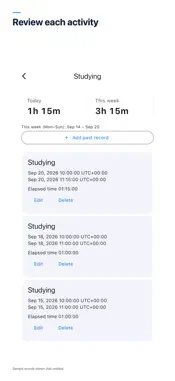
Track time spent studying, creating and reading with Start and Stop. Time Log is a simple activity tracker for understanding how you spend your own time. START WITH AN ACTIVITY NAME Add an activity with just a name. Tap Start to save its starting time and see the elapsed time. Switching to another activity ends the current session and starts the next at the same instant. Only one activity runs at a time. DAILY AND WEEKLY TOTALS ON HOME See today’s total and the current week, starting Monday, without opening a separate dashboard. Tap an activity to review its totals and history. Sessions crossing midnight are split across the days they overlap. ADD AND CORRECT PAST SESSIONS Forgot to record a session? Add it in History. Edit start and end times, change the activity or delete a record. Overlapping sessions are rejected to avoid double counting. Archive activities while keeping their history. RESTORE WHEN YOU RETURN Time includes screen lock, app closure and device restarts until you stop. When you return, elapsed time is calculated from the saved starting time. A reminder appears for long sessions so you can check for a forgotten stop. Your activity records stay on your device. No account or proprietary server sync. Free to use with a small banner ad. Recording works even when ads are unavailable. See the privacy policy for advertising SDK data processing. Available in English, Japanese, Korean, Simplified and Traditional Chinese, Spanish, French, German, Italian and Brazilian Portuguese. Dark mode follows your device setting. Daily totals use the device’s current time zone. Manual clock changes cannot always be detected. OS backup restoration is not guaranteed. Designed for personal activity records, not attendance verification, payroll or invoicing.
What's New
Version 1.1.0 2026-10-01
Added German, Italian, Traditional Chinese and Brazilian Portuguese. Technical Analysis
Package Overview Basic metadata
Bundle ID
jp.co.dotnull.timeLog Current Version 1.1.0
Minimum iOS 15.0
Package Size App Store Size
Package Metadata 0 / 0 version records
Detailed binary, privacy manifest, framework, and Info.plist results have not been indexed for this package yet. The verified App Store and archive metadata above remains available.
Developer Information
Known Version Records
0 version records with stored package metadata
Stored metadata does not guarantee a package is currently available to download.
| Details | Version / IDs | Version date | Action |
|---|