Preview




Description
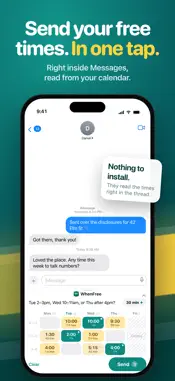
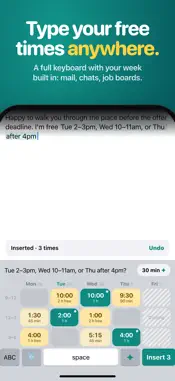
Someone texts "when are you free?" You leave the chat, open your calendar, come back, type times from memory, and get one wrong. WhenFree answers that message from inside the conversation, with exact times from your calendar. PRIVATE BY DESIGN Everything happens on your iPhone. WhenFree has no server and no WhenFree account. Your calendar, your event titles and your messages never leave the device. The keyboard and the Messages extension have no network access at all. The app goes online only if you connect a Google or Outlook account, and then talks only to Google or Microsoft for when you're busy. No analytics, no trackers. App Store privacy label: Data Not Collected. HOW IT WORKS • In Messages, tap +, then WhenFree. Your week appears as a board: days across, morning / afternoon / evening down. Free time is yellow; busy time is grey. • Tap the tiles that work. The reply is written for you, exactly as it will be sent: "Tue 2–3pm, Wed 10–11am, or Thu after 4pm?" • Send. It lands as a normal message, so it works with anyone on any phone. No link for them to open, no booking page. • Suggest picks three good times for you in one tap. Length (15 / 30 / 45 / 60 min) reflows the whole reply. • Expand for the hour-by-hour week. Hold time keeps time free for you; it is never offered. • With WhenFree Pro, step ahead to later weeks and offer times up to a month out, or send times in the other person's time zone. Offered times stay marked until they answer. MEETING TYPES (PRO) A showing is not a call. Give each kind of meeting its own length, time kept free before and after, and a place. Tap the type, or type "showing" in your message and WhenFree picks it. The place goes on the booked event only, never in the message. ON YOUR CALENDAR When they pick a time and send it back, it goes on both calendars. SIRI AND CONTROL CENTER Ask "When am I free in WhenFree", or tap Copy free times in Control Center or on the widget. THE KEYBOARD The same picker lives in a keyboard, so you can insert your free times into Mail, WhatsApp, Slack, or anything else you type in. It is a full QWERTY keyboard with a WhenFree row above it. It never opens other apps, never sends anything anywhere, and works without Full Access. YOUR RULES, APPLIED EVERYWHERE • Working hours per day, including evenings and weekends if you want them • Buffers before and after, so travel time is never offered • Minimum notice and a maximum number of meetings per day • Several calendars treated as busy, all-day events handled sensibly WHAT IT CANNOT DO WhenFree does not book on the other person's behalf, does not send invitations, and does not read your conversations. PLANS Free: 3 sends a month from Messages plus 3 inserts a month from the keyboard, from one calendar, for the current week, using your working hours. WhenFree Pro removes the limit and unlocks every calendar, planning up to a month ahead, meeting types, times in their zone, offered times marked and every rule: buffers, notice, Hold time and repeating holds. Choose the plan that fits: • Annual — $29.99/year • Monthly — $4.99/month • Lifetime — $49.99 once, no subscription All three unlock the same thing, restore on every iPhone on your Apple Account, and support Family Sharing. Payment is charged to your Apple Account at confirmation of purchase. Subscriptions renew automatically unless cancelled at least 24 hours before the end of the current period; your account is charged for renewal within 24 hours before the end of the period. Manage or cancel in Settings › [your name] › Subscriptions. Terms of Use: https://dotdotdotapps.com/whenfree/terms Privacy Policy: https://dotdotdotapps.com/whenfree/privacy Requires iOS 26 or later and Calendar access. Works with any calendar account on your iPhone (iCloud, Google, Outlook/Exchange, and others). Calendar not on your iPhone? Connect Google or Outlook in Settings.
What's New
Version 1.3.1 2026-10-19
What's new in WhenFree 1.3.1: • Took times back after sending? Undo now tells you to tap Send, and the times stop being bookable once that message goes out. • ... Technical Analysis
Package Overview Basic metadata
Bundle ID
com.dotdotdot.whenfree Current Version 1.3.1
Minimum iOS 26.0
Package Size App Store Size
Package Metadata 0 / 0 version records
Detailed binary, privacy manifest, framework, and Info.plist results have not been indexed for this package yet. The verified App Store and archive metadata above remains available.
Developer Information
Known Version Records
0 version records with stored package metadata
Stored metadata does not guarantee a package is currently available to download.
| Details | Version / IDs | Version date | Action |
|---|