Preview








Description
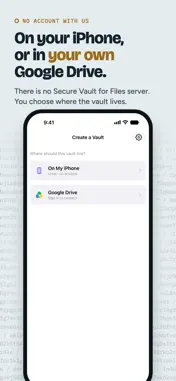
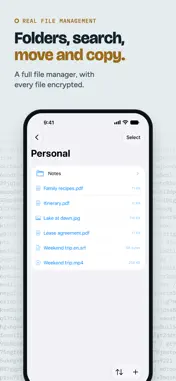
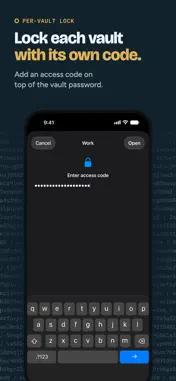
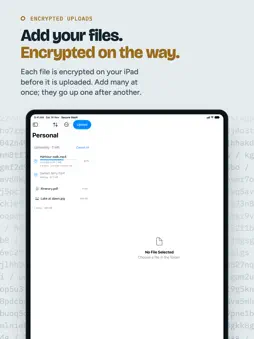
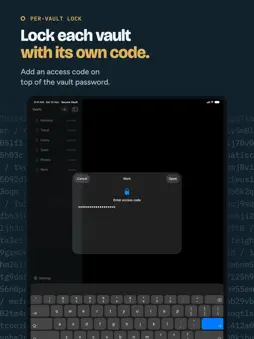
Lock it, stash it, take it anywhere! Secure Vault for Files turns storage you already own into an encrypted vault. Everything is encrypted on your iPhone or iPad before it goes anywhere, and only your password opens it. • Your storage, your keys. Keep a vault on your device, in your own iCloud Drive or in your own Google Drive. No server, no account with us. • iCloud vaults. Keep an encrypted vault in your own iCloud Drive storage, with the iCloud add-on. • Made for iPad. A sidebar of vaults, a folder list beside a preview, several windows with a vault in each, drag and drop, the menu bar and keyboard shortcuts. • Share to Secure Vault. From another app's Share button, add files and whole folders to a vault. They are encrypted at once, and wait for you if no vault is unlocked. • A second, private vault. A second access code opens a separate vault. Your vault list looks the same either way. • No lock-in. Vaults use an encryption format compatible with the open-source rclone tool. • Watch, listen, read. Video, audio, PDFs and photos open right in the app, never decrypted to disk. Subtitles, DTS audio, background audio and Picture in Picture included. • Real file management. Folders, search, rename, move, copy, delete and whole-folder uploads. Pricing. Secure Vault for Files is a one-time purchase: vaults on your device are yours to use for as long as you like, with no subscription. iCloud and Google Drive add-ons. Optional auto-renewable subscriptions (monthly, every 3 months or yearly) add vaults in your own iCloud Drive or your own Google Drive. New subscribers get a 1-month free trial, and payment is charged to your Apple Account when the trial ends. A subscription renews automatically unless cancelled at least 24 hours before the end of the current period, and you can manage or cancel it in your App Store account settings. If the Google Drive add-on ends, your encrypted Google Drive vaults stay readable and you can still export your files. Terms of Use: https://www.apple.com/legal/internet-services/itunes/dev/stdeula/ About the privacy label. If you connect Google Drive, Google's own sign-in component collects your name, email and some device and usage data. That is Google receiving it, not us. Secure Vault for Files has no server and receives nothing: we couldn't read your files if we wanted to, and your password never leaves your device.
What's New
Version 1.1.0 2026-11-21
iCloud vaults: keep an encrypted vault in your own iCloud Drive storage, with the new iCloud add-on (monthly, quarterly or yearly, with a free first month for n...iCloud vaults: keep an encrypted vault in your own iCloud Drive storage, with the new iCloud add-on (monthly, quarterly or yearly, with a free first month for new subscribers). Secure Vault on iPad: one app for iPhone and iPad, with a sidebar of vaults, a folder list beside a preview, several windows with a vault in each, drag and drop, the menu bar and keyboard shortcuts. Share to Secure Vault: from another app's Share button, add files and folders to a vault. They are encrypted at once, and if no vault is unlocked they wait until you unlock one. New • Add an access code to a vault you already have. • On iPad, choose which unlocked vault receives shared items, then a folder or a new folder. • Upload a whole folder: it keeps its subfolders, and merges into a folder of the same name. • DTS audio plays with sound, including DTS-HD Master Audio (DTS Express is not supported). • On iPad with a keyboard: Space plays and pauses, ← and → skip, Esc closes the player. • A hint when you create a vault to choose a strong password, since it cannot be recovered. Improved • Videos from the cloud keep playing more smoothly: each video is downloaded once, so the part you are watching gets the whole connection. • Seeking far into a long cloud video is faster and lands where you dropped it, with its subtitles. • When a video has to wait for the network, the player says so. • Picture in Picture moves on to the next video with the screen locked. • Vaults with an access code are better hidden: their cloud folders get neutral names, and they are found by their password only. • Move and Copy show what is moving and where to. • Clearer error messages that say what failed and whether it was Google Drive, iCloud or this device. • Google Drive: if you declined a permission, the app offers Reconnect instead of failing. • More reliable with Google Drive when it is busy or a sign-in expires. • Cancelling an upload takes effect at once, even while the app is waiting to retry. • Renaming a file in Google Drive keeps its modified date. Changed • New vaults always encrypt file names. A vault made with an older setting opens read-only: you can still view and export its files. • Every vault is now encrypted, and Google Drive vaults need the Google Drive add-on. A Google Drive vault without a password, which needed no add-on in 1.0, is no longer supported: it can be removed, and its files stay in your Google Drive. Encrypted Google Drive vaults you already have still open read-only without the add-on. • In an iCloud vault, Delete is permanent at once (there is no trash). • An alternate vault must use a different password from the vault it is paired with. Fixed • A vault whose folder was deleted or moved to the trash in Google Drive or iCloud now says so when you unlock it, and can be removed. • A paused video stays paused when you leave the app and come back, and one that stopped in the background resumes where it was. • A dropped connection while reading a file is reported as a network problem, never as a damaged file. • A folder the password cannot read is no longer taken for an empty vault. • Styled subtitles are no longer turned off on a busy device. Technical Analysis
Package Overview Basic metadata
Bundle ID
com.code1one.securevault Current Version 1.1.0
Minimum iOS 27.0
Package Size App Store Size
Package Metadata 0 / 0 version records
Detailed binary, privacy manifest, framework, and Info.plist results have not been indexed for this package yet. The verified App Store and archive metadata above remains available.
Developer Information
Known Version Records
0 version records with stored package metadata
Stored metadata does not guarantee a package is currently available to download.
| Details | Version / IDs | Version date | Action |
|---|