
Preview




Description
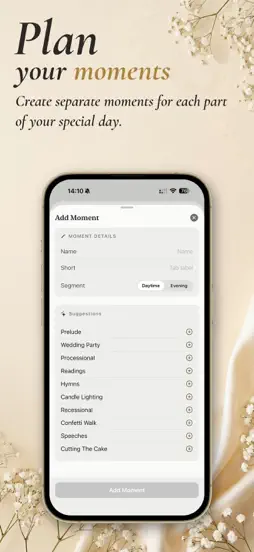
Your wedding music needs to be perfect, and Wedding Player makes sure it is. Build your wedding playlist for every moment, then play it exactly on cue: offline, with smooth fades, and locked so nothing can go wrong. Built by a dad for his daughter's wedding, and now available for yours. Wedding Player is purpose-built for the ceremony and the whole day: your own running order, your own tracks, perfectly timed. ▸ MIX APPLE MUSIC + YOUR OWN FILES Combine tracks from your Apple Music library with custom-edited local files (MP3, M4A, WAV, AIFF) in a single ceremony playlist. Most apps make you pick one. Wedding Player lets you mix both. Trimmed a special version in GarageBand? It sits right alongside your Apple Music tracks. ▸ MORE THAN A PLAYLIST: A CEREMONY TIMELINE Create named moments (Walking Down The Aisle, Signing The Register, Leaving), each with its own playlist, fade settings, and transition controls. Advance between moments with a single tap and a smooth fade-out countdown. ▸ BACKED UP AND IN SYNC WITH iCloud With Full Access, your wedding backs up to iCloud and stays in sync across your iPhone and iPad. Build it on one device and run it from another, and never lose your setup. ▸ GO LIVE: PANIC-PROOF CONTROLS Switch to Live Mode and hand the device to whoever's pressing play. Extra-large controls. Impossible to hit the wrong button. The playlist is locked. No wrong songs, no wrong versions, no accidental skips. Set it up once. Press play with confidence. ▸ 100% OFFLINE Works in airplane mode. No WiFi, no streaming, no ads, no surprises. Local files play directly from your device. Rock-solid reliability with no internet required. Download your Apple Music tracks in advance using the built-in offline checklist. ▸ PROFESSIONAL AUDIO • Crossfade between tracks (1–10 seconds, configurable) • Gapless transitions for Apple Music tracks (native MusicKit) • Volume normalisation across all tracks (-3 dBFS target) • Per-track trim points with fade-in option • Configurable fade-out (2–15 seconds) with live countdown ▸ BUILT FOR THE DAY • Per-track or per-moment looping (repeat until you're ready to advance) • Advance between moments or tracks with a tap or let them flow automatically • Screen stays awake during playback • Works on iPhone and iPad ▸ TRY BEFORE YOU BUY The free demo includes 5 sample tracks and a guided walkthrough. Build your timeline, hear the crossfades. When you're ready, exit the demo and start building your own ceremony, then unlock full access for £12.99. One payment, forever. No subscription. No account required. ▸ FOR WEDDING PROFESSIONALS Running multiple weddings for a living? The Professional Licence (£5.99/month or £49.99/year, with a free month to start) lets you keep multiple ceremonies in its own workspace and switch between them in a tap. No wiping and rebuilding between couples. Built for venues, celebrants and planners. Details at weddingplayer.app/professionals. "I built Wedding Player for my daughter's wedding. Now it's yours." Don McAllister, Wedding Player Developer Your ceremony is the one part of the day you can't redo. Make it perfect. Terms of Use (EULA): https://www.apple.com/legal/internet-services/itunes/dev/stdeula/
What's New
Version 3.0 2026-07-01
Wedding Player is the panic-proof wedding music app. One-off purchase for couples, no subscription, ever. What's new in 3.0 - our biggest update yet! Two big a...Wedding Player is the panic-proof wedding music app. One-off purchase for couples, no subscription, ever. What's new in 3.0 - our biggest update yet! Two big additions, plus polish across the app. • iCloud Backup and Sync Build your ceremony on your iPhone and run it from your iPad. With Full Access, your wedding backs up to iCloud and stays in sync across your devices, with a clear status indicator so you always know it's up to date. • Manage multiple weddings (Wedding Player Pro). As well as iCloud Backup & Sync, Wedding Player Pro now supports multiple weddings. If you run weddings professionally, you can now keep multiple couple's ceremony in one place and switch between them in a tap. Wedding Player now groups your weddings into Today, This week, Planning, and Archive. • Enhanced Track Trimmer An easier track trimmer with a dual-handle slider for setting start and end points. Wedding Player is free to download and build with. Full playback, Live Mode, Offline Readiness, and iCloud sync come with a one-off Full Access purchase; Wedding Professionals can manage multiple weddings with Wedding Player Pro with a Pro Monthly or Annual Subscription (Free month to start). Version 2.1.8 2026-06-19
Wedding Player is the panic-proof wedding music app. One-off purchase for couples, no subscription, ever. New in 2.1.8: - Personalise the email you use to reco...Wedding Player is the panic-proof wedding music app. One-off purchase for couples, no subscription, ever. New in 2.1.8: - Personalise the email you use to recommend Wedding Player, and save your wording so it is reused every time. - Add a whole Apple Music playlist to a moment in one tap. It is now a clear gold Add All button at the top of the playlist. Version 2.1.7 2026-06-11
Wedding Player is the panic-proof wedding music app. £7.99 one-off for couples, no subscription, ever. New in 2.1.7: - Voice guided onboarding for new app inst...Wedding Player is the panic-proof wedding music app. £7.99 one-off for couples, no subscription, ever. New in 2.1.7: - Voice guided onboarding for new app installs takes you through the basic features of Wedding Player. - Replay onboarding from Settings - Share and recommend Wedding Player from Settings using QR Code, share sheet and one-click personalised email generation. Version 2.1.5 2026-05-26
Wedding Player is the panic-proof ceremony music app. £7.99 one-off for couples, no subscription, ever. New in 2.1.5: NEW: Trim and Fade Any Track The biggest...Wedding Player is the panic-proof ceremony music app. £7.99 one-off for couples, no subscription, ever. New in 2.1.5: NEW: Trim and Fade Any Track The biggest upgrade in 2.1.5. You can now edit every track in your ceremony directly inside Wedding Player. No GarageBand, no exporting, no round-trips through other apps. Set the exact moment any track starts and stops. Need the song to begin on the chorus, not the intro? Drag the in-point. Need the track to end before that one wrong lyric? Drag the out-point. The original file is never modified. Wedding Player only remembers your edit, so the same trimmed clip plays the same way every time. Add custom fade-in at the in-point and fade-out at the out-point. Configurable from 2 to 15 seconds in Settings. Three preview buttons let you spot-check the first 10 seconds, the last 10 seconds, or hear the full trimmed clip end to end. Each preview shows a live countdown inside the button so you know exactly what your guests will hear. Best of all, this works on Apple Music tracks too. Other apps treat Apple Music streams as read-only. Wedding Player gives you the same trim and fade controls across all three sources: Apple Music, Wedding Player Originals, and your own local files. NEW: Loop Any Moment The Loop toggle now works on moments with more than one track. Add three pieces of music to "Signing the Register", turn Loop on, and Wedding Player plays them in order, then wraps back to the first track and keeps going until you tap Fade & End. Perfect for the moments where the timing isn't fixed: the signing, the drinks reception, the slow walk back up the aisle. Crossfade carries across the wrap. If you've set a 4-second crossfade for the moment, the last track fades into the first track exactly the same way every other transition sounds. No clunky hard cut at the end of the playlist, no awkward silence while the music re-starts. A small looping indicator shows on the player while a looped moment is running, so it's always obvious the music will keep going. Tap Fade & End once the ceremony beat is over and the loop ends cleanly on the configured fade-out. NEW: Light or Dark Follows Your iPhone Wedding Player no longer locks itself to dark mode on the splash screen, onboarding, demo or paywalls. By default it picks up your iOS Display setting (Light or Dark) automatically. You can still override this in Settings, Appearance if you prefer to lock the app to one mode for a dim venue or a bright outdoor ceremony. NEW: Get More Music A new tip card under the Add Tracks pills shows three on-device routes for finding tracks beyond Apple Music and Originals: Version 2.1.4 2026-05-25
Wedding Player is the panic-proof ceremony music app. £7.99 one-off for couples, no subscription, ever. New in 2.1.4: NEW: Trim and Fade Any Track The biggest...Wedding Player is the panic-proof ceremony music app. £7.99 one-off for couples, no subscription, ever. New in 2.1.4: NEW: Trim and Fade Any Track The biggest upgrade in 2.1.4. You can now edit every track in your ceremony directly inside Wedding Player. No GarageBand, no exporting, no round-trips through other apps. Set the exact moment any track starts and stops. Need the song to begin on the chorus, not the intro? Drag the in-point. Need the track to end before that one wrong lyric? Drag the out-point. The original file is never modified. Wedding Player only remembers your edit, so the same trimmed clip plays the same way every time. Add custom fade-in at the in-point and fade-out at the out-point. Configurable from 2 to 15 seconds in Settings. Three preview buttons let you spot-check the first 10 seconds, the last 10 seconds, or hear the full trimmed clip end to end. Each preview shows a live countdown inside the button so you know exactly what your guests will hear. Best of all, this works on Apple Music tracks too. Other apps treat Apple Music streams as read-only. Wedding Player gives you the same trim and fade controls across all three sources: Apple Music, Wedding Player Originals, and your own local files. NEW: Loop Any Moment The Loop toggle now works on moments with more than one track. Add three pieces of music to "Signing the Register", turn Loop on, and Wedding Player plays them in order, then wraps back to the first track and keeps going until you tap Fade & End. Perfect for the moments where the timing isn't fixed: the signing, the drinks reception, the slow walk back up the aisle. Crossfade carries across the wrap. If you've set a 4-second crossfade for the moment, the last track fades into the first track exactly the same way every other transition sounds. No clunky hard cut at the end of the playlist, no awkward silence while the music re-starts. A small looping indicator shows on the player while a looped moment is running, so it's always obvious the music will keep going. Tap Fade & End once the ceremony beat is over and the loop ends cleanly on the configured fade-out. NEW: Light or Dark Follows Your iPhone Wedding Player no longer locks itself to dark mode on the splash screen, onboarding, demo or paywalls. By default it picks up your iOS Display setting (Light or Dark) automatically. You can still override this in Settings, Appearance if you prefer to lock the app to one mode for a dim venue or a bright outdoor ceremony. NEW: Get More Music A new tip card under the Add Tracks pills shows three on-device routes for finding tracks beyond Apple Music and Originals: Version 2.1.3 2026-05-11
A redesigned Pre-Ceremony Readiness check guides you through every pre-flight item before the ceremony starts, with live Airplane Mode status, a one-tap shortcu...A redesigned Pre-Ceremony Readiness check guides you through every pre-flight item before the ceremony starts, with live Airplane Mode status, a one-tap shortcut to your Apple Music downloads, and a tighter Live Mode that protects against accidental taps on the day. • New Pre-Ceremony Readiness sheet. Tap Go Live and a guided check appears before Live Mode. Any critical warnings are surfaced at the top, followed by a short operator checklist: Airplane Mode (live status), Do Not Disturb (manual confirm), audio system, optional battery. Start the Ceremony activates only when every row is satisfied. • Open Apple Music shortcut. When a track isn't downloaded for offline use, one tap takes you to the Wedding Player Ceremony playlist in Apple Music. Download, return to Wedding Player, and the readiness sheet refreshes automatically. • Per-screen tip cards and in-app Help. Tap the "?" button on most screens for a contextual tip card. The Help section has been updated to cover the new flow. • Confirmation when switching moments in Live Mode. Tapping a different moment always asks for confirmation now, whether music is playing or stopped. Stops accidental taps from derailing the running order on the day. • iPad Live Mode keeps the active moment visible. When the ceremony auto-advances, the sidebar scrolls so the active moment stays in view. • Tap-anywhere settings rows. Tap any settings row anywhere on the row, not just on the text or chevron. • Wi-Fi-only iPad polish. Airplane Mode references hidden in the pre-flight check, tip cards, and Help section where Airplane Mode wouldn't help. Wedding Player still works completely offline once your music is downloaded. No notifications, no surprises — just the right music, exactly when you tap. Version 2.1.2 2026-05-04
Wedding Player 2.1.2 is a thoughtful polish release focused on accessibility, clearer settings, and a safer Live Mode for the day itself. — ACCESSIBILITY — • C...Wedding Player 2.1.2 is a thoughtful polish release focused on accessibility, clearer settings, and a safer Live Mode for the day itself. — ACCESSIBILITY — • Custom text size slider in Settings — override iOS Settings from inside the app, with a live preview as you scroll. • Comprehensive larger-text support across every screen — Rehearsal Mode, transport controls, Live Mode, alerts, and Apple Music search all reflow cleanly at the largest text sizes. — ADD MOMENT, REFRESHED — • New layout matches the rest of the app • Suggestions reordered chronologically: ▸ Daytime: Prelude → Bridesmaids → Processional → Readings → Hymns → Candle Lighting → Recessional → Confetti Walk → Speeches → Cutting The Cake. ▸ Evening: Drinks Reception → Food is Served → First Dance → Dad & Daughter Dance → Party Selection → Last Dance. — LIVE MODE — • Tap-to-exit replaces the swipe gesture — a confirmation prompt now appears before leaving Live Mode, removing the risk of an accidental exit mid-ceremony. • Bigger, clearer moment-name banner at the top of the playback panel. — SMALL iPHONE POLISH — • Bigger, more legible play button in Rehearsal Mode — the compact transport now uses the same prominent Live-Mode-style pill, with the action label inside the button. • Fix for a clipped last-track row on iPhone SE / mini. — SETTINGS — • Tighter vertical layout — more on screen, less wasted space. • "Download Checklist" renamed to "Offline Readiness". — ORIGINALS — • Pick several Wedding Player Originals at once — tap each track to select, then add the whole batch in one go. — iPAD — • Wider sidebar on launch — moment names like "Walking Down The Aisle" fit without truncation. • In-flow editor's track list now lines up perfectly with the panels above it. Thank you to every couple, planner, and venue who's reported feedback. Keep it coming — every release is shaped by you. Version 2.1.1 2026-04-30
Reliability fix for downloaded Wedding Player Originals. After leaving the app idle for an extended period, downloaded Originals could appear available but sil...Reliability fix for downloaded Wedding Player Originals. After leaving the app idle for an extended period, downloaded Originals could appear available but silently fail when added to a moment. This release addresses the issue at two levels: it signals to iOS that downloaded tracks are essential local data (not cache), and it self-heals on each return to the foreground if anything has gone missing — showing a clear prompt instead of failing silently. No new features. Reliability improvements only. Version 2.1 2026-04-30
Wedding Player Originals: 35 free ceremony-ready instrumental tracks now live inside the app. Browse them, audition a 15-second preview, download what you need,...Wedding Player Originals: 35 free ceremony-ready instrumental tracks now live inside the app. Browse them, audition a 15-second preview, download what you need, and add to any moment with a single tap. No subscription. No streaming. Fully offline once downloaded. Reliable on the day: • Lock-screen and Control Centre playback controls so you can lock the phone during the aisle walk and music keeps playing • Bluetooth-proof: if your speaker briefly drops out, audio recovers automatically • Background audio that survives the screen turning off iPad parity: • Full editing toolbar matching iPhone, including Add Originals • Done button when finishing playlist edits • Moment details card for in-place name and segment editing Polish & details: • Source-distinct icons on every track row so you can tell Apple Music, Originals, and local files apart at a glance • Confirmation alert before removing a track from a moment • Cleaner, faster cross-engine playback when mixing Apple Music with Originals or local files • Looping moments now show a passive LOOPING badge, ending only when you fade to the next moment • Improved moment editting Plus dozens of stability fixes and UI improvements Version 2.0.2 2026-04-21
This update focuses on reliability and simplicity for the big day. Moments We've renamed Events to Moments. Simplified Live Controls Live Mode now has a sing...This update focuses on reliability and simplicity for the big day. Moments We've renamed Events to Moments. Simplified Live Controls Live Mode now has a single button: tap to start, tap again to fade to the next moment. The button shows exactly where you're going ("Cue Signing The Register") so there's no guessing mid-ceremony. Fewer controls, fewer things to tap wrong. Fade to Stop for Looping Events
The LOOPING banner is now a button. Tap it to fade out cleanly over your configured duration, without having to switch events to end the loop. Other Improvements • Fade button now shows the destination moment name • Volume warning when muted or below 20% • Setup Guide card when starting fresh • Track numbers display correctly for 10+ track moments • Better handling of Apple Music on fresh installs Technical Analysis
Package Overview Basic metadata
Bundle ID
com.donmcallister.weddingplayer Current Version 3.0
Minimum iOS 17.0
Package Size App Store Size
Package Metadata 0 / 12 version records
Detailed binary, privacy manifest, framework, and Info.plist results have not been indexed for this package yet. The verified App Store and archive metadata above remains available.
Related Apps


Developer Information
Known Version Records
0 version records with stored package metadata • 12 known version records
Stored metadata does not guarantee a package is currently available to download.
| Details | Version / IDs | Version date | Action |
|---|---|---|---|
| Not archived | v3.0 App Store ID: 887640172Build: 3.0 | 2026-07-01 15:35:13 | Request Version |
| Not archived | v2.1.8 App Store ID: 887187235Build: 2.1.8 | 2026-06-20 00:01:59 | Request Version |
| Not archived | v2.1.7 App Store ID: 886537702Build: 2.1.7 | 2026-06-11 12:52:11 | Request Version |
| Not archived | v2.1.5 App Store ID: 886138035Build: 2.1.5 | 2026-05-26 19:50:05 | Request Version |
| Not archived | v2.1.4 App Store ID: 885857360Build: 2.1.4 | 2026-05-26 00:42:34 | Request Version |
| Not archived | v2.1.3 App Store ID: 885512739Build: 2.1.3 | 2026-05-11 23:35:57 | Request Version |
| Not archived | v2.1.2 App Store ID: 885247878Build: 2.1.2 | 2026-05-05 00:05:16 | Request Version |
| Not archived | v2.1.1 App Store ID: 885124094Build: 2.1.1 | 2026-04-30 20:54:00 | Request Version |
| Not archived | v2.1 App Store ID: 885085652Build: 2.1 | 2026-04-30 08:42:25 | Request Version |
| Not archived | v2.0.2 App Store ID: 884740316Build: 2.0.2 | 2026-04-21 19:27:10 | Request Version |
| Not archived | v2.0.1 App Store ID: 884459096Build: 2.0.1 | 2026-04-14 16:49:36 | Request Version |
| Not archived | v2.0 App Store ID: 883928834Build: 2.0 | 2026-04-08 15:19:31 | Request Version |