Preview



Description
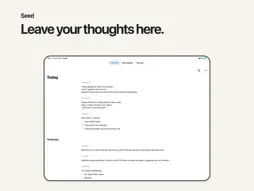
Get it off your mind. A thought, a reminder, a frustration or something you are still working through. Say it to Seed and carry on with your day. You do not need to organize your thoughts before you speak. SAY WHATEVER IS ON YOUR MIND Press once and talk on iPhone or Apple Watch. A few words between tasks or a longer thought on a walk: there is no outline to fill in. Watch recordings go to your iPhone for transcription. You can also start with Siri, Shortcuts or a supported Action button. COME BACK WHEN YOU HAVE ROOM Timeline brings your spoken notes together by day and time. Read back, search for a phrase or highlight a passage worth returning to. Turn selected paragraphs into bullets or checklists yourself. Some thoughts may become a paragraph, a decision or an action. Others have served their purpose just by being spoken. You decide what to make of them. With Apple Intelligence available and enabled on compatible hardware, Seed makes a cleaner reading version and short titles for new recordings. Your original words and audio remain available with each note. Listen at your preferred speed while the words follow along. Optional wording suggestions help you review a possible recognition mistake in context. Tap an underlined word to compare the original and proposed spelling. Applying a correction updates only the reading version and saves the spelling pair to Vocabulary. Undo reverses the correction and its vocabulary learning. ROOM TO SPEAK FREELY Audio transcription runs on your iPhone. No account, no subscription and no data collected by us. On new installs, reading-version processing prefers Apple Private Cloud Compute on eligible iOS 27 devices, with on-device fallback. This includes cleanup, titles and contextual wording review. Existing choices are preserved, and you can choose on-device processing in Settings. Apple's usage limits apply. An optional webhook sends original transcripts to your own tools. KEEP WHAT YOU WANT TO RETURN TO New installs move notes older than seven days to Recently Deleted. Choose 1, 7 or 30 days, or Never, in Settings, Recordings, Auto-delete. Existing choices are preserved. Deleted recordings can be recovered for 30 days. Choose Never if you want to keep notes until you delete them. WHEN YOU WANT MORE CONTROL Use Apple Speech with a chosen language, or download Everyday for automatic detection across 25 languages. Compact offers a smaller download and transcribes while Seed is open. Downloads retain progress when paused; unused optional models can be removed. Vocabulary spelling pairs and optional filler-word removal apply to reading versions. High voice sensitivity can separate quieter background speech in the reading version without changing your original. Available in English, Spanish and German.
What's New
Version 2.3.0 2026-11-11
Share notes from Timeline and Recordings. Review optional word suggestions in context; applying a correction also saves its spelling to Vocabulary. Setup is sim...Share notes from Timeline and Recordings. Review optional word suggestions in context; applying a correction also saves its spelling to Vocabulary. Setup is simpler, with Apple Speech selected first. We also polished recording controls and model downloads. Technical Analysis
Package Overview Basic metadata
Bundle ID
co.donado.dictate Current Version 2.3.0
Minimum iOS 26.2
Package Size App Store Size
Package Metadata 0 / 0 version records
Detailed binary, privacy manifest, framework, and Info.plist results have not been indexed for this package yet. The verified App Store and archive metadata above remains available.
Developer Information
Known Version Records
0 version records with stored package metadata
Stored metadata does not guarantee a package is currently available to download.
| Details | Version / IDs | Version date | Action |
|---|