
Preview


Description
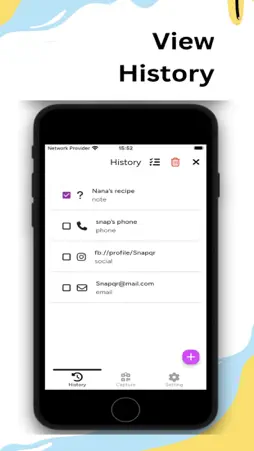
Introducing SnapQR - Your Ultimate QR Code Generator & Scanner SnapQR is a versatile app that functions as both an offline QR code generator and scanner. Seamlessly create QR codes for text, contact information, email addresses, WiFi credentials, messages, social media accounts, or website links with the ease of offline functionality. Once generated, the app empowers you to save the QR code image on your device, ready to be shared directly with your friends. Key Features: - Custom QR Code Creation: Craft personalized QR codes for websites, businesses, or personal use effortlessly. Input the desired information, and SnapQR generates a code in seconds. - User-Friendly QR Code Generation: Generating a QR code is a breeze with SnapQR. Simply follow these steps: Open the QR code making app. Select the type (Text, WiFi, URL, or Contact). Enter your relevant data and tap the proceed button at the top right. Your code is ready! Save and share the QR code as desired. - Effortless QR Code Scanning: SnapQR doubles as a QR code reader, allowing you to instantly access information by scanning any code you come across. Whether it's on a product, in a magazine, or on a website, our app simplifies the process of obtaining the information you need. - User-Friendly Design: SnapQR is designed with simplicity in mind, ensuring that even users with minimal tech expertise can navigate and utilize its features seamlessly. If you're looking for a fast, secure, and user-friendly QR code encoder and decoder, SnapQR is the ideal choice! Try our compact-sized app today. How to Scan or Read QR Code: Open the QR code reader app. Tap on the QR scanner button in the bottom center The QR and Barcode scanner camera will activate. You can also scan saved images using the "From gallery" button. If you find SnapQR helpful, please consider giving us a 5-star rating. Terms of Use: https://sites.google.com/view/snapqr/terms-of-use
What's New
Version 1.0.6 2024-02-18
updated share app message push notifications Technical Analysis
Package Overview Basic metadata
Bundle ID
com.bluechance.snapqr Current Version 1.0.6
Minimum iOS 12.0
Package Size App Store Size
Package Metadata 0 / 6 version records
Detailed binary, privacy manifest, framework, and Info.plist results have not been indexed for this package yet. The verified App Store and archive metadata above remains available.
Known Version Records
0 version records with stored package metadata • 6 known version records
Stored metadata does not guarantee a package is currently available to download.
| Details | Version / IDs | Version date | Action |
|---|---|---|---|
| Not archived | App Store ID: 863825318 | Unknown | Request Version |
| Not archived | App Store ID: 863782075 | Unknown | Request Version |
| Not archived | App Store ID: 863755016 | Unknown | Request Version |
| Not archived | App Store ID: 863649595 | Unknown | Request Version |
| Not archived | App Store ID: 863639323 | Unknown | Request Version |
| Not archived | App Store ID: 863429994 | Unknown | Request Version |