Preview





Description
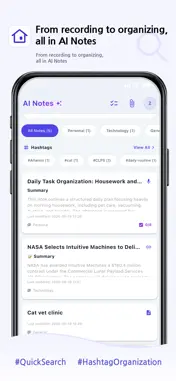
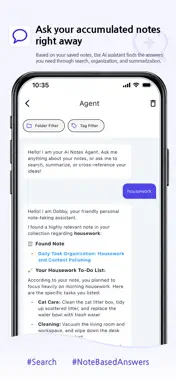
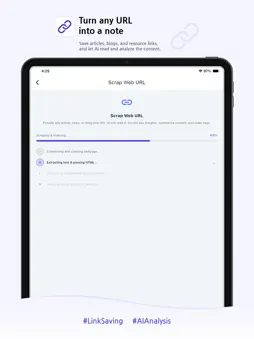
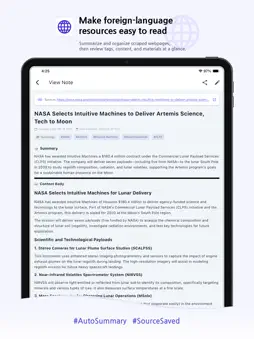
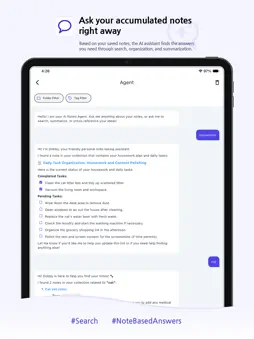
Your mind moves fast. Dobby AI Notes keeps up. The AI-powered second brain that captures, organizes, and retrieves everything you know — all in one place. Tired of hunting through piles of notes to find that one insight? With Dobby AI Notes, simply type, speak, paste a URL, or upload a file, and state-of-the-art Gemini AI instantly turns raw input into clear, structured summaries and actionable to-do lists. Your notes work for you — not the other way around. The crown jewel is the conversational RAG chatbot: your own AI assistant that knows everything inside your personal knowledge base. Ask "What did I read about that marketing strategy last week?" and it will semantically search every saved note in real time, surfacing the exact answer with source references — just like having a personal research assistant available 24/7. [Perfect For] • Scattered thinkers and fast-moving minds who lose ideas before they can write them down • Professionals who want automatic meeting notes and action items without lifting a pen • Students who record lectures and need clean, searchable summaries instantly • Researchers and content creators building a curated, queryable knowledge archive • Productivity enthusiasts building a personal knowledge management (PKM) system or second brain [Core Features] • Smart Web Clipping: Paste any URL to strip away ads and clutter, saving a clean Markdown summary directly to your notes • Voice Notes & AI Refinement: Record live audio with real-time transcription, then let Gemini AI extract key points, summaries, and action items automatically • Conversational RAG Chatbot: Semantically search your entire note database with vector search — ask natural language questions and get accurate, cited answers • Home Screen Widgets (1x1): Record voice notes, check/add to-do lists, and quick-create notes in a single tap without opening the app • Guest Login & Easy Account Linking: Try the app immediately without registering and easily link to your Google, Apple, or email account later • Free Premium Ad Credits: Earn premium AI usage credits by watching rewarded ads without an active subscription • Interactive Onboarding: Learn to navigate the app with our brand new step-by-step interactive coachmarks on mobile and web • Organized Knowledge Base: Sort notes into folders and tags, write in Markdown, and manage tasks with built-in to-do checklists • Multi-Format Input: Text, voice, web clips, and file attachments — every format of knowledge, unified in one app • Usage Dashboard: Monitor daily AI token costs and cloud storage in a clear, transparent dashboard Capture your thoughts. Build your knowledge base. Meet your AI assistant. Start with Dobby AI Notes today! Privacy Policy: https://www.dobby-canvas.com/docs/privacy-policy.html Terms of Service: https://www.dobby-canvas.com/docs/terms-of-service.html
What's New
Version 1.1.1 2026-10-22
Attachments are easier to work with, plus a few fixes. - Drop several files at once and all of them are attached, summarized in the order you dropped them - Att... Technical Analysis
Package Overview Basic metadata
Bundle ID
com.dobbycanvas.ai-notes Current Version 1.1.1
Minimum iOS 15.0
Package Size App Store Size
Package Metadata 0 / 0 version records
Detailed binary, privacy manifest, framework, and Info.plist results have not been indexed for this package yet. The verified App Store and archive metadata above remains available.
Developer Information
Known Version Records
0 version records with stored package metadata
Stored metadata does not guarantee a package is currently available to download.
| Details | Version / IDs | Version date | Action |
|---|