
Preview





Description
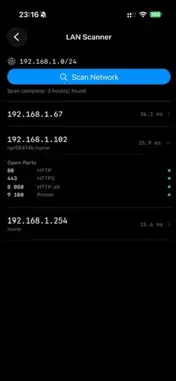
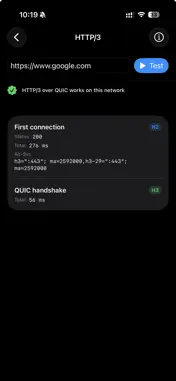
Your game lags but the speed test says 300 Mbps. Your call breaks up while a download runs fine. Your VPN connects on one network and refuses on another. NetDiag+ shows where the problem is: your Wi-Fi, your router or your provider. 31 network tools on your iPhone, running on raw BSD sockets — no jailbreak, no desktop. START HERE • Health Score — one run of about 40 seconds gives a score from 0 to 100 and a verdict for your Wi-Fi, your router and your provider. One reminder can bring you back at the other end of the day, and a home-screen widget shows your last score. • Report for your provider — two or more Health Score checks in one text or PDF document (in English): day or evening, which link was flagged each time, and the numbers from every check. Something concrete to send instead of "my internet is slow". • Latency Dashboard — game regions and CDN edges, plus local carriers for the Gulf, Turkey, Russia and Egypt, sorted worst-first with median, jitter and loss. Your router is checked first, so a problem at home is not mistaken for a slow server. • Bufferbloat — loads your line while pinging your router and the internet, grades the result from A+ to F and shows where the queue builds up: at home or at your provider. If the test server is throttled, it says so instead of guessing a grade. DIAGNOSE • Ping & Traceroute — classic reach tests, with your own interval and packet size • MTR — continuous traceroute with per-hop loss and RTT, probed in parallel • Path MTU Discovery — finds the right MTU for your VPN or tunnel: the largest packet that really gets through, in about 30 seconds • Speed Test — download and upload bandwidth • Site Reach — TCP and TLS audit of 35 popular sites, detects SNI blocks • HTTP/3 Tester — a real QUIC handshake, not a header • Host Monitor — alerts when a server goes down DNS, DOMAINS & SECURITY • NSLookup — any DNS record type • Encrypted DNS — DoH and DoT across Cloudflare, Google, Quad9 and NextDNS, compared • Whois — registration data with parsed fields • SSL Checker — certificate chain and expiry dates • TLS Inspector — which TLS versions and ciphers a server accepts • BGP Info — AS, peers and announced prefixes for any IP • Reverse DNS — the name behind an IP address • HTTP Headers — every response header and the whole redirect chain LOCAL NETWORK • Wi-Fi Info — SSID, signal strength, IP details • LAN Scanner — every device answering on your subnet, with Wake-on-LAN • Bonjour Browser — AirPlay receivers, printers, Chromecasts, HomeKit • Port Scanner — open ports on a host • STUN / NAT — public IP and NAT type for VoIP, gaming and peer-to-peer • VPN Check — whether a VPN is active, your public IP and NAT type, and whether your DNS answers match an encrypted resolver • IPv6 Check — connectivity, NAT64 / DNS64, v4 against v6 UTILITIES • Subnet Calculator, IP Geolocation • Network Passport — a shareable summary of the connection • History — every diagnostic you have run EVERY RESULT EXPORTS AS TEXT OR PDF Text pastes into a support ticket or forum thread; a PDF attaches to a mail to your provider. 13 languages, Arabic with full right-to-left support. In-app help on every tool explains how to read the result. Made for network engineers, sysadmins, gamers and anyone who has ever argued with their ISP. No account. No subscription. Results stay on your iPhone unless you share them. The app shows ads and collects usage analytics, like which tools you open, not what they measured. A one-time purchase removes ads.
What's New
Version 1.4.11 2026-10-07
• Health Score: on networks that block ping, servers that do not answer are no longer counted as packet loss, so your provider is not flagged by mistake. • Stea... Technical Analysis
Package Overview Basic metadata
Bundle ID
com.netdiag.app Current Version 1.4.11
Minimum iOS 16.0
Package Size App Store Size
Package Metadata 2 / 8 version records
Detailed binary, privacy manifest, framework, and Info.plist results have not been indexed for this package yet. The verified App Store and archive metadata above remains available.
Developer Information
Known Version Records
2 version records with stored package metadata • 8 known version records
Stored metadata does not guarantee a package is currently available to download.
| Details | Version / IDs | Version date | Action |
|---|---|---|---|
| 9.85 MB | v1.4.5 App Store ID: 890129708Build: 1.4.5 | 2026-09-09 04:55:44 | Get Version |
| Not archived | App Store ID: 889950803 | Unknown | Request Version |
| Not archived | App Store ID: 889848400 | Unknown | Request Version |
| Not archived | App Store ID: 889272610 | Unknown | Request Version |
| 9.85 MB | v1.4.5 App Store ID: 886498084Build: 1.4.5 | 2026-09-09 04:55:44 | Get Version |
| Not archived | App Store ID: 886419385 | Unknown | Request Version |
| Not archived | App Store ID: 884431931 | Unknown | Request Version |
| Not archived | App Store ID: 884344342 | Unknown | Request Version |