
Beresta: Library & Highlights App Icon

Beresta: Library & Highlights

Book • Dmitriy Laukhin
4+ v1.6 Recorded price: $19.99 App Store →
🏆 Best: #2 Paid (RUS)
IPA Analysis
Technical Specs
Bundle ID com.secondbrain.beresta.Beresta
Version 1.6
App Store Size 40.69 MB
Minimum iOS 26.0
Devices iPhone, iPad, iPod touch
Catalog release date 2026-09-19
Latest recorded version date 2026-10-25
Features & Support
Advisory 4+
Languages (7)
EN, FR, DE, IT, KK, RU, ES
Top In App Purchases
No In App Purchases Listed

Preview

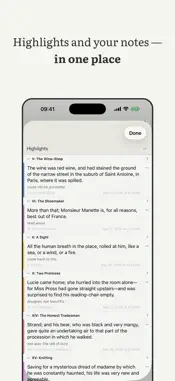
Beresta: Library & Highlights screenshot 1 Beresta: Library & Highlights screenshot 2 Beresta: Library & Highlights screenshot 3 Beresta: Library & Highlights screenshot 4 Beresta: Library & Highlights screenshot 5 Beresta: Library & Highlights screenshot 6 Beresta: Library & Highlights screenshot 7 Beresta: Library & Highlights screenshot 8 Beresta: Library & Highlights screenshot 9 Beresta: Library & Highlights screenshot 10 Beresta: Library & Highlights screenshot 11 Beresta: Library & Highlights screenshot 12 Beresta: Library & Highlights screenshot 13 Beresta: Library & Highlights screenshot 14 Beresta: Library & Highlights screenshot 15

Description

Beresta keeps what you read and what you took from it: books, articles, highlights — and the notes they turn into. BOOKS STAY FILES Opens EPUB, FB2, PDF, MOBI and plain text. Importing copies: the file you brought stays where it was. Any book comes back out as a file under its real name through Share; on the Mac, "Save a copy of the library…" lays the whole library out as Author/Title folders. A book may hold several files at once — the reader picks the one that reads best, and you can pick another by hand. HIGHLIGHTS YOU CAN TAKE WITH YOU A quote, your own thought beside it, tags, bookmarks. On iPad, ink over PDF pages with Apple Pencil. All of it exports into an Obsidian vault as ordinary Markdown files rather than "our format": a person edits the note, not the program, and the next export will not overwrite what you wrote. There is a separate Obsidian plugin, open source. SYNC WITHOUT SOMEONE ELSE'S SERVER Beresta has no server of its own and no account. Devices exchange through a place you choose. To Backblaze B2 and WebDAV everything travels sealed: the key is derived from your passphrase on the device itself and stays with you. Through a folder — your own, a shared one, or one inside iCloud Drive — the files travel as they are: there the storage protects them, not Beresta, so pick a folder you trust. A LIBRARY, NOT A FILE LIST Authors, series, tags, nested shelves. Search by title and author everywhere; search inside the book you are reading, too; full-text search across the whole library on the Mac. Reading statuses and a reading log. On the Mac, import from Calibre brings covers and your own highlights along, and import from Zotero brings articles and notes. ARTICLES FROM THE WEB RSS subscriptions deliver articles straight into the library and store them the way books are stored: text, images and the original source. On the Mac a page can be clipped with the Safari extension — it ships inside the app, nothing to install. ON ALL YOUR DEVICES One purchase covers Mac, iPhone and iPad. Widgets: continue reading, and quote of the day. A nearby device offers to continue the book you started; if that is too much, one switch in settings turns it off. WHAT BERESTA DOES NOT DO No account. No analytics, no telemetry, and nothing leaves your device on its own. If something goes wrong, "Diagnostics" in Settings builds a report, shows it to you in full before anything is sent, and you decide whether to send it at all. No ads. It does not decide for you where your books live. Keeping your own files is not about distrusting clouds. It is about libraries taking years to build, and apps living shorter lives than that. A year of updates is included. After that you can extend for new features — or stay with what you bought: the app keeps working.

What's New

Version 1.6 2026-10-25
Three themes, book details from the web, Vocabulary and Share to Beresta Choose from three themes: Wax, Imprint and the new Galley, each with a light and a dar...Three themes, book details from the web, Vocabulary and Share to Beresta Choose from three themes: Wax, Imprint and the new Galley, each with a light and a dark variant (Settings, Appearance). The book page, the iPad shelf column and the iPhone shelf list now take the theme’s colors, and Dark reaches the page too. Book details from the web: the book screen has “Details from the Web”. When you tap Search, Beresta asks Open Library and Google Books and shows a before-and-after comparison, and you tick what to take: authors, year, publisher, description, cover. Your own Google Books key goes into Settings, “Details from the Web”, and is kept in the Keychain. Words you look up in the dictionary now collect in Vocabulary, with the sentence from the book, the meaning and the place you looked them up. It lives in the sidebar, you can edit the meaning, and words go to Anki cards the same way highlights do. Send a page from Safari or any app to Beresta with Share: the sheet shows the title and a tag, and says “Already in Beresta” if you saved it before. Import lists from Pocket, Instapaper and wallabag (CSV): archived items come in as read, favorites and folders become tags, and article texts download in the background with one button. At page 50 a book asks once whether to keep going, put it aside or drop it; turn this off under Reading. Also in this build. On the book screen, the Read and Download buttons are filled with the theme’s accent and stay legible in any appearance, and captions under covers no longer vanish when you switch themes. iPhone and iPad now measure a book’s length themselves: an EPUB is no longer “not yet measured — time only”, and your reading shows up in statistics as pages, not just minutes. EPUB import no longer lists the translator, editor or illustrator as authors, and “Luhmann, Niklas” becomes “Niklas Luhmann”. In a PDF, “Last, First” in the author field is one person too, not two. A brightness slider in the view menu, next to the page color; the edge gesture stays. Page-turn animation can be turned off. Deleting a hashtag from a note removes its tag. Merging authors updates the name in older highlights too. Tweets and podcasts from a Readwise export are skipped, and the summary says how many. Sync: when a server temporarily limits requests, as Koofr does, Beresta says so in plain words and waits until the stated time instead of extending the limit with more attempts; for Koofr it explains that you need an app password. If the iCloud folder has not finished downloading, Download says the folder is unavailable instead of staying silent. Fixed: Read in the iPad book card opens the book at once, your place no longer jumps ahead when you change the text size after moving with the slider, [1]-style footnotes open in a popup, PDF books no longer close with an error, and the password from an OPDS catalog address is not kept in the library. Adding a note to an existing highlight no longer recolors it with the color picked in the menu: its color and style stay as they were. You can still recolor a highlight with the color circle.

Technical Analysis

Package Overview Basic metadata
Bundle ID com.secondbrain.beresta.Beresta
Current Version 1.6
Minimum iOS 26.0
Package Size App Store Size
Package Metadata 0 / 0 version records
Detailed binary, privacy manifest, framework, and Info.plist results have not been indexed for this package yet. The verified App Store and archive metadata above remains available.

Developer Information

Known Version Records

0 version records with stored package metadata

Stored metadata does not guarantee a package is currently available to download.

Details Version / IDs Version date Action