
Preview




Description
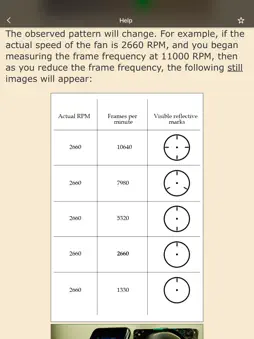
When the frame rate of a video matches the speed of a particular part, the effect is the same as using a strobe light. In the video, that part freezes. Since the frame rate of a video can be adjusted, this effect can be used to determine the rotational speed of a part. The smartphone must support slow-motion video recording (filming at a high frame rate). This is the case for all smartphones starting with iPhone 5S. The range is as follows: • 0.5—240 Hz (30—14400 RPM), for all phones from iPhone 6 onward • 0.5—120 Hz (30—7200 RPM), for iPhone 5S THE HERTZ (Hz) VALUE IS MORE ACCURATE THAN THE REVOLUTIONS PER MINUTE (RPM) VALUE, SINCE REVOLUTIONS PER MINUTE ARE CALCULATED FROM HERTZ AND ROUNDING IS DONE. To get a clear image, good lighting is important. The clarity of the image is controlled by the exposure of the video (exposure time and light sensitivity (ISO)). If the exposure time is reduced, the image will increase in clarity, but brightness will lower. To increase the brightness, you need to raise the camera's light sensitivity (ISO), but then the amount of noise increases. You also need to manually adjust the focus of the camera. The app can record video. The video format depends on the selected format in the app settings. If your iPhone supports 4K video format (3840x2160), then you can record 4K video at the frame rate supported by your iPhone. Text with important information is added to the frames of the recorded video: the selected frame rate, exposure duration, ISO, time stamp, time difference between the current and previous frames (Tcurr. − Tprev.), the sequence number of the frame in the recorded video. If you want any other information to be added, then let me know. You can choose to add only part of this information, and you can choose a different text color. You also have the option of not adding any information. You can change the information that is added and the color of the text while recording a video. At high frame rates, frames that do not have time to be processed may be discarded. This does not affect subsequent frames and can be controlled using the time difference between the current frame and the previous frame (Tcurr. − Tprev.). Dropping frames affects the video frame rate displayed in the "Photos" app. But the time interval between frames that were taken one after another and were not discarded will correspond to the selected frame rate. Frames may be dropped even when shooting slow motion video using the "Camera" app. You can check this by looking at the frame rate for slow motion video in the "Photos" app. Video containing the app's interface can be captured using the iOS "Screen Recording" function. The app can take a photo with the measurement result, date, and time written on the photo. The exposure time and ISO settings will be saved in the photo's metadata. To take a photo that shows the app interface, tap the "Pause" button and take a screenshot. It is possible to choose a video format that has the best quality, but has a significantly lower maximum frame rate. The difference between the formats is clearly visible only when using the digital zoom. Also, when using a format with better quality, the Rolling Shutter effect is stronger. Therefore, the best quality format can be used at speeds less than about 2000 rpm. You can turn on hints for easier observation of changes in rotation speed. Hints show how to change the frame rate (decrease or increase) depending on the direction of rotation of the mark. The hints are selected manually, but then you do not need to remember this information. The hints are relevant for frequencies close to the rotation frequency. If the direction of rotation of the impeller is known, hints can be selected in advance. The arrow showing the direction of rotation of the impeller must correspond to the "+" button. The video tachometer measures the rotational speed in exactly the same way a stroboscopic tachometer would.
What's New
Version 2.1.10 2026-08-22
• The phase shift of a moving object in an image when the image is made still. Touch and hold. Technical Analysis
Package Overview Basic metadata
Bundle ID
com.usefulmobileapps.video-tachometer Current Version 2.1.10
Minimum iOS 15.6
Package Size App Store Size
Package Metadata 3 / 27 version records
Detailed binary, privacy manifest, framework, and Info.plist results have not been indexed for this package yet. The verified App Store and archive metadata above remains available.
Developer Information
Known Version Records
3 version records with stored package metadata • 27 known version records
Stored metadata does not guarantee a package is currently available to download.
| Details | Version / IDs | Version date | Action |
|---|---|---|---|
 5.46 MB | v2.1.10 App Store ID: 887889540Build: 2.1.10 | 2026-08-22 21:03:57 | Get Version |
| Not archived | App Store ID: 884535320 | Unknown | Request Version |
| 3.74 MB | v2.1.5 App Store ID: 882483469Build: 27 | 2026-02-15 10:03:42 | Get Version |
 3.74 MB | v2.1.4 App Store ID: 879684141Build: 26 | 2025-11-11 19:18:40 | Get Version |
| Not archived | App Store ID: 879422867 | Unknown | Request Version |
| Not archived | App Store ID: 874686555 | Unknown | Request Version |
| Not archived | App Store ID: 870083907 | Unknown | Request Version |
| Not archived | App Store ID: 866380874 | Unknown | Request Version |
| Not archived | App Store ID: 863263149 | Unknown | Request Version |
| Not archived | App Store ID: 859833278 | Unknown | Request Version |
| Not archived | App Store ID: 859276754 | Unknown | Request Version |
| Not archived | App Store ID: 856220710 | Unknown | Request Version |
| Not archived | App Store ID: 854635694 | Unknown | Request Version |
| Not archived | App Store ID: 854159631 | Unknown | Request Version |
| Not archived | App Store ID: 850846650 | Unknown | Request Version |
| Not archived | App Store ID: 848349810 | Unknown | Request Version |
| Not archived | App Store ID: 847521259 | Unknown | Request Version |
| Not archived | App Store ID: 842335886 | Unknown | Request Version |
| Not archived | App Store ID: 842133324 | Unknown | Request Version |
| Not archived | App Store ID: 840249258 | Unknown | Request Version |
| Not archived | App Store ID: 839413740 | Unknown | Request Version |
| Not archived | App Store ID: 838448650 | Unknown | Request Version |
| Not archived | App Store ID: 838072308 | Unknown | Request Version |
| Not archived | App Store ID: 837729334 | Unknown | Request Version |
| Not archived | App Store ID: 837574765 | Unknown | Request Version |
| Not archived | App Store ID: 837284766 | Unknown | Request Version |
| Not archived | App Store ID: 834115043 | Unknown | Request Version |