
Preview



Description
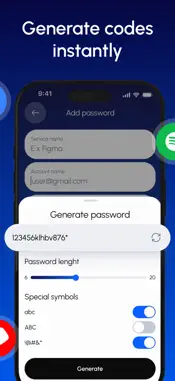
Secure your online accounts with Authenticator: MFA Auth & TOTP, a fast and reliable app for generating one-time passwords (OTPs) and enabling multi-factor authentication (MFA). Authenticator helps protect your accounts by adding an extra layer of security beyond passwords. It supports time-based one-time passwords (TOTP) used by thousands of popular services, including social media, email, cloud platforms, and more. Key Features * Generate secure TOTP codes for MFA and 2FA * Works with major platforms and services * Quick setup using QR code scanning * Offline code generation * Clean, simple, and easy-to-use interface * Designed with privacy and security in mind Why Use Authenticator Passwords alone are no longer enough. Authenticator provides an additional verification step that helps keep your personal data safe from unauthorized access. Take control of your account security with Authenticator: MFA Auth & TOTP — simple, secure, and dependable. Subscription Information: - Payment. Charges apply to your iTunes Account at purchase confirmation. - Auto-Renewal. Subscriptions renew automatically unless canceled at least 24 hours before the current period ends. - Renewal Charges. Your account will be charged for renewal within 24 hours prior to the end of the current period, based on the selected plan. - Manage Your Subscription. Go to your Account Settings after purchase to handle auto-renewal and other preferences. Privacy Policy: https://telegra.ph/Privacy-Policy--2FA-Authenticator-12-16 Terms Of Use: https://telegra.ph/Terms-of-Use--2FA-Authenticator-12-16
What's New
Version 1.0.2 2026-03-06
Bug fixes Technical Analysis
Package Overview Basic metadata
Bundle ID
com.otp.secure.password.gen Current Version 1.0.2
Minimum iOS 16.0
Package Size App Store Size
Package Metadata 0 / 3 version records
Detailed binary, privacy manifest, framework, and Info.plist results have not been indexed for this package yet. The verified App Store and archive metadata above remains available.
Known Version Records
0 version records with stored package metadata • 3 known version records
Stored metadata does not guarantee a package is currently available to download.
| Details | Version / IDs | Version date | Action |
|---|---|---|---|
| Not archived | App Store ID: 883055402 | Unknown | Request Version |
| Not archived | App Store ID: 880968962 | Unknown | Request Version |
| Not archived | App Store ID: 880731007 | Unknown | Request Version |