
Preview



Description
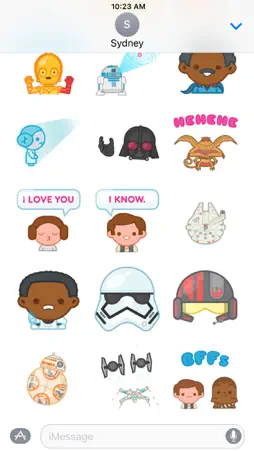
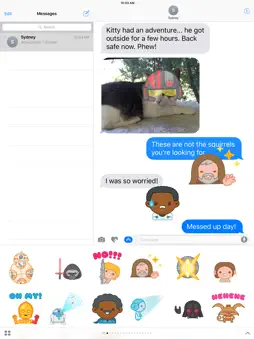
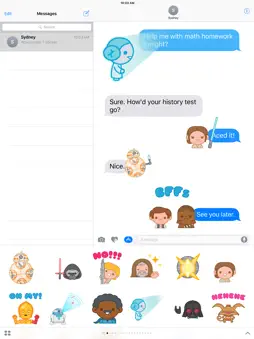
Awaken your iMessages with this exclusive animated Star Wars sticker pack! Express yourself with iconic Star Wars imagery that you can place anywhere in your iMessages. Layer Rebel pilot or stormtrooper helmets over your photos. • SEND dynamic and animated stickers in chat • PLACE stickers anywhere on your iMessages • CUSTOMIZE your photos with stickers in chat • LAYER stickers over each other, in chat, and on photos • SCALE & ROTATE stickers Stickers Include: 1. BB-8 -- thumbs up/lighter 2. Kylo Ren – slashing lightsaber 3. Luke Skywalker – “No!” 4. Obi-Wan Kenobi – Jedi mind trick 5. Death Star -- explosion 6. Rey -- powerful 7. C-3PO – “Oh my!” 8. R2-D2 – getting directions 9. Lando Calrissian -- wink 10. Princess Leia -- holographic message 11. Darth Vader – Force choke 12. Salacious Crumb -- LOL 13. Princess Leia – “I love you.” 14. Han Solo – “I know.” 15. Millennium Falcon – on my way 16. Finn – stressed 17. Stormtrooper helmet (prop) 18. Rebel pilot helmet (prop) 19. BB-8 -- sad 20. X-wing/TIE fighter -- battle 21. Han & Chewie -- BFFs HOW TO FIND YOUR STICKERS: • Access iMessage apps— Enter a contact to message, then tap the App Store icon beside the chat field to see your most recently used iMessage app. • Find new stickers—First tap the App Store icon, then tap the 4-ovals icon in the lower left to bring up the app drawer. Then, tap the + icon to access the Store. • If you are not seeing Stickers that you have purchased, you may need to change your settings. Tap the App Store icon, then tap the 4-ovals icon in the lower left to bring up the app drawer. Then click the + symbol to open the store, and select the Manage button top right. Make sure the app you are looking for is turned on. • Use stickers in chat—Tap to send, or touch and hold to put stickers on top of a bubble, other stickers, photos, and videos. • Apple Watch (iOS 3), iPhone & iPad users (iOS 10)—Transform your chat with animated stickers! Earlier iOS versions and other platforms will see static stickers in chat. Privacy Policy - https://disneyprivacycenter.com Terms of Use - https://disneytermsofuse.com Your California Privacy Rights - https://privacy.thewaltdisneycompany.com/en/current-privacy-policy/your-california-privacy-rights/ Do Not Sell My Info - https://privacy.thewaltdisneycompany.com/en/dnsmi/
What's New
Version 1.0.4 2020-01-14
-Sticker optimizations Technical Analysis
Package Overview Basic metadata
Bundle ID
com.disney.stickers.starwars Current Version 1.0.4
Minimum iOS 10.0
Package Size App Store Size
Package Metadata 0 / 3 version records
Detailed binary, privacy manifest, framework, and Info.plist results have not been indexed for this package yet. The verified App Store and archive metadata above remains available.
Developer Information
Known Version Records
0 version records with stored package metadata • 3 known version records
Stored metadata does not guarantee a package is currently available to download.
| Details | Version / IDs | Version date | Action |
|---|---|---|---|
| Not archived | App Store ID: 831940642 | Unknown | Paid / Arcade |
| Not archived | App Store ID: 818938773 | Unknown | Paid / Arcade |
| Not archived | App Store ID: 818557234 | Unknown | Paid / Arcade |