
Preview


Description
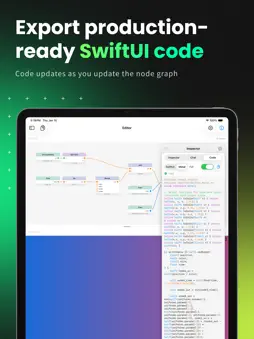
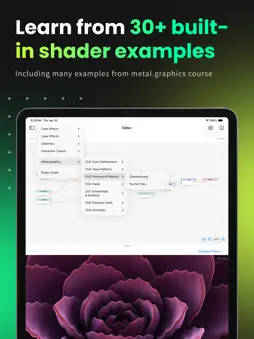
MetalGraph is a visual node-based editor for creating Metal shaders on iPad and Mac. Design stunning visual effects, learn GPU programming concepts, and export production-ready code—all without writing a single line of shader code. VISUAL SHADER CREATION • Drag-and-drop node editor with 50+ nodes • Real-time preview shows your shader instantly • Connect nodes to build complex effects • Animated preview with time-based effects LEARN BY DOING • 30+ built-in examples covering: - Color effects (gradients, plasma, voronoi) - Layer effects (glass, chromatic aberration) - Distortion (waves, ripples) - Interactive touch effects • Perfect companion for metal.graphics course PRODUCTION-READY EXPORT • Generate complete Metal Shading Language code • SwiftUI-ready .colorEffect and .layerEffect variants • Copy code directly into your Xcode project • Syntax-highlighted code display AI ASSISTANT • Ask questions about shader techniques • Get help building complex effects • Claude and OpenAI integration ADVANCED FEATURES • Create reusable custom nodes • For loops for iterative computations • Touch-responsive interactive effects • Multi-window support on iPad Whether you're learning Metal shaders, prototyping visual effects, or building production graphics—MetalGraph makes GPU programming accessible and fun. --- From the creator of metal.graphics. Terms of Use: https://metal.graphics/terms
What's New
Version 1.10.0 2026-04-25
- Drop a wire end in empty space to open a searchable picker that creates and connects a new node in one motion. - Drag a node from the sidebar onto the canva... Technical Analysis
Package Overview Basic metadata
Bundle ID
xyz.digitaltoys.MetalGraph Current Version 1.10.0
Minimum iOS 18.0
Package Size App Store Size
Package Metadata 1 / 3 version records
Detailed binary, privacy manifest, framework, and Info.plist results have not been indexed for this package yet. The verified App Store and archive metadata above remains available.
Developer Information
Known Version Records
1 version record with stored package metadata • 3 known version records
Stored metadata does not guarantee a package is currently available to download.
| Details | Version / IDs | Version date | Action |
|---|---|---|---|
 5.91 MB | v1.10.0 App Store ID: 884928691Build: 25 | 2026-04-25 15:59:28 | Get Version |
| Not archived | App Store ID: 882690280 | Unknown | Request Version |
| Not archived | App Store ID: 881296288 | Unknown | Request Version |