Preview


Description
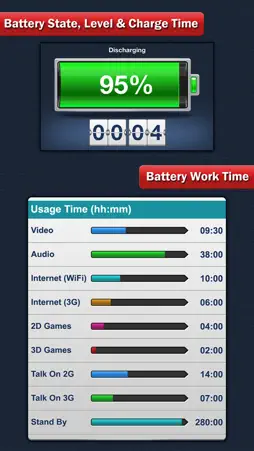
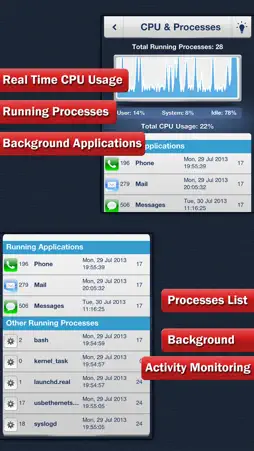
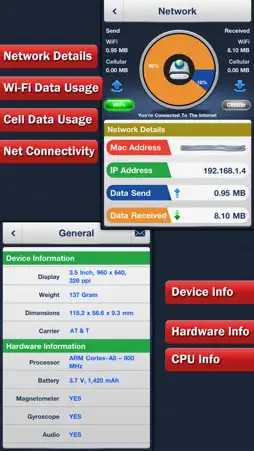
Would you like to control and monitor all activity of your iOS devices then System Status Monitor is the perfect app for you people. System Status Monitor is the ultimate app for activity monitoring, managing and optimizing your device performance. It provides significant system status information such as battery charge and activity log, memory manager, cpu and disk usage, network info with wifi or cellular identification, various hardware-related data etc. === Battery charge and activity log === • Battery level visual display • Battery status monitor (discharging, charging, fully charged) • Battery work time usage activity (video, audio, Wi-Fi and 3G internet, talk time, 2D and 3D games, stand by) • Tips on saving battery life === Memory manager and storage (disk) monitoring === • Runtime memory consumption • Graphical display of wired, active, inactive, and free memory • Total, used and free storage (disk) usage observation === CPU usage monitoring & processes list === • Runtime CPU usage & CPU load graph • CPU Usage with user usage, system usage and idle usage • All running processes and applications list with detailed information about each of them including process name, process start time and date, priority & PID • List of application services in background === Network connection details === • Network connectivity information • Wi-Fi data usage and 3G (cellular) data usage • MAC and IP address of the current connection • Network data send and receive details === General === • Device Information like system boot time, device model, operating system name and version etc • Detailed CPU information like model, CPU frequency, and others • Hardware features of the device including display resolution, pixel density, battery capacity, front and rear camera resolution and many more === Other features === • Full support for all iPhone and iPod Touch devices • Retina display, high resolution, pixel perfect graphics • Real time updates of the display every time the monitored parameters change • Share general information like device details, CPU information and hardware information via email • Easy to use interface and much more Checkout app video on YouTube: http://www.youtube.com/watch?v=CD_47ByeRdE
What's New
Version 3.0 2016-12-07
This app has been updated by Apple to display the Apple Watch app icon. - Added support for iOS 10. - Minor bug fixes. Technical Analysis
Package Overview Basic metadata
Bundle ID
com.digifungames.syspro Current Version 3.0
Minimum iOS 7.0
Package Size Latest Recorded Package Size
Package Metadata 1 / 1 version records
4.2 / 5.0 (120 ratings)
Detailed binary, privacy manifest, framework, and Info.plist results have not been indexed for this package yet. The verified App Store and archive metadata above remains available.
Developer Information
Known Version Records
1 version record with stored package metadata
Stored metadata does not guarantee a package is currently available to download.
| Details | Version / IDs | Version date | Action |
|---|---|---|---|
 10.06 MB | v3.0 App Store ID: 841438001Build: 4.0 | 2021-04-15 16:10:46 | Get Version |