
Preview



Description
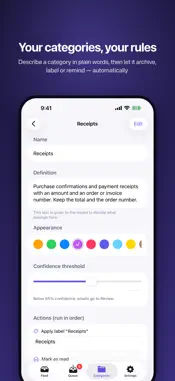
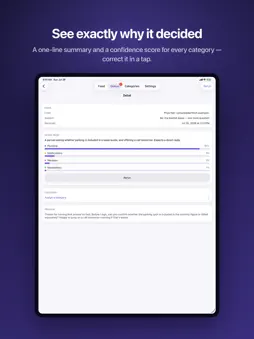
Your inbox, sorted into categories you write in plain English — by a model that runs entirely on your iPhone. Huginn connects to your Gmail, walks your unread mail newest to oldest, and files each message into a category you defined. Not "Promotions" and "Social" — categories like "Needs a reply this week" or "Receipts for the accountant", described in your own words. Nothing about your mail is uploaded anywhere, because the model reading it is running on your device. YOUR CATEGORIES, YOUR WORDS A category is a name plus a sentence or two saying what belongs in it. There are no filters to build, no rules to chain, no regular expressions. Write what you mean and Huginn sorts to it. Start from the three it seeds for you — Notifications, Newsletters, Personal — and change them into whatever your inbox actually is. IT LEARNS FROM YOUR CORRECTIONS Every time you move an email to the right category, Huginn remembers three things: the shape of that kind of message, how you've treated that sender before, and the decision itself as an example for next time. The more you correct it, the more mail it files instantly, without waking the model at all. And when you'd rather it didn't guess at all, pin the sender. Tap a name and every email from that address goes straight to the category you picked, no model involved. Pinned senders are listed and editable in Settings. READS LIKE MAIL SHOULD Open a message and you see it the way its sender built it — their own layout, their own images — not a wall of stripped-out text. The model still reads the plain text underneath; you get the actual email. DO SOMETHING ABOUT IT Each category carries an ordered list of actions that run when mail lands in it: - Archive, mark as read, star, or apply a Gmail label - Send a notification with the sender and subject - Pull structured fields out of the body — order numbers, dates, links - Save a link to read later, or add an item to Reminders - Fire a notification that deep-links straight into another app Actions are idempotent: an interrupted run resumes where it stopped and never archives or notifies twice. ON-DEVICE, ON PURPOSE Classification runs on Apple Foundation Models, or on Qwen3 downloaded and run locally through MLX — your choice, on any supported device. Your email is never sent to an inference service, ours or anyone else's. There is no analytics SDK, no tracking, no telemetry, and no account to create. The only servers Huginn talks to are Google's, to read the mail you asked it to read. Nor does it hoard your mail. Huginn mirrors your unread inbox rather than keeping a copy: once a message is read, archived, or dealt with elsewhere, its contents are dropped from the app. What stays behind is what it learned — sender, category, pattern — not the email. CAUTIOUS BY DEFAULT Out of the box Huginn only loads your inbox — read-only. You classify emails on demand, one at a time, and see exactly how confident the model was in each category before you accept it. When you trust it, turn on automatic classification and let the actions run themselves. That order is deliberate: nothing touches your mailbox until you say so. By default it only touches unread mail still sitting in your inbox — archived messages, and anything living under a label, are left alone. WHAT YOU NEED An iPhone on iOS 26. You can try the whole app on sample mail first, without connecting anything — tap Try the demo on the opening screen. For your own mail you'll need a Gmail account; Huginn requests a single Gmail permission, enough to read your mail and change its labels, and nothing more. On devices without Apple Intelligence, choose the Qwen3 backend in Settings and download the weights once. Privacy Policy: https://didierfuentes.com/projects/huginn2/privacy Terms of Use: https://didierfuentes.com/projects/huginn2/terms
Technical Analysis
Package Overview Basic metadata
Bundle ID
com.didierfuentes.huginn2 Current Version 1.0
Minimum iOS 26.2
Package Size App Store Size
Package Metadata 0 / 0 version records
Detailed binary, privacy manifest, framework, and Info.plist results have not been indexed for this package yet. The verified App Store and archive metadata above remains available.
Developer Information
Known Version Records
0 version records with stored package metadata
Stored metadata does not guarantee a package is currently available to download.
| Details | Version / IDs | Version date | Action |
|---|