Preview




Description
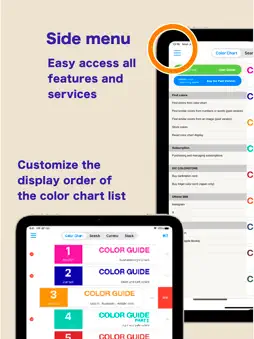
This is a digital color library of the DIC Color Guide, a color sample book with the top market share in Japan. Please use the Guide as a color communication tool that allows you to select, stock, communicate, and share your favorite colors from a selection of 2,553 colors. This app has been provided free of charge since 2011 and has proved very popular. [Key Features] (Some features require a subscription.) - You can check the ink blending ratio to reproduce the colors of the DIC Color Guide in print. - You can use a pre-taken photographic image to call up a similar color from the Color Guide. (Subscription) - You can check the visual texture of DIC Color Guide colors printed on the substrate you wish to use (various types of paper, metal, and film). - The color library “Traditional Colors Series (Japan, France, China)” allows you to browse all the color names from these countries, and their origins. - Selected colors can be stocked together and text notes can be added. - Color swatch data from Adobe's Illustrator and Photoshop graphic software, RGB values, CMYK values, and other data can be sent by e-mail. -Calibration cards* can be used to convert colors under various light sources, such as sunlight, indoor fluorescent light, LED, etc., to pseudo colors that are the same as when the image is taken under a standard light source (D50/D65). This allows for the same color reproduction as when shooting under standard light sources without concern for the light source at the time of shooting. (Subscription) *In rare cases, jaggies or moiré may appear after calibration is performed. *Calibration cards must be purchased separately online from the DIC Graphics store (DIC Color Store). We will ship about 2 weeks after your order is placed. Precautions for using the calibration card ・To obtain good search results, you will need a mobile device that supports the calibration card, a bright environment, and a clean camera lens. ・Please take pictures in a well-lit place (office: approx. 700 lux; 10 am on a sunny day: approx. 65,000 lux). When photographing the calibration card, make sure that light does not reflect or cast shadows on the card surface. The calibration function may not work properly. ・When searching from DIC Color Guide images, search results may differ depending on factors such as the age of the Color Guide, its condition, and color changes. ・Calibration cards are valid for one year. Due to inventory and shipping issues, the calibration card may be valid for more than one year at the time of delivery. ・The expiration date of the calibration card is displayed on the Subscription Management Screen of the Digital Color Guide app. [Please note] If a film, glass, or other material is attached to the display surface of the device, the color may be affected by the color of the material, resulting in a discoloration of the displayed color. We recommend having no film, glass, etc. on the surface of the device. When viewing the screen, please set the brightness to the maximum brightness of each device. [Disclaimer] We make doubly sure that all information and values are correct, but give you no guarantee of those. Please note that all information and values are for reference only. We will never make restitution, if using this application may cause any damage or trouble.
What's New
Version 6.3.2 2026-10-16
Updated the banner design for the JAFCA trend colors Technical Analysis
Package Overview Basic metadata
Bundle ID
jp.co.dic-graphics.digitalcolorguide Current Version 6.3.2
Minimum iOS 16.0
Package Size App Store Size
Package Metadata 1 / 28 version records
Detailed binary, privacy manifest, framework, and Info.plist results have not been indexed for this package yet. The verified App Store and archive metadata above remains available.
Developer Information
Known Version Records
1 version record with stored package metadata • 28 known version records
Stored metadata does not guarantee a package is currently available to download.
| Details | Version / IDs | Version date | Action |
|---|---|---|---|
| 98.66 MB | v6.3.0 App Store ID: 880295647Build: 6.3.0 | 2026-09-08 01:28:22 | Get Version |
| Not archived | App Store ID: 877430323 | Unknown | Request Version |
| Not archived | App Store ID: 876363025 | Unknown | Request Version |
| Not archived | App Store ID: 866992395 | Unknown | Request Version |
| Not archived | App Store ID: 866985735 | Unknown | Request Version |
| Not archived | App Store ID: 865491568 | Unknown | Request Version |
| Not archived | App Store ID: 864038414 | Unknown | Request Version |
| Not archived | App Store ID: 861387871 | Unknown | Request Version |
| Not archived | App Store ID: 861260832 | Unknown | Request Version |
| Not archived | App Store ID: 859065700 | Unknown | Request Version |
| Not archived | App Store ID: 858991927 | Unknown | Request Version |
| Not archived | App Store ID: 858449508 | Unknown | Request Version |
| Not archived | App Store ID: 855667011 | Unknown | Request Version |
| Not archived | App Store ID: 854434269 | Unknown | Request Version |
| Not archived | App Store ID: 841391167 | Unknown | Request Version |
| Not archived | App Store ID: 817470733 | Unknown | Request Version |
| Not archived | App Store ID: 814239764 | Unknown | Request Version |
| Not archived | App Store ID: 568612903 | Unknown | Request Version |
| Not archived | App Store ID: 471532637 | Unknown | Request Version |
| Not archived | App Store ID: 343423114 | Unknown | Request Version |
| Not archived | App Store ID: 9967293 | Unknown | Request Version |
| Not archived | App Store ID: 4324566 | Unknown | Request Version |
| Not archived | App Store ID: 3829873 | Unknown | Request Version |
| Not archived | App Store ID: 3400401 | Unknown | Request Version |
| Not archived | App Store ID: 3313693 | Unknown | Request Version |
| Not archived | App Store ID: 3302433 | Unknown | Request Version |
| Not archived | App Store ID: 3223108 | Unknown | Request Version |
| Not archived | App Store ID: 3168979 | Unknown | Request Version |