
Preview




Description
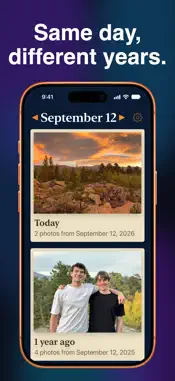
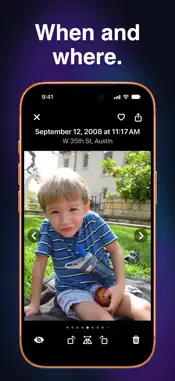
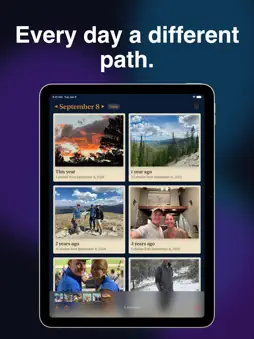
Same season, same month, same day. Different years. Children grow up, everyone grows older, some of the faces and places remain the same, some come and go. Sit back and take a trip through the years. Every day a different path. SCROLL THROUGH THE YEARS There's a card for every year you have photos from on this day. Sometimes it's only one, other times lots more. Tap the card to dive into this day in that year. REVISIT THAT DAY Everything from today's date in the year you've chosen. Panoramas stay wide and portraits stay tall, so you can tell them apart. Today has a card too, when you've taken photos today, so the first day of school sits right next to the same day ten years ago. Tap one photo, or select a group to share or delete. LOOK CLOSER Tap a photo to see its details, including where and when it was taken. Tap again to see it fullscreen. Swipe to the next one, or pinch to zoom in. Favorite it, rotate or flip it, share it, or delete it right there. Your changes show up in Photos. CONNECT THROUGH THE PAST Share one photo, a few from the same day, or a then-and-now set from different years, on Facebook, in email, with Messages, on Instagram, however and with whomever you want to share your memories. Shared photos come with how many years ago it was, and where, if the photo has a location. Facebook, Instagram, and Threads don't accept a caption, so the app copies it for you to paste into your post. They will be delighted. RIGHT ON YOUR HOME SCREEN You don't even have to remember to open the app. The widget shows one "on this day" photo, updated every day. Tap it and that photo opens in the app. It comes in small, medium, and large, plus an extra-large size on iPad and, with iOS 27, on iPhone; the two bigger ones show every year at once. It works in a Smart Stack too. THE DETAILS • Faces first: the photo that leads a year is one with faces when there is one, then pets, then scenery, found with Apple's Vision framework on your phone, and the crop keeps the faces in view. A photo you've hearted in Photos still comes first of all • Screenshots optional: filter out screenshots and photo bursts, or keep them in • Light or dark mode: follow the system, or pick one • iPhone and iPad: one column on a phone, up to three on an iPad • Pull to refresh: just downloaded some photos? Pull down to refresh • Limited access works: if you only give it access to some of your photos, it works with those and says so. Changing the selection is one tap away YOUR PHOTOS NEVER LEAVE YOUR PHONE On This Day reads your photo library and that's it. The face and scene detection that picks each year's photo is Apple's Vision framework, and the face grouping on iOS 27 is Apple's Media Intelligence framework; both run on your phone, and no one is named. There's no server, no account, and no tracking. The widget keeps a few small thumbnails on your phone, and they blur on the Lock Screen the same way Photos does. Totally private. How is this different from Memories in Photos? Memories picks what to show you and when. On This Day doesn't pick. Every day it shows every year you have photos from that date, and the widget does the same thing on your Home Screen. Free, with no ads and no in-app purchases. Requires iOS or iPadOS 18 or later. Privacy Policy: https://dgrlabs.co/privacy.html
What's New
Version 2.4.2 2026-11-02
• Cards now show the date the photos were taken instead of how long ago, and name holidays like Halloween. • Fixed a bug where sharing a card could open a blank...• Cards now show the date the photos were taken instead of how long ago, and name holidays like Halloween. • Fixed a bug where sharing a card could open a blank sheet. Technical Analysis
Package Overview Basic metadata
Bundle ID
co.dgrlabs.OnThisDay Current Version 2.4.2
Minimum iOS 18.0
Package Size App Store Size
Package Metadata 0 / 0 version records
Detailed binary, privacy manifest, framework, and Info.plist results have not been indexed for this package yet. The verified App Store and archive metadata above remains available.
Developer Information
Known Version Records
0 version records with stored package metadata
Stored metadata does not guarantee a package is currently available to download.
| Details | Version / IDs | Version date | Action |
|---|