
Preview




Description
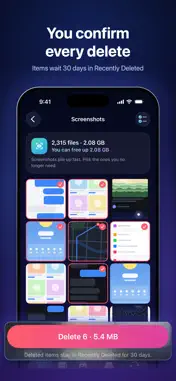
See what fills your phone, clear what you don't need, and shrink heavy videos without losing your memories. PHONE STORAGE (NEW) • One ring shows how full your phone is: photos and videos, everything else, and space left • "You can free up" is an estimate of the space you could get back, including what compressing heavy videos would save • Heavy videos: compress them instead of deleting them. The date, place, favorites and albums stay, and the original is replaced only after you confirm • Duplicates: exact copies of the same photo (identical files). The oldest copy stays; the others are offered for deletion • Similar shots: photos taken seconds apart. The largest shot of each series stays by default; check the rest before you delete • Similar photos: pictures taken close together that look alike. The comparison can be wrong, so nothing is selected for you; check before you delete • Screenshots and screen recordings, each in its own list • Live Photos: see how many you have and how much room they take • The check reads file sizes, dates and dimensions and compares small previews of photos and the files of possible copies, all on your phone. Nothing is uploaded SAFE BY DESIGN • iOS asks you to confirm every deletion • Deleted items stay in Recently Deleted for 30 days, so you can change your mind. The space comes back once Recently Deleted is emptied, or after 30 days • Allowed access to selected photos only? The check covers just those photos, and the rest of the app works as usual VIDEO COMPRESSOR • Reduce video size for real limits: email (under 25 MB), messaging apps, or your own target in MB • Squeeze: pinch a video and watch its size drop • Trim before compressing, rotate 90° with a tap, or save a silent copy • Quality and resolution control; HEVC and batch mode (Pro) • Open videos from Photos or the Files app PHOTO COMPRESSOR • Make every photo fit under 100 KB, 500 KB or any limit you set • Three quality levels and a maximum size such as 1080 px or your own • Batch up to 100 photos at once (Pro) • Side-by-side 100% zoom compare, so you can check the quality yourself FREE UP SPACE • Finds the biggest videos in your library and replaces them with smaller copies after you confirm. Date, location, favorites and albums stay CONVERTER & PRIVACY TOOLS • HEIC to JPG or PNG, MOV or HEVC to MP4 (H.264) • Video to GIF, extract audio as M4A, or all your photos in one PDF (Pro) • Remove location and metadata (EXIF/GPS) before sharing PRIVATE • Everything runs on your phone; your photos and videos never leave it • No account, no ads, no analytics. The app collects no data FREE & PRO Free: the Phone Storage check, 10 deletions and 1 compression a day, exact-size photos, trimming, converting to JPEG, HEIC, PNG, MP4 and MOV, and metadata removal. Pro: no daily limits on deletions or compressions, batch mode, HEVC, and GIF, PDF and audio conversion. Bought the paid version earlier? Pro is already yours. Note: compression is lossy by design, and the sizes shown before compressing or deleting are estimates; already-optimized files may shrink less. Terms of Use: https://ios.service-lab.site/videoshrink/terms.html Privacy Policy: https://ios.service-lab.site/videoshrink/privacy.html
What's New
Version 4.0 2026-11-07
New: Similar photos. Phone Storage now also finds pictures taken close together that look alike. It compares small previews on your phone, uploads nothing and s...New: Similar photos. Phone Storage now also finds pictures taken close together that look alike. It compares small previews on your phone, uploads nothing and selects nothing for you. Duplicates: now only photos whose files are truly identical are listed. Free limits are now 1 compression and 10 deletions a day (they were 3 and 20). Pro removes both limits. Technical Analysis
Package Overview Basic metadata
Bundle ID
site.service-lab.videoshrink Current Version 4.0
Minimum iOS 16.0
Package Size App Store Size
Package Metadata 0 / 0 version records
Detailed binary, privacy manifest, framework, and Info.plist results have not been indexed for this package yet. The verified App Store and archive metadata above remains available.
Developer Information
Known Version Records
0 version records with stored package metadata
Stored metadata does not guarantee a package is currently available to download.
| Details | Version / IDs | Version date | Action |
|---|