
Preview


Description
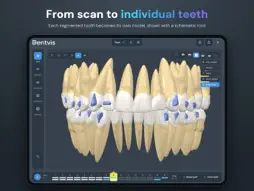
DentVIS is dental CAD software for qualified dental professionals. Import intraoral scans, segment teeth, prepare a Virtual Setup as a basis for the design of orthodontic and prosthetic appliances, and review the result in an interactive 3D view — on your iPad. FOR DENTAL PROFESSIONALS ONLY DentVIS is intended to be used exclusively by qualified dental professionals (dentists, orthodontists, dental technicians) trained in digital dental workflows. It is not intended for use by laypersons. WHAT YOU CAN DO • Import — load STL scans of the upper and lower jaw into a new case. • Segment — tap each tooth, then check and refine every tooth outline with your finger, a trackpad or Apple Pencil. • Virtual Setup — position and align individual teeth manually to prepare a digital working model. • Review — inspect occlusion, contacts and gaps in a smooth, precise 3D viewer; show the initial and final positions with schematic roots. • Prepare for production — orient the model, trim the base, add pontics and place the models on the build plate of your 3D printer. • Export — save segmented models and Virtual Setups as STL or VIS files for the production of working models, with a PDF case report. • Notes — keep a note for the case and for individual steps. • Share — generate a secure, view-only web link with an interactive 3D visualization of a case, with your practice branding. • Sync — keep your cases in one place, synchronized securely across your macOS, Windows and iPad devices. • Languages — English, Czech, German, French, Spanish, Italian and Polish. MEDICAL DEVICE INFORMATION DentVIS is a Class I medical device pursuant to Regulation (EU) 2017/745 on medical devices (MDR), CE marked and registered in EUDAMED. Manufacturer: Dentmall s.r.o., Czech Republic. Intended purpose: CAD software for preparation of digital dental models for orthodontic and prosthetic appliance manufacturing. Not for diagnostic use. For professional use only. DentVIS does not provide any diagnostic, therapeutic or clinical recommendations. It is a passive CAD visualization and editing tool: every repositioning of teeth and every other editing of a model is performed manually by the user — the software does not automatically analyse tooth positions and does not propose tooth movements. Values show the position set in the model — not a measurement; they must not be used as a basis for clinical decisions. All clinical decisions are made exclusively by a qualified healthcare professional. The electronic Instructions for Use are an integral part of the device. Read them before first use and follow the warnings and precautions they contain. ACCOUNT AND LICENCE DentVIS is licensed to dental practices, clinics and dental laboratories. A DentVIS account provided by your organization is required to sign in; the app does not offer account registration. Viewing cases is free on any signed-in device. Editing requires a licence, which is administered by your organization. This app contains no purchases. REQUIREMENTS iPadOS 16.0 or later.
What's New
Version 3.0.7 2026-10-22
• Virtual Setup, Movement timing: set the steps in which each movement of a tooth takes place between two goals. By default a movement changes evenly over the w... Technical Analysis
Package Overview Basic metadata
Bundle ID
cz.dentmall.dentvis.ipad Current Version 3.0.7
Minimum iOS 16.0
Package Size App Store Size
Package Metadata 0 / 0 version records
Detailed binary, privacy manifest, framework, and Info.plist results have not been indexed for this package yet. The verified App Store and archive metadata above remains available.
Known Version Records
0 version records with stored package metadata
Stored metadata does not guarantee a package is currently available to download.
| Details | Version / IDs | Version date | Action |
|---|