
Preview






Description
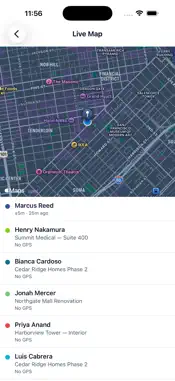
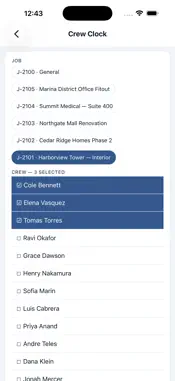
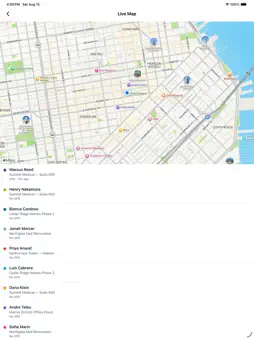
Klees is time tracking, scheduling, and job costing for the people who do the work — construction crews, janitorial teams, HVAC techs, roofers, landscapers, electricians, solar installers, and field-service operators across the United States. We built Klees because every existing time-tracking app shipped English-only. About thirty percent of US construction labor speaks Spanish at home, and the crews you ask to use software every day deserve to read their own screen. Klees ships English, Spanish, and Portuguese on every screen, push notification, email, and support reply, on day one. Foremen pick their language on the first launch. What's in the app · Clock in / clock out with GPS verification. Quick break and lunch buttons with paid / unpaid rules per company. · PinShot — a live-camera capture at clock-in with anti-spoof scoring. Catches photo-of-photo, screen replay, and 3D-mask attempts. Photos auto-delete in 60 days and employees can see every photo of themselves. · Crew Clock — the foreman batch-clocks a 12-person crew from one phone. Pick the job, pick the cost code, tap once. No kiosk. No iPad. Works at no-signal sites and syncs when LTE returns. · Live Map — every clocked-in worker plotted on a single Apple Maps view with last GPS fix, accuracy, battery, and which job they're on. Privacy-respecting delay keeps you compliant in CA, NY, and IL. · Daily logs, expense receipts with OCR, mileage tracking, and equipment check-in/out — all from the field. · Schedule, Time Off, and Reports — view your shifts and approve teammate timesheets from your phone. For managers and owners · Approve timesheets, edit clock-ins and break records, broadcast schedule changes, and run the entire crew from the truck. · Invitations admin: send pending invites, resend, revoke, share invite link. · Multi-state payroll consolidation. Certified payroll WH-347 generation. QuickBooks, Gusto, ADP, Paychex, Xero, Sage Intacct, and Rippling sync. For employees · Three taps to clock in. The keyboard never gets in the way. Notifications when your week is approved. · The PinShot photo is yours — every capture is visible to you and disputable in two taps. · Background location only runs while you're clocked in, then stops. Privacy is in the design, not the marketing. About your account Klees is used by companies for their crews. Your employer sets up Klees and invites you; this app is for signing in and tracking your work. There is nothing to buy in the app. Built in Miami, Florida by demelos LLC. We answer real email at [email protected].
What's New
Version 1.3.0 2026-11-13
- Clocking in tells you if your company ends shifts when your location stops, and how long you have. - On iPhone, if you swipe Klees away during a shift, you ge...- Clocking in tells you if your company ends shifts when your location stops, and how long you have. - On iPhone, if you swipe Klees away during a shift, you get a notification and time to reopen it before your shift ends. - PinShot works again for clock-in and clock-out photos, and any problem now says what went wrong. - Clock-out photos are taken with the camera. - Klees tells you when a new version is available. - Location is requested only after you sign in, and signing out stops tracking and reminders. - Fixes and improvements. Technical Analysis
Package Overview Basic metadata
Bundle ID
app.klees.mobile Current Version 1.3.0
Minimum iOS 16.4
Package Size App Store Size
Package Metadata 0 / 2 version records
Detailed binary, privacy manifest, framework, and Info.plist results have not been indexed for this package yet. The verified App Store and archive metadata above remains available.
Developer Information
Known Version Records
0 version records with stored package metadata • 2 known version records
Stored metadata does not guarantee a package is currently available to download.
| Details | Version / IDs | Version date | Action |
|---|---|---|---|
| Not archived | App Store ID: 887931801 | Unknown | Request Version |
| Not archived | App Store ID: 886356748 | Unknown | Request Version |