
Preview






Description
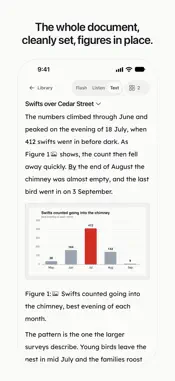
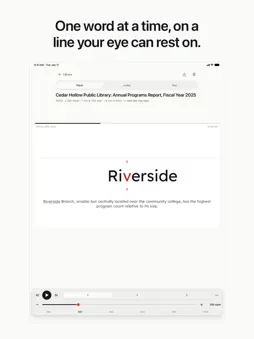
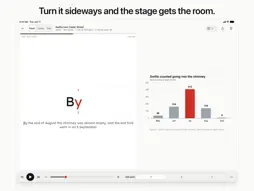
Tempo takes a document apart and gives it back to you at a pace you set. Open a PDF, a Word file, an EPUB, a PowerPoint deck, a web page, or a photo of a printed page. Tempo lifts the text out — the real text, not the headers, page numbers and footnotes — and keeps the charts and pictures that went with it. Then it reads to you in one of three ways. FLASH One word at a time, in the middle of the screen, with the letter your eye fixes on held on a fixed line so your eye never has to hunt for it. Set the pace anywhere from 100 to 1,200 words a minute, or show two or three words at once. Sentences and paragraphs get a beat of silence, so the rhythm of the writing survives the speed. LISTEN The same document spoken aloud, from a quarter speed to four times. It keeps playing with the screen off, shows on the lock screen, and remembers where you were. A sleep timer stops it after the minutes you pick. TEMPO NEURAL VOICES Five natural English voices — Heart, Bella, Nicole, Michael and Fenrir — made on your device, with no internet needed. They install with the app, and Heart is the voice you start with. At a speed too fast for a voice, or in a document that isn't English, your Apple voice takes over, so Listen never stops. Tempo Neural needs an iPhone or iPad with 6 GB of memory or more. TEXT The whole document, cleanly set at a comfortable measure, with its figures where they were. Tap any sentence to start reading from there. Words the app was unsure of — from a photo, or a bad scan — are marked, so you know what to check. FIGURES Charts, diagrams, photographs and slides stay with the words that explain them. Tempo finds them in PDFs, Word files, EPUBs and PowerPoint decks. In Text they sit in place. In Flash, turn on Glance and a figure appears under the word as the sentence reaches it. In Listen, the current figure sits above the player and on the lock screen. Open Figures to look through them all, pinch to zoom, and tap Read from here to pick the text up again. TURN IT SIDEWAYS On iPhone and iPad, landscape gives the reading its room: a larger Flash stage, the figure beside the word, and controls that hide and come back with a tap. WHAT IT READS PDF, Word (.docx), PowerPoint (.pptx), EPUB, plain text, Markdown, web pages, and photographs of printed pages. Scanned PDFs are read with on-device text recognition, page by page, and the app tells you which pages it had to read that way. Share a file to Tempo from any app, or open one from Files. Your library stays on your device, and the gear on Home opens Settings, with everything in one place. YOUR DOCUMENTS STAY ON YOUR DEVICE Everything happens on the device: lifting the text out, finding the figures, recognising the photographs, the voices, all of it. Nothing is uploaded, and there is no account to make. The voices arrive with the app from the App Store. The only time Tempo reaches the network is when you ask it to read a web page, and then it fetches that page and nothing else. BUILT TO BE READABLE Lexend, Atkinson Hyperlegible and OpenDyslexic are all built in. Dynamic Type, VoiceOver and Reduce Motion are supported throughout. Light and dark, and a stage you can pin to either regardless of the rest. SUBSCRIPTION Importing and the library are free; reading needs Tempo Pro. Tempo Pro is an auto-renewing subscription, monthly at CA$3.99 per month or yearly at CA$24.99 per year. Payment is charged to your Apple Account at confirmation of purchase. It renews automatically unless you turn off auto-renew at least 24 hours before the end of the current period, and your account is charged for renewal within 24 hours of the end of the current period. You can manage your subscription and turn off auto-renew in your Apple Account settings after purchase. Terms of Use: https://www.apple.com/legal/internet-services/itunes/dev/stdeula/ Privacy Policy: https://tempo.ciav.ca/privacy/app Tempo by CIAV Group of Companies.
Technical Analysis
Package Overview Basic metadata
Bundle ID
ca.ciav.tempo Current Version 1.0
Minimum iOS 26.0
Package Size App Store Size
Package Metadata 0 / 0 version records
Detailed binary, privacy manifest, framework, and Info.plist results have not been indexed for this package yet. The verified App Store and archive metadata above remains available.
Developer Information
Known Version Records
0 version records with stored package metadata
Stored metadata does not guarantee a package is currently available to download.
| Details | Version / IDs | Version date | Action |
|---|