
Preview


Description
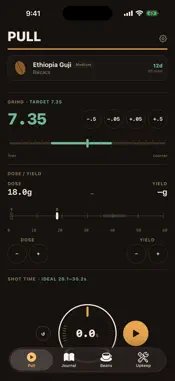
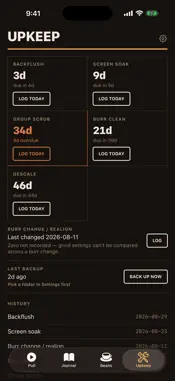
Chirp is a shot log for people dialling in espresso at home. You already know the method: pull a shot, taste it, move the grind. What is hard is remembering what you did three days ago, and noticing that the answer has been sitting in your own notes the whole time. THE SWEET SPOT, FROM YOUR OWN SHOTS Chirp watches for the gap. When you have a shot that tasted bitter at one grind setting and a shot that tasted sour at a coarser one, the setting you want is between them. Chirp finds that bracket, shows it as a band under the grind control, and tells you the number to try next. No formula, no model, no guessing at your beans. It is your coffee, your grinder and your palate — Chirp only keeps track. IT TELLS YOU WHEN NOT TO TRUST A SHOT A log that quietly averages bad data is worse than no log at all. • Channelled shots are excluded, and Chirp says so and counts them. A sour taste from a channelled puck is not a grind problem, and grinding finer makes it worse. • Change two things at once and the shot is flagged as confounded and kept out of the maths. You cannot learn anything from a shot where the dose and the basket both moved. • Adjust the grind without purging the chute and Chirp reminds you the first shot is still the old setting. It never blocks a save. A skipped log is worse than a flawed one. BUILT FOR SIX IN THE MORNING • A timer you start with your thumb, with the ideal window drawn on the dial from your own best shots. • Grind, dose and yield on drag controls sized for wet hands, with typing as the escape hatch. • Tabular figures everywhere, so nothing shifts under a running timer. • Dark by default, light if you want it. KEEPS TRACK OF THE MACHINE TOO Backflush, screen soak, group scrub, burr clean and descale, each with its own interval and a plain count of days since you last did it. Log a burr change and Chirp records the dial reading at the chirp, so grind settings from before the change can still be compared with settings from after it — which is where the app gets its name. YOUR DATA IS YOURS Chirp collects nothing, sends nothing and has no account. Every shot lives on your device. Back up whenever you like to a folder you choose — iCloud Drive, Google Drive, Dropbox or local storage — as dated files that are never overwritten. Nothing is uploaded anywhere else, ever. No subscription. No ads. No sign-up.
What's New
Version 1.1 2026-09-01
Edit a bean after you've added it — fix a name, or fill in a roast date you didn't have to hand at the time. Roast date now works on iPhone, so "days off roast"...Edit a bean after you've added it — fix a name, or fill in a roast date you didn't have to hand at the time. Roast date now works on iPhone, so "days off roast" is no longer blank. A SUGGESTION ROW ON JOURNAL Chirp now reads your last shot and names the one thing to change. It works from your very first shot, before there is any history to find a sweet spot in. It can also tell you to change the ratio rather than the grind, which is the right answer more often than it sounds: a sour shot pulled short does not want a finer grind, it wants more water. Grinding finer to chase it walks the setting somewhere it should never have gone. If the shot channelled, it says so and points at your distribution instead — neither the grind nor the yield is the problem there. WHEN A DIALLED SETTING HAS MOVED Beans age, and the setting that was right last week starts running bitter. Chirp used to keep recommending it anyway. Now it tells you the point has moved, and which way to go to find it again. Technical Analysis
Package Overview Basic metadata
Bundle ID
com.dandco.chirp Current Version 1.1
Minimum iOS 17.0
Package Size App Store Size
Package Metadata 0 / 0 version records
Detailed binary, privacy manifest, framework, and Info.plist results have not been indexed for this package yet. The verified App Store and archive metadata above remains available.
Known Version Records
0 version records with stored package metadata
Stored metadata does not guarantee a package is currently available to download.
| Details | Version / IDs | Version date | Action |
|---|