Preview


Description
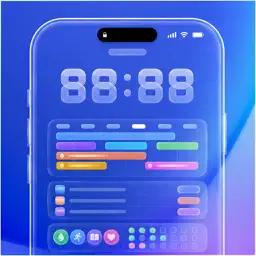
LockScreen Calendar: Dately brings your schedule, to-dos, and habits together in one simple planner app. Plan your day with a beautiful timeline calendar, crush your to-do list, and build lasting habits — all without switching between apps. LOCK SCREEN SCHEDULE WALLPAPER Turn your Lock Screen into a personal schedule board. Display today's events, to-dos, and habits as your Lock Screen wallpaper. Set your favorite photo as the background and freely customize font size, color, and layout. See your daily plan at a glance every time you pick up your iPhone. CALENDAR VIEWS FOR DAILY PLANNING View your schedule in Daily, Weekly, or Monthly calendar views. A rich timeline calendar shows every event at a glance, with smart overlap handling so nothing gets lost. Swipe between days or weeks effortlessly. TO-DO LIST THAT GETS DONE Create to-dos with deadlines, optional due times, and four priority levels. See what's urgent at a glance with color-coded priority indicators. Mark to-dos complete with a single tap and watch your progress grow. BUILD BETTER HABITS Track daily or weekly habits with flexible frequency settings. Choose between simple Yes/No check-ins or count-based goals (like "8 glasses of water"). Watch your streaks grow, visualize consistency with a GitHub-style heatmap, and review your weekly completion rate. WIDGETS & LIVE ACTIVITY Add beautiful home screen widgets to see today's schedule, upcoming to-dos, or active habits at a glance. Choose from multiple styles including clear and blur variants. Live Activity support keeps your planner visible on your Lock Screen and Dynamic Island. APPLE CALENDAR & REMINDERS Seamlessly integrate your existing Apple Calendar events and Reminders. Everything appears together in one unified planner with automatic duplicate detection. SMART NOTIFICATIONS Set reminders exactly when you need them — at the event time, 10 minutes, 30 minutes, 1 hour, or even a day before. Never miss a deadline or forget a habit check-in. CUSTOMIZE YOUR PLANNER Personalize each item with 12 vibrant color presets and SF Symbol icons. Add notes for extra context. The sleek dark-mode interface with glass-effect cards makes planning feel effortless. KEY FEATURES - All-in-one planner: schedule, to-dos, and habits in one app - Lock Screen Schedule Wallpaper: display your schedule as wallpaper - Three calendar views: daily, weekly, and monthly - Habit streaks and heatmap visualization - To-do priority levels with visual indicators - 11 home screen widgets with style variants - Live Activity on Lock Screen & Dynamic Island - Apple Calendar & Reminders integration - Smart duplicate detection - Customizable colors and icons - Flexible planner notification timing - SwiftData with iCloud sync • For more information, please see our Privacy Policy and Terms of Use. Terms of use: https://deeplyai.app/terms.html Privacy policy: https://deeplyai.app/privacy.html • Support & Contact Need help? Rate us! Got feedback? [email protected]
What's New
Version 1.1 2026-08-15
We’re excited to bring you this update with Performance improvements and minor bug fixes for a smoother experience. Thank you for using LockScreen Calendar: Dat... Technical Analysis
Package Overview Basic metadata
Bundle ID
com.deeplyai.Dately Current Version 1.1
Minimum iOS 18.6
Package Size App Store Size
Package Metadata 1 / 2 version records
Detailed binary, privacy manifest, framework, and Info.plist results have not been indexed for this package yet. The verified App Store and archive metadata above remains available.
Developer Information
Known Version Records
1 version record with stored package metadata • 2 known version records
Stored metadata does not guarantee a package is currently available to download.
| Details | Version / IDs | Version date | Action |
|---|---|---|---|
| 27.37 MB | v1.1 App Store ID: 889798150Build: 1.1 | 2026-08-15 20:29:50 | Get Version |
| Not archived | App Store ID: 886642200 | Unknown | Request Version |