Preview






Description
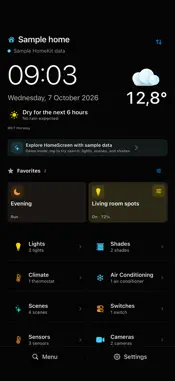
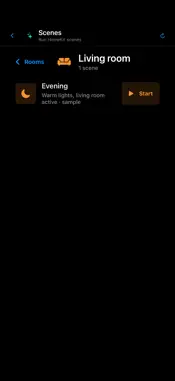
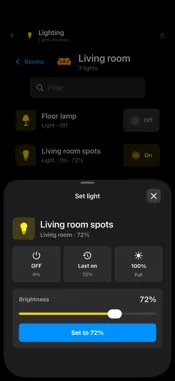
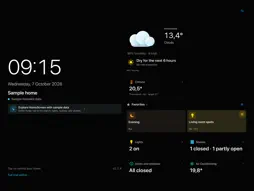
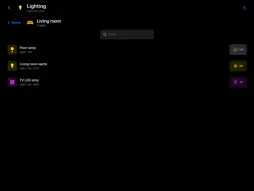
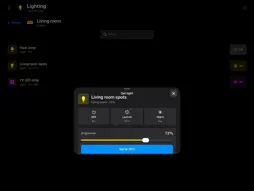
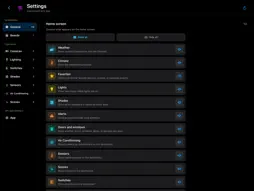
Your home at a glance. At home and on the go. HomeScreen for HomeKit turns your iPhone or iPad into a personal dashboard and a simple control panel for your home. On a wall-mounted iPad, on your iPhone or in CarPlay: see what matters and keep your favorite controls within reach. YOUR HOME AT A GLANCE See the time, full date, current weather and rain forecast alongside the status of your lights, doors, windows, shades and alerts. Check temperatures, humidity and climate devices, and keep favorite scenes and accessories on your dashboard. Create multiple dashboards for different places and situations. HomeScreen supports portrait and landscape on iPhone and iPad. ALSO IN CARPLAY Choose up to four separate CarPlay favorites for each home on your iPhone. Start scenes and control supported accessories from your car’s display, independently of your dashboard favorites. See which lights are on and turn them off directly. Browse open doors and windows, sensor readings and alerts, grouped by room. Hidden items stay out of view in CarPlay too. Set up your CarPlay favorites before driving, so you do not have to search on the road. CONTROL WHAT YOU NEED Find scenes and accessories by name or room, or reopen recently used items. Switch lights and switches, adjust brightness and set shades to the position you want with a slider. Set the temperature of supported thermostats and air conditioners directly in HomeScreen. Before a climate change, HomeScreen can warn you about HomeKit automations that may change your setting later. Your automations remain unchanged. View HomeKit cameras full screen, with optional audio and configurable PTZ buttons. Switch easily between your HomeKit homes. HOME SCREEN WIDGETS Control favorites or check home alerts without opening HomeScreen first. Choose a widget size that suits you and switch between homes in the favorites widget. MAKE IT YOURS Choose which rooms, scenes and accessories are visible. Reorder rooms, cameras and dashboard tiles, and customize names and room icons. Save dashboards and supported settings through iCloud. Choose separately on each device whether the screen stays active, dims or goes black, and whether the doorbell camera opens automatically when someone rings. ALERTS THAT HELP See which accessories need attention, such as a low battery, an unreachable device, an open door or window, smoke or a water leak. Components belonging to the same physical device are grouped where possible. Hide irrelevant alerts and restore them later. PRIVACY AND PURCHASE HomeScreen works with Apple HomeKit, requires no separate account and contains no ads. iCloud stores your HomeScreen setup; it does not back up your HomeKit home or automations. Try all features for 30 days, including CarPlay and widgets. Then unlock HomeScreen with a one-time purchase. No subscription and no automatic charge when the trial ends. HomeKit features require a configured home and permission to access Home data. Local weather uses your location with your permission. CarPlay requires a compatible car or receiver. Available controls, camera audio and PTZ depend on your accessories and what they expose through HomeKit.
What's New
Version 2.1.5 2026-10-12
• Improved the iPad dashboard layout to keep favorites and status buttons fully visible, including on smaller models. • Improved touch targets at the bottom of ... Technical Analysis
Package Overview Basic metadata
Bundle ID
com.dbruin.HomeScreen Current Version 2.1.5
Minimum iOS 17.0
Package Size App Store Size
Package Metadata 0 / 19 version records
Detailed binary, privacy manifest, framework, and Info.plist results have not been indexed for this package yet. The verified App Store and archive metadata above remains available.
Developer Information
Known Version Records
0 version records with stored package metadata • 19 known version records
Stored metadata does not guarantee a package is currently available to download.
| Details | Version / IDs | Version date | Action |
|---|---|---|---|
| Not archived | App Store ID: 889219969 | Unknown | Request Version |
| Not archived | App Store ID: 889055067 | Unknown | Request Version |
| Not archived | App Store ID: 888965764 | Unknown | Request Version |
| Not archived | App Store ID: 888943695 | Unknown | Request Version |
| Not archived | App Store ID: 888905888 | Unknown | Request Version |
| Not archived | App Store ID: 887991599 | Unknown | Request Version |
| Not archived | App Store ID: 887917801 | Unknown | Request Version |
| Not archived | App Store ID: 887725769 | Unknown | Request Version |
| Not archived | App Store ID: 887628544 | Unknown | Request Version |
| Not archived | App Store ID: 887595895 | Unknown | Request Version |
| Not archived | App Store ID: 887139162 | Unknown | Request Version |
| Not archived | App Store ID: 886612182 | Unknown | Request Version |
| Not archived | App Store ID: 886428038 | Unknown | Request Version |
| Not archived | App Store ID: 886342557 | Unknown | Request Version |
| Not archived | App Store ID: 886197390 | Unknown | Request Version |
| Not archived | App Store ID: 886153983 | Unknown | Request Version |
| Not archived | App Store ID: 886096863 | Unknown | Request Version |
| Not archived | App Store ID: 886058664 | Unknown | Request Version |
| Not archived | App Store ID: 886052576 | Unknown | Request Version |