
Preview





Description
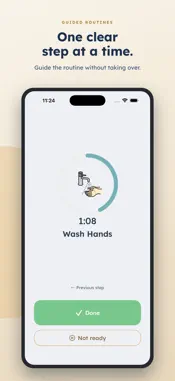
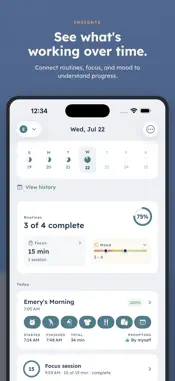
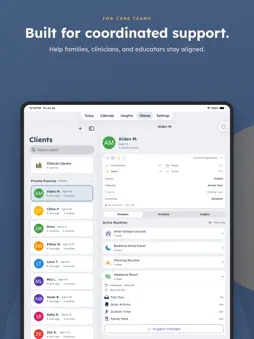
DaySteps is a visual schedule for every level of support, from one guided step at a time to a simple checklist. Build a routine once, then adjust the structure as needs change. Use it for mornings, homework, transitions, chores, bedtime, or any part of the day that keeps turning into another reminder. Parents create the structure. Kids see a clear next step, a visual timer when it helps, and calm completion feedback. Teens and adults can use the same tools to run their own day. ONE CLEAR STEP AT A TIME In Guided Mode, DaySteps shows one clear, finishable step. The full routine does not have to compete for attention, and the next step does not always have to come from another verbal reminder. When less support is needed, Checklist Mode keeps the full sequence visible. TIME YOU CAN SEE Add a gentle visual countdown to any step. When time runs out, there is no failure state or harsh alarm. The step simply stays ready to finish. SUPPORT THAT ADJUSTS Parents choose how much of the routine a child sees, which tools are available, and how independently the child moves through the day. Support can change as needs change, without rebuilding the routine. CALM BY DESIGN No points. No streaks. Nothing to lose on a hard day. DaySteps does not use child-facing badges, negative sounds, or red failure states. Progress is acknowledged in the moment without turning a hard day into something to make up. BUILT FOR CARE TEAMS, WITH PARENTS IN CONTROL Parents create routines and choose what to share. A connected clinician can view shared routine patterns and send a structured suggestion for a specific, parent-created routine. The parent approves or declines every suggestion before anything changes for the child. Educators can connect to run structured classroom sessions. FOR FAMILIES AND INDIVIDUALS * Parents: build routines, follow along, and see patterns over time * Kids: use PIN-protected Child Mode with only the tools a parent enables * Teens and adults: use the same calm structure for their own day * Clinicians: support families between appointments while parents stay in control DaySteps is grounded in published executive function research and designed for people with ADHD, autism, and other executive function differences. It is a support tool, not a treatment, diagnostic, or cure. PRIVATE BY DESIGN No ads. No selling personal data. Children do not need their own account, and nothing about a child is shared without explicit parent consent. FREE TO START Create unlimited routines and use the core DaySteps experience for free. DaySteps Family adds full calendar views, Insights history, templates, and calendar sync. DaySteps Practice adds tools for clinicians supporting multiple families, and connected client households receive Family access at no cost while connected. Subscriptions automatically renew unless canceled at least 24 hours before the end of the current period. Manage or cancel anytime in App Store settings. Terms of Use: https://daysteps.app/legal/terms/ Privacy Policy: https://daysteps.app/legal/privacy/ Calm days are built one step at a time.
What's New
Version 1.3.2 2026-10-22
Avatars are now created right on your device, so the avatar builder works even when you’re offline. Crash reports now leave out screen titles, so names you typ... Technical Analysis
Package Overview Basic metadata
Bundle ID
com.daysteps.app Current Version 1.3.2
Minimum iOS 17.0
Package Size App Store Size
Package Metadata 0 / 0 version records
Detailed binary, privacy manifest, framework, and Info.plist results have not been indexed for this package yet. The verified App Store and archive metadata above remains available.
Developer Information
Known Version Records
0 version records with stored package metadata
Stored metadata does not guarantee a package is currently available to download.
| Details | Version / IDs | Version date | Action |
|---|