
Preview




Description
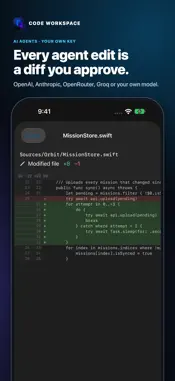
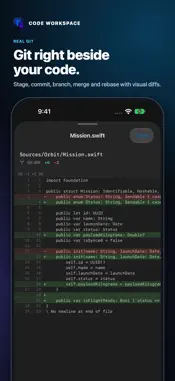
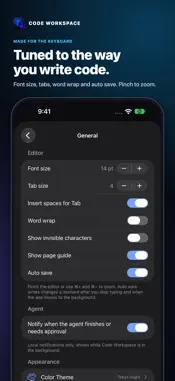
Code Workspace is a free, agent-first development environment for iPad and iPhone. Explore projects, edit and run code, manage Git and connect to remote development tools from one focused workspace. No account, no subscription and no in-app purchases. AN AI AGENT INSIDE YOUR PROJECT Work with a coding agent that understands your project. Mention files with @, use /explain, /fix, /tests and /review, attach screenshots or photos, and follow its progress, even from the Lock Screen with a Live Activity on iPhone. You remain in control. Review sensitive actions before they run, inspect proposed changes line by line and choose the AI provider you want with your own key: Claude, GPT, Gemini and other compatible services. Keys are stored in Keychain. RUN AND FORMAT ON DEVICE Run Python 3.14 and JavaScript files offline with ⌘R and read their output in the terminal. Format JavaScript, TypeScript, JSON, CSS, HTML and Markdown with Prettier, and preview HTML, CSS and JavaScript offline. A WORKSPACE FOR REAL PROJECTS Create a project, clone a repository, or import folders, ZIP archives and files from Files, iCloud Drive or other apps. Edit with Tree-sitter syntax highlighting in 13 themes that can follow Light and Dark mode, split the editor to see two files side by side, and use optional Vim keybindings. BUILT FOR IPAD Use the iPadOS menu bar and keyboard shortcuts, multiple windows, resizable panels, trackpad hover effects, Split View and Stage Manager. GIT, WITHOUT LEAVING YOUR CODE • Review changed files and visual diffs. • Stage, commit, branch, stash, merge, rebase and cherry-pick. • Resolve conflicts visually and see per-line blame. • Draft commit messages with Apple Intelligence (iOS and iPadOS 26 or later). • Connect GitHub, GitLab or your own Git server, and review pull and merge requests. SSH, SFTP AND A PERSISTENT TERMINAL Use interactive terminal sessions for shells, REPLs, Vim and long-running processes. Create SSH profiles, authenticate with passwords or Ed25519/RSA keys and access remote files through SFTP. PROFESSIONAL LANGUAGE TOOLING Connect language servers on your development host for completion, diagnostics, definitions, references, code actions and rename. Debug with DAP breakpoints, stepping, call stacks and variables. Works with Swift, JavaScript, TypeScript, Python, Dart, Go, Rust, HTML, CSS and Markdown. BUILT FOR IPHONE DUO Unfold iPhone Duo for the full multi-panel workspace on the inner display; fold it to keep working in the compact one-handed layout. LOCAL FIRST, CONNECTED WHEN YOU CHOOSE Files stay on your device unless you choose a Git remote, SSH server, AI provider or iCloud backup. By DVX Labs
What's New
Version 0.9.1 2026-10-27
Code Workspace 0.9.1 brings Swift and iOS development to iPad and iPhone. Still free. • Build and test on your Mac or Linux host over SSH: Build Project (⇧⌘B) ... Technical Analysis
Package Overview Basic metadata
Bundle ID
com.dvxlabs.codeworkspace Current Version 0.9.1
Minimum iOS 17.0
Package Size App Store Size
Package Metadata 0 / 0 version records
Detailed binary, privacy manifest, framework, and Info.plist results have not been indexed for this package yet. The verified App Store and archive metadata above remains available.
Price History (USA store)
2 recorded price change points. These are historical observations, not a guarantee of the current price.
| Recorded at | Price | Currency |
|---|---|---|
| 0.0 | USD | |
| 8.99 | USD |
Developer Information
Known Version Records
0 version records with stored package metadata
Stored metadata does not guarantee a package is currently available to download.
| Details | Version / IDs | Version date | Action |
|---|