
Preview


Description
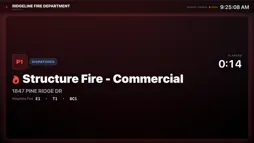
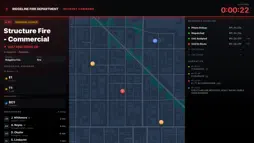
Respond Display turns the TV in your station into your department's live dispatch board. It is part of stationOS Respond, the dispatch service fire and EMS departments use to page their members, and it shows the same live incident feed as their phones. WHEN THE TONE DROPS The call takes over the whole screen. The tone plays and the call is read aloud, so the crew walking into the bay knows where they are going before anyone reaches a phone. Until the call clears, the screen shows it in full: a running clock, the units assigned and their status, the timeline as dispatch updates it, and the department's note for the address. EVERYTHING ELSE THE ROOM ASKS Between calls, the board answers the questions people walk up to a whiteboard for: - Calls in neighbouring departments you follow, and your own recent calls. - Which apparatus are out of service. - Who is on duty now. - The department calendar: what's happening today, this week's assignments, and a QR code to check in to a drill. - Weather, and nearby wildfire activity if your department turns it on. - Your department's camera feeds. - Who is talking on the radio, if your department has a receiver. NO KEYBOARD, NO PASSWORD A new Apple TV shows a QR code. Someone from your department scans it with a phone signed in to stationOS, chooses the station, and the board appears. Nobody types anything on the remote, and there is no password stored on the TV. A department can mark a screen as public-facing for a lobby or a front window. Calls on it show only their type and street, like "Medical on Spruce St", with no house number, map, or names. Members can also put their station's board on an Apple TV at home, if their department allows it. It stops working if they leave the department. GETTING STARTED Respond Display needs a department on stationOS Respond. There is no sign-up on the TV. If you are a member, ask your department administrator to pair the screen. If you are a department, start at stationos.io. Want to see it first? Choose "See a demo — no pairing needed" on the first screen. It runs a fictional department with a scripted call, and nothing in it is real.
Technical Analysis
Package Overview Basic metadata
Bundle ID
io.stationos.respond.display Current Version 1.0
Minimum iOS 16.0
Package Size App Store Size
Package Metadata 0 / 0 version records
Detailed binary, privacy manifest, framework, and Info.plist results have not been indexed for this package yet. The verified App Store and archive metadata above remains available.
Known Version Records
0 version records with stored package metadata
Stored metadata does not guarantee a package is currently available to download.
| Details | Version / IDs | Version date | Action |
|---|