
Preview


Description
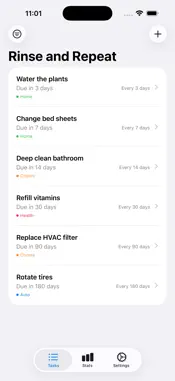
I wrote this app to scratch a personal itch. The Apple built-in Reminders app let's you set up repeating reminders but the schedule is fixed based on whenever you created it. If your weekly reminder is due every Monday, if you do it on Sunday it's still due Monday! I wrote Rinse & Repeat so that each time you mark a task completed, the next due date is what it should be: one repeat interval ahead. Complete a weekly task on Saturday? Then the next one is due next Saturday. Don't get it done till Monday? Then next time it's due next Monday. You can also set up reminders that don't have a repeat interval so that you don't need to use a different app for the simple one-time things. There's probably lots of reminder apps already out there that do this but it's now so easy to write your own iPhone apps I went ahead and made my own. It's simple and lightweight. It doesn't have a ton of features that I don't want and get in the way. It's also privacy first: there's no cloud. No accounts. No sync'ing. Reminders live on your phone and stay on your phone. No need to wade through the privacy policies of a bunch of other apps to see what they do with your data. This app is a life saver for me, helping me get my routine things done. I don't know if it will be useful for you, but I'm putting it out there so other folks can benefit from it as well. Rinse & Repeat is a clean, focused way to track the tasks you do again and again — watering plants, changing air filters, rotating tires, refilling prescriptions, deep-cleaning the kitchen. Got a one-time errand too? It fits right in alongside your recurring tasks, so you're not juggling a second app for the odd thing you only need to remember once. Here's a list of the features in case I missed some in the main description: DYNAMIC SCHEDULING Instead of locking tasks to a fixed calendar, Rinse & Repeat calculates each task's next due date from when you actually complete it. Finish a task early or late, and the next cycle adjusts automatically — no manual rescheduling required. FLEXIBLE INTERVALS Repeat tasks every few days, weekly, every few weeks, monthly, or on a fully custom schedule. One-time tasks are supported too, for the occasional errand that doesn't need its own app. TAGS & FILTERING Organize tasks with color-coded tags — Home, Health, Auto, whatever fits your life — and filter your list to focus on what matters right now. TRACK YOUR CONSISTENCY See your on-time completion rate, current streak, and which tasks you're most consistent with. Every completion is recorded, so you can look back at your history over time. PRIVATE BY DESIGN No accounts, no sign-in, no cloud service. Your tasks live on your device — they're only backed up the normal way, through your own iPhone backup, just like any other app. STAY ON TOP OF WHAT'S DUE Optional notifications keep you informed with a daily summary and an app badge count, configurable to include overdue tasks, tasks due today, and tasks due tomorrow.
What's New
Version 1.1 2026-10-23
After you’ve completed a few tasks, the app will now ask if you’d like to leave an App Store review. Apparently those matter quite a bit for visibility. There’...After you’ve completed a few tasks, the app will now ask if you’d like to leave an App Store review. Apparently those matter quite a bit for visibility. There’s also a new link in Settings if you’d rather do it later. And I’m genuinely interested in feedback, so please let me know what you do or don’t like about the app! Technical Analysis
Package Overview Basic metadata
Bundle ID
app.rinseandrepeat.RinseAndRepeat Current Version 1.1
Minimum iOS 26.1
Package Size App Store Size
Package Metadata 0 / 0 version records
Detailed binary, privacy manifest, framework, and Info.plist results have not been indexed for this package yet. The verified App Store and archive metadata above remains available.
Developer Information
Known Version Records
0 version records with stored package metadata
Stored metadata does not guarantee a package is currently available to download.
| Details | Version / IDs | Version date | Action |
|---|