
Preview


Description
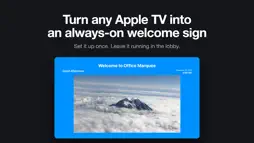
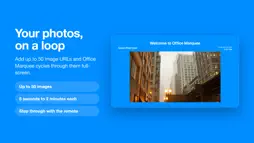
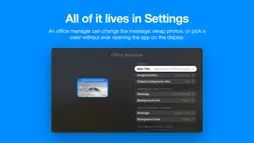
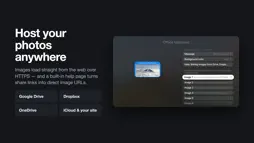
Office Marquee turns any Apple TV into a beautiful, always-on welcome sign for your workplace. Set it up once, leave it running on a screen in your lobby, reception desk, breakroom, classroom, or storefront, and let it greet everyone who walks in with a rotating slideshow, the live time and date, and a friendly message that changes itself throughout the day. A sign that changes with the day Office Marquee automatically swaps its greeting and background color as the workday moves along: • Morning — a bright "Good Morning" welcome • Midday — a "Lunch Time" callout • Afternoon — a calm "Good Afternoon" • Evening — a warm "Good Evening" sign-off Each message, and the color that goes with it, is fully customizable in Settings, so you can match your team's voice and your brand. Your photos, on a loop Add up to 50 image URLs and Office Marquee will cycle through them as a smooth full-screen slideshow. Choose how long each picture stays on screen — anywhere from 5 seconds up to 2 minutes — and swipe (or use your Apple TV remote) to step through them manually any time. Images load straight from the web, so you can host them anywhere you already keep photos: • Your own website • Google Drive, Dropbox, OneDrive, or iCloud share links • Any other publicly reachable image URL An in-app help page walks you through converting cloud-storage share links into direct image URLs, so non-technical staff can swap photos without touching the app at all. Always-on, always current • The screen never times out — perfect for unattended displays • Live, monospaced clock that updates every second • Full date with the day of the week so customers always know "what day is it again?" • Custom main title across the top — your company name, school, team, or daily message • Pick from 11 background colors for each time-of-day period • Returning to the app picks up the latest settings instantly Built for the way real offices work No accounts. No logins. No subscriptions. No ads. No analytics or tracking. Office Marquee fetches the images you point it at over HTTPS, and that's it. Configuration lives in the standard Settings app, so an office manager can update messages, swap photos, or change colors without ever opening the app on the display device. Great for • Reception desks and lobbies • Classrooms and school front offices • Breakrooms and employee lounges • Trade-show booths and pop-up events • Retail counters and storefronts • Coworking spaces and co-op workshops • Houses of worship and community halls • Anywhere a friendly, low-maintenance digital sign would help Plug in an Apple TV, point Office Marquee at your photos, and you have a welcoming, professional digital sign in minutes.
What's New
Version 2.0.1 2026-08-31
Office Marquee 2.0.1 is a from-the-ground-up rewrite in modern SwiftUI, with a refreshed look and a much bigger photo library. • Brand-new SwiftUI interface — ... Technical Analysis
Package Overview Basic metadata
Bundle ID
com.mid.SSCmarquee Current Version 2.0.1
Minimum iOS 26.0
Package Size App Store Size
Package Metadata 1 / 2 version records
Detailed binary, privacy manifest, framework, and Info.plist results have not been indexed for this package yet. The verified App Store and archive metadata above remains available.
Price History (USA store)
3 recorded price change points. These are historical observations, not a guarantee of the current price.
| Recorded at | Price | Currency |
|---|---|---|
| 1.99 | USD | |
| 9.99 | USD | |
| 1.99 | USD |
Developer Information
Known Version Records
1 version record with stored package metadata • 2 known version records
Stored metadata does not guarantee a package is currently available to download.
| Details | Version / IDs | Version date | Action |
|---|---|---|---|
| 26.31 MB | v2.0.1 App Store ID: 886303016Build: 2.0.1 | 2026-08-31 15:24:13 | Paid / Arcade |
| Not archived | App Store ID: 848442249 | Unknown | Paid / Arcade |