
Preview



Description
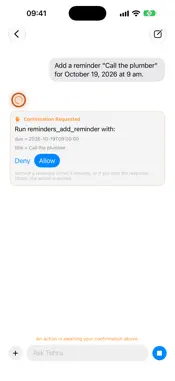
Tohru is a conversational assistant that works with Apple Intelligence right after you install it, and that you can connect to your own tools and your own AI model. READY RIGHT AWAY • No account, no key: Tohru answers with Apple Intelligence (Private Cloud Compute model). • Streaming replies, in English or French, in the language of your question. • Attach images and PDFs: Tohru reads them and answers (text recognition for scanned pages). • On-device dictation, and replies read aloud. YOUR TOOLS, THROUGH MCP • Add an MCP (Model Context Protocol) server by its address alone: Tohru discovers its tools and uses them to answer. • Protected servers: their login page opens on its own (MCP's OAuth authorization standard); Tohru never sees your password and renews access by itself. • Add links: a provider can publish a link that opens its server's sheet, already filled in. • Private servers with self-signed certificates are supported. • Nothing happens behind your back: any tool that writes, sends or deletes shows a confirmation card with all its parameters, and nothing runs without your approval. YOUR OWN MODEL, IF YOU WISH • Enter the URL of any model compatible with the OpenAI API: a local model on your network, or an online service with its key. • Adjust the temperature, the system prompt and the reasoning level. MAC, IPHONE, IPAD AND IPHONE DUO • A clean interface: your conversations, search across your whole history, swipe to delete, settings within thumb's reach. • On iPhone Duo: conversations on one side and the chat on the other in book posture; the chat on top and the input at the bottom in laptop posture. PRIVACY • Your conversations stay on your device. The developer collects no data: no account, no analytics, no ads. • Requests only go to Apple Intelligence, and to the model and servers you chose. Apple Intelligence requires a compatible device with Apple Intelligence turned on, and an Internet connection; its requests count against your iCloud account's quota. Full guide (MCP servers, model by URL): r0o.wtf/tohru
What's New
Version 1.2 2026-11-11
MCP servers are easier to add and more reliable. • API-key servers: when a server asks for a token, the sheet immediately shows the “Access token” field. A tok...MCP servers are easier to add and more reliable. • API-key servers: when a server asks for a token, the sheet immediately shows the “Access token” field. A token pasted by mistake into the certificate field is recognized and put back where it belongs. • Self-signed certificates: a separate “Certificate” section shows the fingerprint. An accepted fingerprint stays valid after saving, and a dropped connection is no longer wrongly reported as an unrecognized certificate. • Add links can carry the certificate fingerprint (sha256 parameter, pinned) and indicate that a token is expected (auth=bearer). A token is never part of a link. A link to a server you have already added reopens its sheet (to paste a new token, for example) instead of creating a second one, and cannot change its accepted certificate. • Replies: a complete reply is no longer displayed cut short when its last words arrive all at once (especially after a tool); streamed replies no longer drop passages, and a service interruption is reported above the reply. • Tools: a failing tool (certificate, rejected token, timeout) is shown above the reply; server instructions favor their document search tools over the web. • With Apple Intelligence and MCP tools, a subtle hint reminds you that a model by URL works better. Technical Analysis
Package Overview Basic metadata
Bundle ID
wtf.r0o.penta.TohruAI Current Version 1.2
Minimum iOS 27.0
Package Size App Store Size
Package Metadata 0 / 0 version records
Detailed binary, privacy manifest, framework, and Info.plist results have not been indexed for this package yet. The verified App Store and archive metadata above remains available.
Known Version Records
0 version records with stored package metadata
Stored metadata does not guarantee a package is currently available to download.
| Details | Version / IDs | Version date | Action |
|---|