
Preview




Description
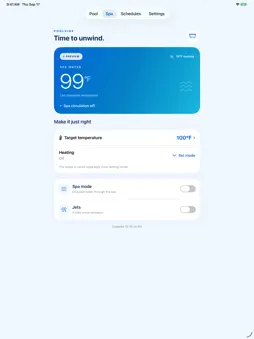
For Pentair EasyTouch and IntelliTouch systems with ScreenLogic Your pool. Your spa. A little closer to the water. Poolside Control brings your pool and spa together in a clean, easy-to-use interface on iPhone, iPad and Apple Watch. Warm up the spa, turn on the lights, adjust the temperature and manage your equipment from home or away. MAKE IT JUST RIGHT • See water temperatures, heating and equipment status at a glance. • Adjust pool and spa temperature targets and supported heating modes. • Turn pool circulation, Spa Mode, spa jets and pool lights on or off. • Add controls for extra installed circuits and give them familiar names. • Choose Fahrenheit, Celsius or your controller’s temperature units. SCHEDULE YOUR POOL TIME Create, edit and delete recurring schedules for supported pumps, lights and equipment. Schedules run on your controller, even when your phone is away. Keep the controller’s clock in sync automatically or set its date and time yourself. Special controller schedules are available to view only. CONNECT AT HOME OR AWAY Automatic connection tries your local ScreenLogic adapter first, then attempts a remote connection if the local adapter is unavailable. You can also choose local-only or remote-only access. Your saved remote password is protected by your device’s Keychain. QUICK CONTROLS ON YOUR WRIST Use Apple Watch to control lights, spa jets, pool circulation, temperatures, heating and selected extra circuits. Set up independent watch access on your paired iPhone to control your pool over Wi-Fi or cellular without keeping the iPhone app open. A HELPFUL SPA REMINDER Choose optional reminders for Spa heat, Spa Mode and Spa jets after 15, 30, 45, 60 or 90 minutes, 2 hours or 3 hours. Alerts are off by default. Reminders use activity reported by the app and known schedules. Changes made elsewhere may not be reflected, so reminders cannot confirm continuous operation and do not turn equipment off. CHECK COMPATIBILITY BEFORE DOWNLOADING Requires a Pentair EasyTouch or IntelliTouch system with a working ScreenLogic protocol adapter. Poolside Control does not connect directly to IntelliCenter or standalone Wi-Fi pumps. Available controls depend on your installed equipment and controller settings. Local access requires your adapter’s IP address and access to its network. Remote access requires configured ScreenLogic remote access and an internet connection. Independent Apple Watch access uses our secure online service. Pentair, EasyTouch, IntelliTouch, and ScreenLogic are trademarks of their respective owners. Poolside Control is developed by an independent third-party developer and is not affiliated with, endorsed by, or associated with Pentair. Use Poolside Control at your own risk.
What's New
Version 1.0.3 2026-10-20
Poolside is now available in English, French and Spanish, with translated controls, settings and schedules. Technical Analysis
Package Overview Basic metadata
Bundle ID
com.inncommand.poolside Current Version 1.0.3
Minimum iOS 17.0
Package Size App Store Size
Package Metadata 0 / 0 version records
Detailed binary, privacy manifest, framework, and Info.plist results have not been indexed for this package yet. The verified App Store and archive metadata above remains available.
Developer Information
Known Version Records
0 version records with stored package metadata
Stored metadata does not guarantee a package is currently available to download.
| Details | Version / IDs | Version date | Action |
|---|