
Preview



Description
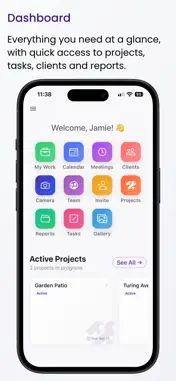
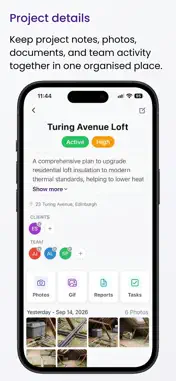
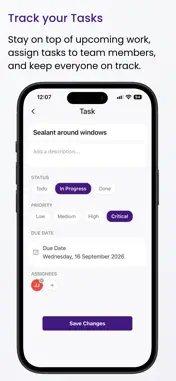
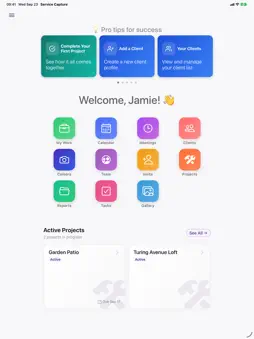
Service Capture is a job documentation and proof-of-work app for trades and service professionals, and the teams they work with. Organise every job as a project, capture and tag photos on site, and turn them into professional PDF reports to share with clients. Scattered photos, inconsistent records and manual paperwork cost time and create disputes. Service Capture brings your clients, projects, schedule, photos, tasks and reports together in one place, so every job has a clear, time-stamped record from first visit to handover. PROJECTS AT THE CENTRE Each job is a project, linked to its client and team. Photos, tasks, reports and meetings all live with the project, so everything about a job is one tap away. CAPTURE AS YOU WORK Take photos directly in the app and they're filed to the right project straight away. Tag them as you go, mark them up with annotations, add descriptions, and create before-and-after GIFs to show the difference your work made. FIND ANY PHOTO IN SECONDS Tag photos with labels like Before, After or Damage, or your own. Filter the gallery by one or more tags to see every match across every job, or find photos you haven't tagged yet. Tags work on GIFs, videos and PDFs too. WORKS WITHOUT SIGNAL No connection on site? Keep working. Photos, tags, projects, tasks and reports are saved on your device and sync automatically when you're back online. PROFESSIONAL REPORTS Build reports in sections, choose the photos for each, add captions and a cover page, then generate a polished PDF. Every generated version is kept, so you have a full history to share or refer back to. SCHEDULE AND TASKS Book meetings on the calendar, link them to clients and projects, and assign tasks to team members so everyone knows what's next. BUILT FOR TEAMS Invite your team and choose what each person can see and do, from owners and managers to site staff. Everyone works from the same up-to-date records and the same set of tags. YOUR WHOLE PORTFOLIO Browse every photo, GIF and PDF in the gallery, filtered by project, person, date, category or tag. Archive finished work to keep things tidy without losing anything. Core features: • Projects linked to clients, team members and meetings • In-app photo capture with annotations and descriptions • Photo tagging, with gallery filters to find any shot fast • Before-and-after GIFs • Multi-section PDF reports with version history • Calendar and meeting scheduling • Task assignment for your team • Team invites with role-based permissions • Offline capture with automatic sync • Gallery with filters, and archiving for completed work • Share photos and reports with clients • Designed for iPhone and iPad, with a web dashboard for the office Service Capture is designed for independent service providers, small businesses and growing teams who need reliable visual records of their work. Its focus is documentation, accountability and professionalism — helping you stay organised, prove completed work, and build trust with clients through clear visual evidence. Terms of Use: https://www.apple.com/legal/internet-services/itunes/dev/stdeula/
What's New
Version 2.0.6 2026-10-14
NEW: PHOTO TAGGING Label photos with tags like Before, After or Damage, or create your own, then find every matching shot across all your jobs in seconds. • Ta... Technical Analysis
Package Overview Basic metadata
Bundle ID
com.servicecapture.app Current Version 2.0.6
Minimum iOS 15.1
Package Size App Store Size
Package Metadata 0 / 3 version records
Detailed binary, privacy manifest, framework, and Info.plist results have not been indexed for this package yet. The verified App Store and archive metadata above remains available.
Developer Information
Known Version Records
0 version records with stored package metadata • 3 known version records
Stored metadata does not guarantee a package is currently available to download.
| Details | Version / IDs | Version date | Action |
|---|---|---|---|
| Not archived | App Store ID: 886140689 | Unknown | Request Version |
| Not archived | App Store ID: 885858823 | Unknown | Request Version |
| Not archived | App Store ID: 883262992 | Unknown | Request Version |