
Preview







Description
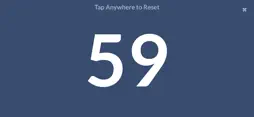
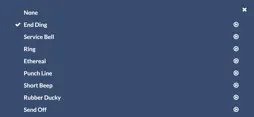
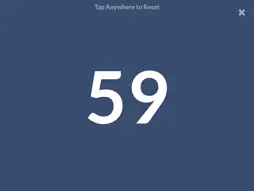
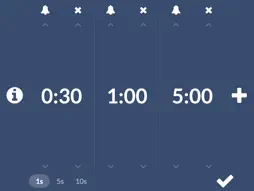
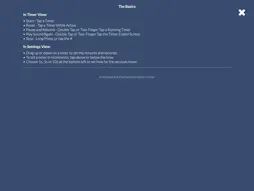
Presentation Ender keeps every speaker on time. A huge countdown fills the screen so it can be read from across the room, and the whole screen is the button: tap anywhere to reset for the next person, without looking down to find a control. Made for networking breakfasts, elevator pitches, club meetings, classrooms, debates, sermons, panels and any turn-based round of talks, it lets the person keeping time stay focused on the room instead of the phone. HOW IT WORKS • Tap a timer to start it, and tap again to reset it for the next speaker • Double tap or two-finger tap to pause and resume • The screen turns gradually from blue to red over the last fifth of the time • When time is up an ending sound plays, the screen pulses red and it counts how far over the speaker has gone • Double tap the end screen to play the sound again • Long press, or tap the X, to stop SET UP IN SECONDS • Save up to 6 timers for one-tap use • Drag a timer up or down to set the minutes and seconds, or tap above or below it to step in increments • Choose from 9 ending sounds: End Ding, Service Bell, Ring, Ethereal, Punch Line, Short Beep, Rubber Ducky, Send Off and Strum, or none at all MADE FOR THE FRONT OF THE ROOM • Large, high-contrast numbers in landscape on iPhone and iPad • The screen stays awake while a timer runs • No ads, no account, no tracking. Works offline
What's New
Version 2.0.1 2026-10-24
You can now choose how far the seconds move when you set a timer. In Settings, pick 1s, 5s or 10s at the bottom left. Tapping above or below the seconds, and dr... Technical Analysis
Package Overview Basic metadata
Bundle ID
com.eliasart.presender Current Version 2.0.1
Minimum iOS 16.4
Package Size App Store Size
Package Metadata 0 / 0 version records
Detailed binary, privacy manifest, framework, and Info.plist results have not been indexed for this package yet. The verified App Store and archive metadata above remains available.
Developer Information
Known Version Records
0 version records with stored package metadata
Stored metadata does not guarantee a package is currently available to download.
| Details | Version / IDs | Version date | Action |
|---|