
Preview




Description
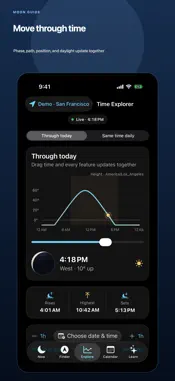
Look up with confidence. Moon Guide tells you whether the Moon is above your horizon, where to look, what its phase looks like, when it next rises, and why it is in that part of the sky. EVERYTHING IN ONE OBSERVATION CONTEXT Choose a place and moment, then watch the entire app update together: phase, orientation, illumination, compass direction, altitude, daily path, upper-limb rise and set times, and plain-language explanations. FIND THE MOON Follow a clear compass ribbon and tilt guidance. Moon Guide translates astronomical coordinates into useful directions such as “southeast, 38° up,” shows heading accuracy, and tells you when the Moon is below the horizon. EXPLORE TIME Scrub through the local day to see the Moon cross the sky. Compare the same clock time across several days to understand how its orbit changes where and when it appears. PLAN AHEAD View moonrise, meridian transit, moonset, and illumination for upcoming dates. Select any supported date and inspect its local sky path. LEARN IN CONTEXT Understand why the Moon is low, visible during daylight, tilted, waxing, or waning. Explanations are generated from the selected place and time—not pulled from a generic encyclopedia. FREE WIDGETS AND REMINDERS See today’s moonrise beneath the Moon on your circular or rectangular Lock Screen widget. Choose from nine Home Screen designs, including a moonrise countdown, rise and set times, a three-day strip, a week ahead, a monthly calendar, and a sky path. Compare them in Settings → Widget Gallery. Widgets use your saved observing place and its local time. Opt into full-Moon phase reminders, a daily Moon summary, or a reminder 15, 30, or 60 minutes before moonrise. Reminders respect quiet hours and are scheduled locally for a rolling period up to 30 days. Open the app to refresh the actual horizon shown in Settings. iOS controls widget refresh and notification delivery. ONE-TIME REMOVE ADS Remove all Calendar and Learn banners with a one-time purchase. Its localized price appears in Settings. Restore Purchases is available; widgets, reminders, and all observing features remain free. PRIVATE BY DESIGN No account and no developer analytics. Astronomy, location, compass, and motion calculations stay on your iPhone, and Moon guidance remains available offline. Limited, non-personalized ads support the app only on Calendar and Learn screens. Ads never appear in the finder or time explorer. Location is optional; approximate location, preset places, and manual coordinates are supported. Moon Guide calculates astronomical position but cannot see clouds, buildings, trees, terrain, or haze. Visibility guidance is an assessment, not a promise.
What's New
Version 1.0.1 2026-11-03
Moonrise is now on your Lock Screen, beneath the Moon and its illumination percentage. • Nine new Home Screen widgets, from a simple rise time and countdown to... Technical Analysis
Package Overview Basic metadata
Bundle ID
com.davidede.MoonGuide Current Version 1.0.1
Minimum iOS 17.0
Package Size App Store Size
Package Metadata 0 / 0 version records
Detailed binary, privacy manifest, framework, and Info.plist results have not been indexed for this package yet. The verified App Store and archive metadata above remains available.
Developer Information
Known Version Records
0 version records with stored package metadata
Stored metadata does not guarantee a package is currently available to download.
| Details | Version / IDs | Version date | Action |
|---|