Preview


Description
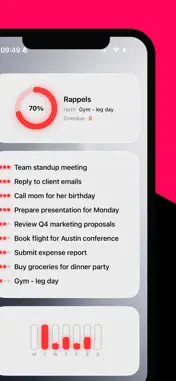
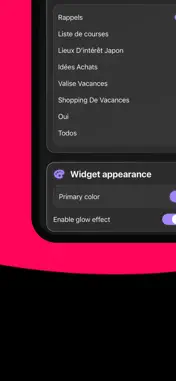
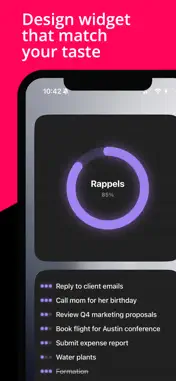
WHY LIDGET? • Clean, Minimalist Design Lidget's widgets are designed to be elegant and distraction-free. No unnecessary elements, just your tasks displayed beautifully. • Built for Apple Reminders Works seamlessly with your existing reminder lists. No data migration, no extra setup. Select a list and you're done. • Multiple Widget Styles Choose from various designs to match your preference: - Ring progress widget for quick completion overview - List widget with interactive checkboxes - Weekly bars showing your productivity trends - Title widget for a minimal look - Insight widget with helpful statistics • Fully Customizable Pick your accent colors, enable glow effects, and make your widgets truly yours. Match your home screen aesthetic perfectly. • Interactive & Fast Check off tasks directly from your home screen. No need to open the app—tap and done. Changes sync instantly. • Privacy First All your data stays on your device. We don't collect, track, or transmit any personal information. Your reminders are yours alone. PREMIUM FEATURES Unlock all widget styles and future updates with a simple subscription: - Access to all current widget designs - All future premium widgets included - Priority color customization - Glow effects and advanced styling - Support independent development PERFECT FOR - Professionals managing daily tasks - Students tracking assignments - Anyone who values clean design - Users who want their home screen to look great AND work well HOW IT WORKS 1. Select a reminder list from Apple Reminders 2. Choose your widget style and size 3. Customize colors to match your taste 4. Add to your home screen 5. Check off tasks directly from widgets REQUIREMENTS • iOS 17.6 or later • Apple Reminders app Terms of Use: https://www.apple.com/legal/internet-services/itunes/dev/stdeula/ Privacy Policy: https://devidb.github.io/policy/privacy-policy.html
What's New
Version 1.1 2025-11-24
UI Improvements : - Better display when the title is long - Consistent margins New price (cheaper and without subscription !) Technical Analysis
Package Overview Basic metadata
Bundle ID
dacode.app.Lidget Current Version 1.1
Minimum iOS 26.0
Package Size App Store Size
Package Metadata 0 / 2 version records
Detailed binary, privacy manifest, framework, and Info.plist results have not been indexed for this package yet. The verified App Store and archive metadata above remains available.
Developer Information
Known Version Records
0 version records with stored package metadata • 2 known version records
Stored metadata does not guarantee a package is currently available to download.
| Details | Version / IDs | Version date | Action |
|---|---|---|---|
| Not archived | App Store ID: 880028556 | Unknown | Request Version |
| Not archived | App Store ID: 876941951 | Unknown | Request Version |